> ## Documentation Index
> Fetch the complete documentation index at: https://memberful.com/docs/llms.txt
> Use this file to discover all available pages before exploring further.
# WordPress troubleshooting
> Troubleshoot common issues with the Memberful WordPress plugin so you can catch and fix problems before they affect member sign-in, access, or billing.
export const ContactSupport = ({label = "Contact us to get set up →", fallbackEmail = "info@memberful.com", className = ""}) => {
const handleClick = e => {
e.preventDefault();
if (typeof window !== 'undefined' && window.Intercom) {
try {
window.Intercom('showNewMessage');
return;
} catch (error) {
console.warn('Intercom failed to open:', error);
}
}
window.location.href = `mailto:${fallbackEmail}`;
};
return
{label}
;
};
In this help article, we'll describe common problems you may encounter when using the Memberful WordPress plugin and how to solve them.
## None of my members are able to sign in
If all of your members are having trouble signing in, or if they're constantly being asked to sign in again, it's possible that your server might be blocking Memberful's cookies, which are required for the plugin to work.
Memberful's plugin comes with a button to test if your server is blocking Memberful's cookies. To run this test, in your WordPress dashboard, go to *Settings → Memberful → Cookies Test* and click **Run Cookies Test**.
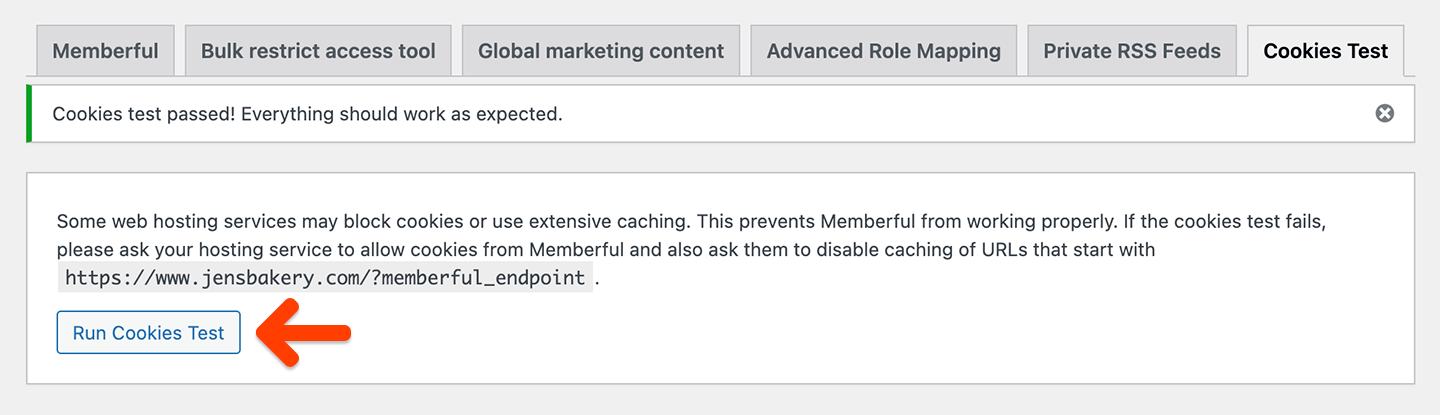 If you see a message that says "Cookies test passed! Everything should work as expected", then your server is not blocking Memberful's cookies.
## A member is stuck in a sign-in loop
If most of your members are able to sign in successfully, but you have a member who reports that they are being prompted to repeatedly sign in, even though they've already signed in, their browser may be blocking third-party cookies — which Memberful requires to work.
The most likely culprit is using the browser's Private or Incognito mode since those often block third-party cookies by default. Some browsers, like Brave, block third-party cookies by default. There are also browser extensions/add-ons that block third-party cookies.
These blocks can be disabled in most cases, but you'll need to work with the member to find out how to do that in their specific browser. The first step would be to ensure they're not using Private or Incognito mode. If that doesn't fix the issue, you can ask them to try this on a different browser / device, or to disable their browser extensions until you've found the culprit, then look for a way to disable the third-party cookie block.
## The Memberful plugin isn't protecting my content
Make sure that your theme and page builder are [compatible with Memberful.](/wordpress-plugin/troubleshooting/theme-and-plugin-compatibility/)
## My members can't access my protected content
This is generally caused by a caching issue. Some of the symptoms of a caching issue could include:
* After signing in, the member is still not being able to access protected content until they refresh the page.
* After signing in, the member is still not seeing updated menu links reflecting that they're signed in until they refresh the page (e.g. they're still seeing the "Sign in" link instead of the "Account" and "Sign out" links).
* Members report that they are able to access some protected content posts but not others.
#### A brief explanation on why this happens
As part of the sign-in process, Memberful will load URLs with a `memberful_endpoint` query string, and we'll need to make sure that ANY URL that contains that query string won't get cached.
So in practice, this means that all of these URLs would need to be exempt from caching:
* `https://YOURSITE.com/?memberful_endpoint`
* `https://YOURSITE.com/contact-us/?memberful_endpoint`
* `https://YOURSITE.com/category/business/?memberful_endpoint`
* `https://YOURSITE.com/2023/05/02/update-google-analytics/?memberful_endpoint`
* etc...
All of these URLs can continue to be cached, though:
* `https://YOURSITE.com/`
* `https://YOURSITE.com/contact-us/`
* `https://YOURSITE.com/category/business/`
* `https://YOURSITE.com/2023/05/02/update-google-analytics/`
* etc...
We also need to account for trailing slashes and for other query parameters that might be in the URL (such as UTM parameters for analytics or ad tracking), for example:
`https://YOURSITE.com/?utm_campaign=ads&memberful_endpoint&utm_source=fb`
Because of this, we can't just add a single URL to the cache exception. We need to add a pattern that will match all of the possible URLs containing `memberful_endpoint`.
#### How to solve caching issues
The only way to solve any caching issues is to set up a cache exception with this exact criteria:
**"Any URL that contains memberful\_endpoint anywhere in the URL"**
This needs to be set up in all caching systems on your website, including caching plugins you might have installed and caching systems that your hosting provider might have set up for you.
The latter is the most common culprit as you might not even be aware that your hosting provider is caching your website, so you should reach out and ask them if they are.
Here are some instructions on how to set up the cache exception with common hosting providers that apply caching:
* If you're hosting with **Flywheel,** ask them to whitelist `?memberful_endpoint` and add `memberful_endpoint` as a cookie-keeping path.
* If you're hosting with **SiteGround,** you can add the custom cache exception via the [SG Optimizer plugin](https://www.siteground.com/tutorials/wordpress/sg-optimizer/supercacher/).
If you see a message that says "Cookies test passed! Everything should work as expected", then your server is not blocking Memberful's cookies.
## A member is stuck in a sign-in loop
If most of your members are able to sign in successfully, but you have a member who reports that they are being prompted to repeatedly sign in, even though they've already signed in, their browser may be blocking third-party cookies — which Memberful requires to work.
The most likely culprit is using the browser's Private or Incognito mode since those often block third-party cookies by default. Some browsers, like Brave, block third-party cookies by default. There are also browser extensions/add-ons that block third-party cookies.
These blocks can be disabled in most cases, but you'll need to work with the member to find out how to do that in their specific browser. The first step would be to ensure they're not using Private or Incognito mode. If that doesn't fix the issue, you can ask them to try this on a different browser / device, or to disable their browser extensions until you've found the culprit, then look for a way to disable the third-party cookie block.
## The Memberful plugin isn't protecting my content
Make sure that your theme and page builder are [compatible with Memberful.](/wordpress-plugin/troubleshooting/theme-and-plugin-compatibility/)
## My members can't access my protected content
This is generally caused by a caching issue. Some of the symptoms of a caching issue could include:
* After signing in, the member is still not being able to access protected content until they refresh the page.
* After signing in, the member is still not seeing updated menu links reflecting that they're signed in until they refresh the page (e.g. they're still seeing the "Sign in" link instead of the "Account" and "Sign out" links).
* Members report that they are able to access some protected content posts but not others.
#### A brief explanation on why this happens
As part of the sign-in process, Memberful will load URLs with a `memberful_endpoint` query string, and we'll need to make sure that ANY URL that contains that query string won't get cached.
So in practice, this means that all of these URLs would need to be exempt from caching:
* `https://YOURSITE.com/?memberful_endpoint`
* `https://YOURSITE.com/contact-us/?memberful_endpoint`
* `https://YOURSITE.com/category/business/?memberful_endpoint`
* `https://YOURSITE.com/2023/05/02/update-google-analytics/?memberful_endpoint`
* etc...
All of these URLs can continue to be cached, though:
* `https://YOURSITE.com/`
* `https://YOURSITE.com/contact-us/`
* `https://YOURSITE.com/category/business/`
* `https://YOURSITE.com/2023/05/02/update-google-analytics/`
* etc...
We also need to account for trailing slashes and for other query parameters that might be in the URL (such as UTM parameters for analytics or ad tracking), for example:
`https://YOURSITE.com/?utm_campaign=ads&memberful_endpoint&utm_source=fb`
Because of this, we can't just add a single URL to the cache exception. We need to add a pattern that will match all of the possible URLs containing `memberful_endpoint`.
#### How to solve caching issues
The only way to solve any caching issues is to set up a cache exception with this exact criteria:
**"Any URL that contains memberful\_endpoint anywhere in the URL"**
This needs to be set up in all caching systems on your website, including caching plugins you might have installed and caching systems that your hosting provider might have set up for you.
The latter is the most common culprit as you might not even be aware that your hosting provider is caching your website, so you should reach out and ask them if they are.
Here are some instructions on how to set up the cache exception with common hosting providers that apply caching:
* If you're hosting with **Flywheel,** ask them to whitelist `?memberful_endpoint` and add `memberful_endpoint` as a cookie-keeping path.
* If you're hosting with **SiteGround,** you can add the custom cache exception via the [SG Optimizer plugin](https://www.siteground.com/tutorials/wordpress/sg-optimizer/supercacher/).
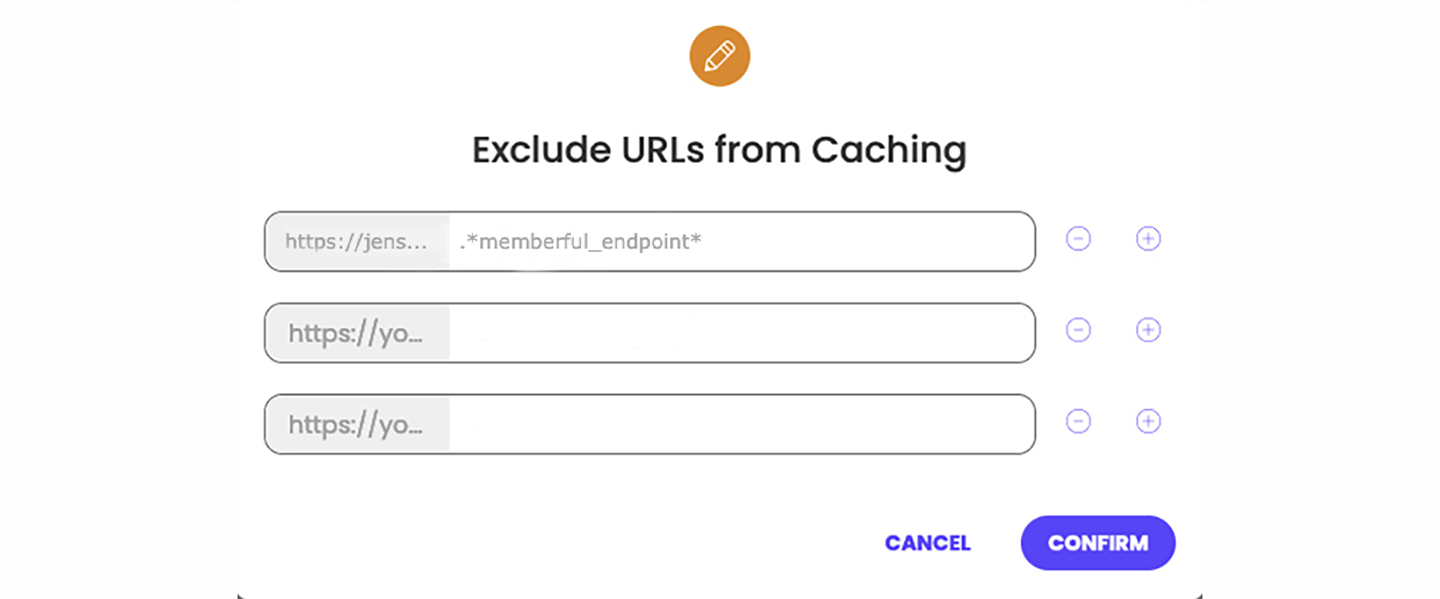 * If you're hosting with **Rocket,** ask them to bypass caching for any URL containing `memberful_endpoint` and whitelist the following cookies:
* `__cf_bm`
* `memberful_session`
* `member_referrer`
* `remember_member_token`
* `third_party_cookie_supported`
* `wordpress_logged_in_`
* If you're hosting with **Pair,** you'll need to disable Varnish caching which can only be done if you have a VPS-level account or an Apache-based server.
* If you're hosting with **HostPresto,** ask them to bypass Varnish caching on URLs with the query string `memberful_endpoint` and configure Varnish to allow URLs with the query string `memberful_endpoint` to set cookies.
* If you're hosting with **Pantheon,** you'll need to [disable caching on specific pages](https://pantheon.io/docs/cache-control#exclude-specific-pages-from-caching). Make sure to update the regex patterns they list so that they match the pages you don't want to cache.
```text theme={null}
$regex_path_patterns = array(
'#memberful_endpoint#',
);
```
**Hosting with Bluehost, Dreamhost, GoDaddy, or EasyWP by Namecheap?**
We've found that these hosting providers can't configure this type of cache exception. or consider using a [different hosting provider](https://memberful.com/docs/wordpress-plugin/setup/wordpress-hosting-providers).
## My member was redirected to a WordPress form
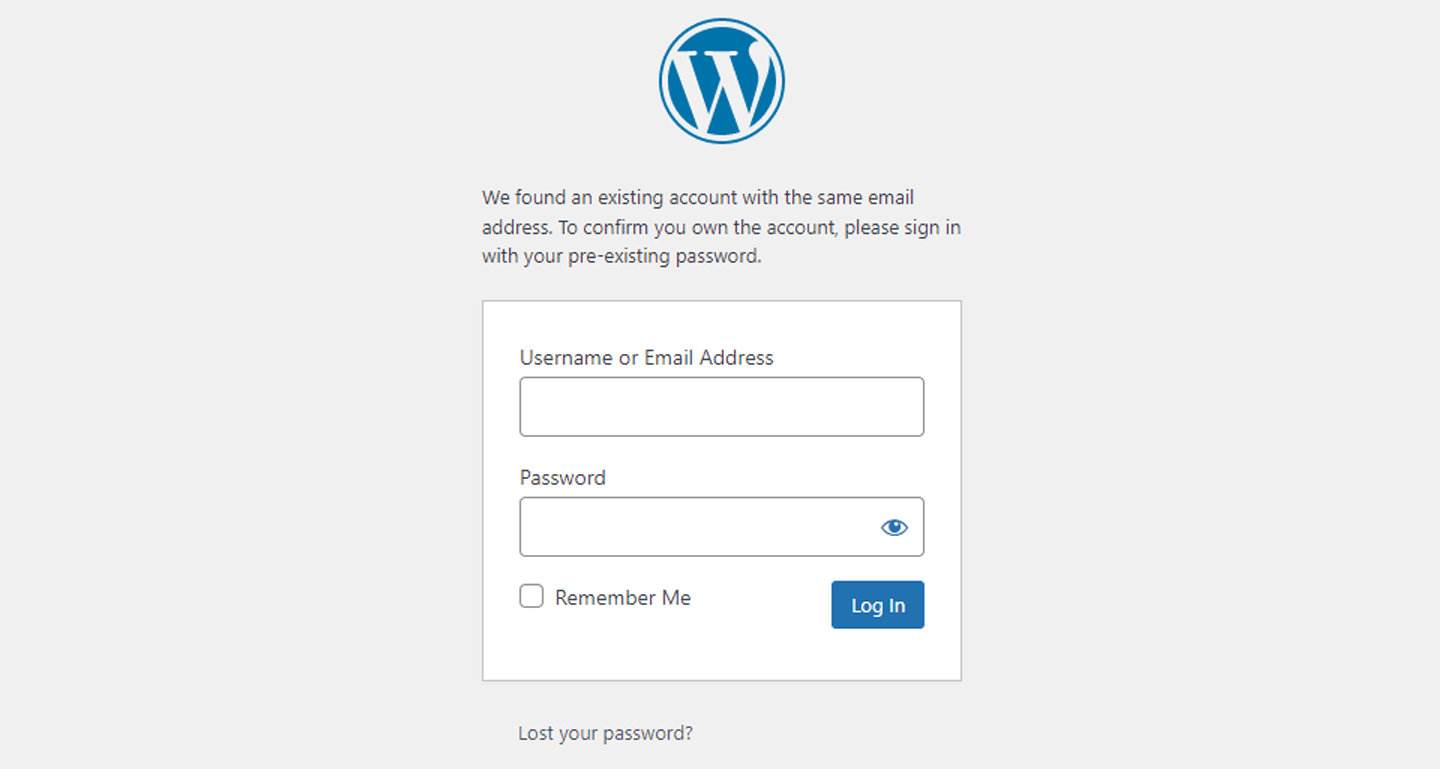
After integrating with Memberful, we recommend that you delete your users from WordPress. (We will recreate the users.) If you don't delete the users, we will ask them to sign in with their existing WordPress credentials via the WordPress form so we can sync their WordPress / Memberful accounts.
* If you're hosting with **Rocket,** ask them to bypass caching for any URL containing `memberful_endpoint` and whitelist the following cookies:
* `__cf_bm`
* `memberful_session`
* `member_referrer`
* `remember_member_token`
* `third_party_cookie_supported`
* `wordpress_logged_in_`
* If you're hosting with **Pair,** you'll need to disable Varnish caching which can only be done if you have a VPS-level account or an Apache-based server.
* If you're hosting with **HostPresto,** ask them to bypass Varnish caching on URLs with the query string `memberful_endpoint` and configure Varnish to allow URLs with the query string `memberful_endpoint` to set cookies.
* If you're hosting with **Pantheon,** you'll need to [disable caching on specific pages](https://pantheon.io/docs/cache-control#exclude-specific-pages-from-caching). Make sure to update the regex patterns they list so that they match the pages you don't want to cache.
```text theme={null}
$regex_path_patterns = array(
'#memberful_endpoint#',
);
```
**Hosting with Bluehost, Dreamhost, GoDaddy, or EasyWP by Namecheap?**
We've found that these hosting providers can't configure this type of cache exception. or consider using a [different hosting provider](https://memberful.com/docs/wordpress-plugin/setup/wordpress-hosting-providers).
## My member was redirected to a WordPress form
After integrating with Memberful, we recommend that you delete your users from WordPress. (We will recreate the users.) If you don't delete the users, we will ask them to sign in with their existing WordPress credentials via the WordPress form so we can sync their WordPress / Memberful accounts.
 Be careful not to accidentally delete WordPress admins.
## The sign-in link in my comments section isn't working
After integrating with Memberful, we recommend that you update any member account management links in your theme, content, and plugins.
The most common example of this is the sign-in link in your comments section. [Learn how to update these links.](/wordpress-plugin/setup/member-account-links/#update-links-in-your-theme-content-and-plugins)
## Memberful oauth error
*We had a problem signing you in, please try again later or contact the site admin. memberful\_oauth\_error*
If a member reports the error above, it means we couldn't communicate with your WordPress site. [Disconnect / reconnect the plugin](/wordpress-plugin/troubleshooting/disconnect-reconnect-plugin/) and then contact us if that doesn't resolve the issue.
## Could not create the Memberful mapping table
*Could not create the Memberful mapping table*
If you get the error above, it means when you cleaned up your WordPress database, you didn't remove Memberful's mapping table. To resolve this error, manually delete table wp\_memberful\_mapping from your database (assuming that your database table prefix is wp\_) and reactivate the plugin. [You can even use a plugin like Advanced Database Cleaner](https://en-ca.wordpress.org/plugins/advanced-database-cleaner/) to help you track it down. Alternatively, you can ask your hosting provider for help.
## Parse error: syntax error, unexpected
*Parse error: syntax error, unexpected '?' in /home1/craftmba/public\_html/tractionable/wp-content/plugins/memberful-wp/src/shortcodes.php on line 132*
If you get the error above, your server is likely using an unsupported version of PHP (the language WordPress runs on). Our latest plugin update uses a feature that was added to PHP in version 7 (over 4 years ago), and older versions no longer get security updates. For this reason, PHP creators and WordPress consider them "end of life" and [unsafe to use.](https://wordpress.org/about/requirements/)
To resolve this error, ask your hosting provider to update you to a recent version of PHP. This will get the plugin working and secure your site. If this isn't possible, you can manually [download an older version of the Memberful plugin.](https://wordpress.org/plugins/memberful-wp/advanced/) (Version 10.5.2 should work.)
Be careful not to accidentally delete WordPress admins.
## The sign-in link in my comments section isn't working
After integrating with Memberful, we recommend that you update any member account management links in your theme, content, and plugins.
The most common example of this is the sign-in link in your comments section. [Learn how to update these links.](/wordpress-plugin/setup/member-account-links/#update-links-in-your-theme-content-and-plugins)
## Memberful oauth error
*We had a problem signing you in, please try again later or contact the site admin. memberful\_oauth\_error*
If a member reports the error above, it means we couldn't communicate with your WordPress site. [Disconnect / reconnect the plugin](/wordpress-plugin/troubleshooting/disconnect-reconnect-plugin/) and then contact us if that doesn't resolve the issue.
## Could not create the Memberful mapping table
*Could not create the Memberful mapping table*
If you get the error above, it means when you cleaned up your WordPress database, you didn't remove Memberful's mapping table. To resolve this error, manually delete table wp\_memberful\_mapping from your database (assuming that your database table prefix is wp\_) and reactivate the plugin. [You can even use a plugin like Advanced Database Cleaner](https://en-ca.wordpress.org/plugins/advanced-database-cleaner/) to help you track it down. Alternatively, you can ask your hosting provider for help.
## Parse error: syntax error, unexpected
*Parse error: syntax error, unexpected '?' in /home1/craftmba/public\_html/tractionable/wp-content/plugins/memberful-wp/src/shortcodes.php on line 132*
If you get the error above, your server is likely using an unsupported version of PHP (the language WordPress runs on). Our latest plugin update uses a feature that was added to PHP in version 7 (over 4 years ago), and older versions no longer get security updates. For this reason, PHP creators and WordPress consider them "end of life" and [unsafe to use.](https://wordpress.org/about/requirements/)
To resolve this error, ask your hosting provider to update you to a recent version of PHP. This will get the plugin working and secure your site. If this isn't possible, you can manually [download an older version of the Memberful plugin.](https://wordpress.org/plugins/memberful-wp/advanced/) (Version 10.5.2 should work.)