> ## Documentation Index
> Fetch the complete documentation index at: https://memberful.com/docs/llms.txt
> Use this file to discover all available pages before exploring further.
# Disconnect or reconnect plugin
> Disconnect and reconnect the Memberful WordPress plugin to fix syncing or sign-in issues and restore the connection between your site and Memberful.
export const RelatedDocs = ({link1, link2, link3, link4, link5, link6, link7, link8, link9, link10, className = ""}) => {
const links = [link1, link2, link3, link4, link5, link6, link7, link8, link9, link10].filter(Boolean);
if (!links.length) return null;
return ;
};
If you're having trouble with the Memberful WordPress plugin — like sync errors, sign-in issues, or problems viewing restricted content — reconnecting the plugin can often resolve them.
In this help article, we'll cover when to disconnect or reconnect the plugin, what happens during the process, and how to complete it step-by-step.
## When should I disconnect/reconnect the plugin?
You may need to disconnect and reconnect the plugin in these cases:
* When you move from a [staging site](/wordpress-plugin/setup/use-a-staging-site/) to a live site
* If you notice a syncing issue between your site and Memberful
* If you have problems signing in and/or viewing restricted content
* After you install an [SSL certificate](/wordpress-plugin/setup/enable-ssl/) on your site
* After you complete the process of [setting up a custom domain](/configuration/branding/set-up-a-custom-domain/)
* When you're working on a new site that is password protected (we'll notify you by email)
## Is it safe to disconnect the plugin? Will I lose member data?
Yes, it's safe to disconnect the plugin. You won't lose any member data — it's all stored on Memberful's servers. Disconnecting can even resolve sync issues by forcing Memberful to resend data to WordPress. Once reconnected, your settings remain intact and your installation will be refreshed and synced. The process only takes a few minutes.
## Will there be any downtime?
There won't be any downtime on your website, and Memberful purchase links will continue to work. Sign-in and account management links, however, won't function until you reconnect the plugin. If you follow this article, the process takes less than a minute and your site will be back to normal quickly.
## How do I disconnect/reconnect the plugin?
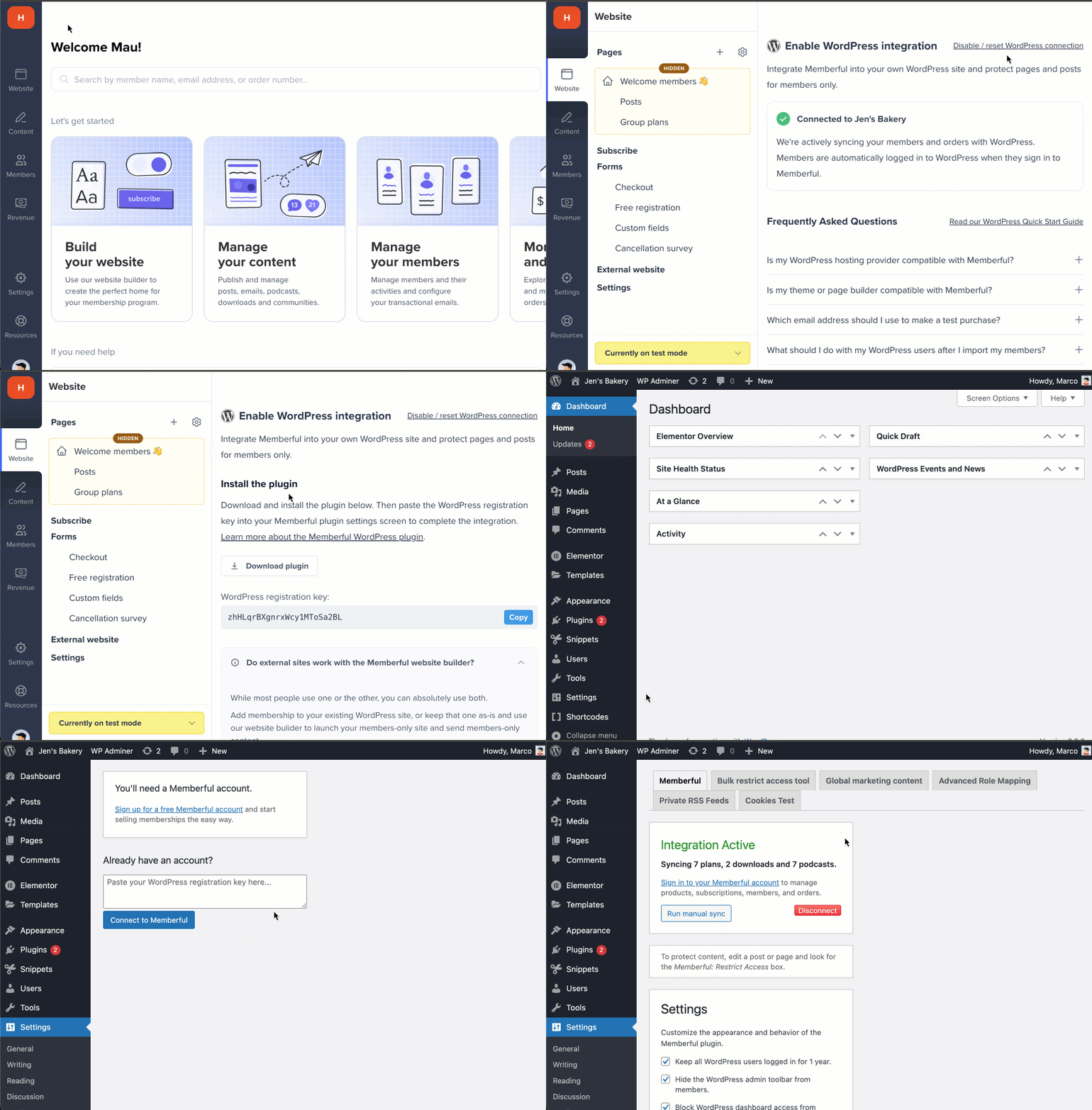
You'll need to disconnect the plugin from **both** your Memberful dashboard and your WordPress dashboard to ensure a clean reconnect.
1. In your Memberful dashboard, go to *Website → External website,* then click **Disable/reset WordPress connection.**
2. Click **I'm using WordPress** and copy the registration key (ctrl/cmd + c).
3. In your WordPress dashboard, go to *Settings → Memberful* and click **Disconnect.**
4. Paste your registration key (ctrl/cmd + v) into the field and click **Connect to Memberful.**