> ## Documentation Index
> Fetch the complete documentation index at: https://memberful.com/docs/llms.txt
> Use this file to discover all available pages before exploring further.
# WordPress shortcodes
> With WordPress shortcodes, you can decide exactly what members see. Use them to protect exclusive content and enhance your membership offering.
export const RelatedDocs = ({link1, link2, link3, link4, link5, link6, link7, link8, link9, link10, className = ""}) => {
const links = [link1, link2, link3, link4, link5, link6, link7, link8, link9, link10].filter(Boolean);
if (!links.length) return null;
return ;
};
Memberful's WordPress plugin allows you to restrict access to an entire post or page through its [Restrict Access meta box](/wordpress-plugin/protect-content/restrict-access-to-a-single-post/#choose-who-has-access). If you want to protect certain *parts* of the content in a post or page, you can use our [shortcodes](http://codex.wordpress.org/Shortcode) instead.
In this help article, we'll cover how to use Memberful's shortcodes in your WordPress posts and pages, and the different types of shortcodes available.
## Access shortcodes via the Memberful editor button
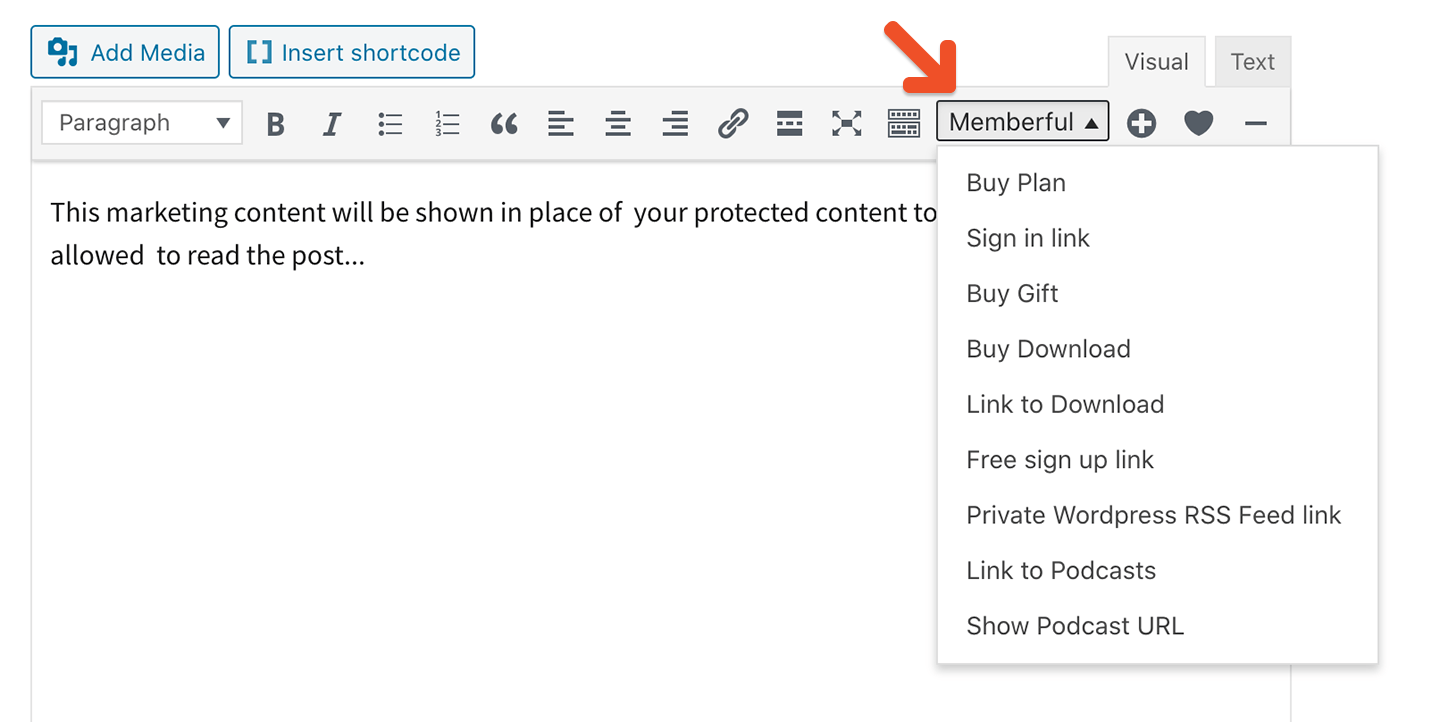
This article shows all our shortcodes. The Memberful button in the classic WordPress editor (not available in the new Gutenberg block editor) allows you to add **the most common shortcodes** to any page or post. Some other shortcodes can only be added manually.
The Memberful button allows you to pre-populate shortcodes with the correct slugs for your plans, downloads, and podcasts, so this is the recommended way to add them to your posts and pages.
 ## Link shortcodes
Link for a member to sign in to their account:
```text theme={null}
[memberful_sign_in_link]Sign in[/memberful_sign_in_link]
```
Link for a member to sign out of their account:
```text theme={null}
[memberful_sign_out_link]Sign out[/memberful_sign_out_link]
```
Link for a member to manage their account:
```text theme={null}
[memberful_account_link]Account[/memberful_account_link]
```
Link to sign up as a free member:
```text theme={null}
[memberful_register_link]Sign up for a free account![/memberful_register_link]
```
Link to buy a plan:
```text theme={null}
[memberful_buy_subscription_link plan=64879-monthly]Buy Monthly plan[/memberful_buy_subscription_link]
```
Link to buy a gift:
```text theme={null}
[memberful_buy_gift_link plan='64879-monthly']Buy the Monthly plan as a gift for someone[/memberful_buy_gift_link]
```
Link to buy a download:
```text theme={null}
[memberful_buy_download_link download='123-my-download-slug']Buy Preset pack 1[/memberful_buy_download_link]
```
Link to a protected download:
```text theme={null}
[memberful_download_link download="123-my-download-slug"]Download Preset pack 1[/memberful_download_link]
```
Link to all the podcasts in the member's account:
```text theme={null}
[memberful_podcasts_link]Access your podcasts[/memberful_podcasts_link]
```
Deep-link to a specific podcast in a member's account:
```text theme={null}
[memberful_podcasts_link podcast=5787]Access the podcast[/memberful_podcasts_link]
```
Display the RSS URL for a member's specific podcast:
```text theme={null}
[memberful_podcast_url podcast=2]
```
Link to a member's [private WordPress RSS feed](/wordpress-plugin/protect-content/private-rss-feeds):
```text theme={null}
[memberful_private_rss_feed_link]Your RSS feed[/memberful_private_rss_feed_link]
```
## Restrict access with shortcodes
We recommend using [Memberful's Restrict Access meta box](/wordpress-plugin/protect-content/restrict-access-to-a-single-post/#choose-who-has-access) to restrict access to content. However, if you only want to protect certain parts of the content in a post or page, you can use shortcodes.
Go to *Revenue → Plans,* then click the **Links** button for the plan you want to use in your shortcode.
## Link shortcodes
Link for a member to sign in to their account:
```text theme={null}
[memberful_sign_in_link]Sign in[/memberful_sign_in_link]
```
Link for a member to sign out of their account:
```text theme={null}
[memberful_sign_out_link]Sign out[/memberful_sign_out_link]
```
Link for a member to manage their account:
```text theme={null}
[memberful_account_link]Account[/memberful_account_link]
```
Link to sign up as a free member:
```text theme={null}
[memberful_register_link]Sign up for a free account![/memberful_register_link]
```
Link to buy a plan:
```text theme={null}
[memberful_buy_subscription_link plan=64879-monthly]Buy Monthly plan[/memberful_buy_subscription_link]
```
Link to buy a gift:
```text theme={null}
[memberful_buy_gift_link plan='64879-monthly']Buy the Monthly plan as a gift for someone[/memberful_buy_gift_link]
```
Link to buy a download:
```text theme={null}
[memberful_buy_download_link download='123-my-download-slug']Buy Preset pack 1[/memberful_buy_download_link]
```
Link to a protected download:
```text theme={null}
[memberful_download_link download="123-my-download-slug"]Download Preset pack 1[/memberful_download_link]
```
Link to all the podcasts in the member's account:
```text theme={null}
[memberful_podcasts_link]Access your podcasts[/memberful_podcasts_link]
```
Deep-link to a specific podcast in a member's account:
```text theme={null}
[memberful_podcasts_link podcast=5787]Access the podcast[/memberful_podcasts_link]
```
Display the RSS URL for a member's specific podcast:
```text theme={null}
[memberful_podcast_url podcast=2]
```
Link to a member's [private WordPress RSS feed](/wordpress-plugin/protect-content/private-rss-feeds):
```text theme={null}
[memberful_private_rss_feed_link]Your RSS feed[/memberful_private_rss_feed_link]
```
## Restrict access with shortcodes
We recommend using [Memberful's Restrict Access meta box](/wordpress-plugin/protect-content/restrict-access-to-a-single-post/#choose-who-has-access) to restrict access to content. However, if you only want to protect certain parts of the content in a post or page, you can use shortcodes.
Go to *Revenue → Plans,* then click the **Links** button for the plan you want to use in your shortcode.
 Copy the **Plan ID**.
 The slug for a download is shown at the bottom of the page when editing that download.
 Renaming a plan or a download will modify its slug, but the old slug will continue to work in WordPress shortcodes. Rename your plans and downloads anytime, knowing that your existing shortcodes will not break.
Here's a basic example of requiring a subscription to the *Big Awesome* plan to see the protected content:
```text theme={null}
[memberful has_subscription_to="154-big-awesome"]
Protected content goes here...
[/memberful]
```
Require the *Super Rad* download to see the protected content:
```text theme={null}
[memberful has_download="27-super-rad"]
Protected content goes here...
[/memberful]
```
Alternatively, you can restrict the content to members that have a subscription to **any** plan:
```text theme={null}
[memberful_if_has_active_subscription]
This will be visible to members that have a subscription to any plan.
[/memberful_if_has_active_subscription]
```
## Show content to visitors who haven't yet purchased
If you want to show potential members a message encouraging them to subscribe to a plan, use the `does_not_have_subscription_to` shortcode:
```text theme={null}
[memberful does_not_have_subscription_to="154-big-awesome"]
Shown to users who haven't purchased the "Big Awesome" subscription.
[/memberful]
```
Or for a download, use `does_not_have_download`:
```text theme={null}
[memberful does_not_have_download="27-super-rad"]
Shown to users who haven't purchased the "Super Rad" download.
[/memberful]
```
You can also show content to those that don't have a subscription to **any** plan:
```text theme={null}
[memberful_if_does_not_have_active_subscription]
This will only be visible to users that don't have any subscriptions.
[/memberful_if_does_not_have_active_subscription]
```
## Specify multiple plans or downloads
If you want to specify multiple subscription plans or downloads, use a comma separated list.
The following shortcode will show content if the member is subscribed to **any** of the plans you specify:
```text theme={null}
[memberful has_subscription_to="154-big-awesome,277-cool-hair"]
This will only be visible to members who have either the "Big Awesome" subscription, or the "Cool Hair" subscription.
[/memberful]
```
The following shortcode will show content if the member owns **any** of the downloads you specify:
```text theme={null}
[memberful has_download="27-super-rad,59-rock-on"]
This will only be visible to members who have purchased either the "Super Rad" download, or the "Rock On" download.
[/memberful]
```
The following shortcode will show content if the member is **not** subscribed to any of the plans you specify:
```text theme={null}
[memberful does_not_have_subscription_to="154-big-awesome,277-cool-hair"]
This will only be visible to members who are neither subscribed to the "Big Awesome" plan nor the "Cool Hair" plan.
[/memberful]
```
The following shortcode will show content if the member does **not** own any of the downloads you specify:
```text theme={null}
[memberful does_not_have_download="27-super-rad,59-rock-on"]
This will only be visible to members who have neither purchased the "Super Rad" download nor the "Rock On" download.
[/memberful]
```
Renaming a plan or a download will modify its slug, but the old slug will continue to work in WordPress shortcodes. Rename your plans and downloads anytime, knowing that your existing shortcodes will not break.
Here's a basic example of requiring a subscription to the *Big Awesome* plan to see the protected content:
```text theme={null}
[memberful has_subscription_to="154-big-awesome"]
Protected content goes here...
[/memberful]
```
Require the *Super Rad* download to see the protected content:
```text theme={null}
[memberful has_download="27-super-rad"]
Protected content goes here...
[/memberful]
```
Alternatively, you can restrict the content to members that have a subscription to **any** plan:
```text theme={null}
[memberful_if_has_active_subscription]
This will be visible to members that have a subscription to any plan.
[/memberful_if_has_active_subscription]
```
## Show content to visitors who haven't yet purchased
If you want to show potential members a message encouraging them to subscribe to a plan, use the `does_not_have_subscription_to` shortcode:
```text theme={null}
[memberful does_not_have_subscription_to="154-big-awesome"]
Shown to users who haven't purchased the "Big Awesome" subscription.
[/memberful]
```
Or for a download, use `does_not_have_download`:
```text theme={null}
[memberful does_not_have_download="27-super-rad"]
Shown to users who haven't purchased the "Super Rad" download.
[/memberful]
```
You can also show content to those that don't have a subscription to **any** plan:
```text theme={null}
[memberful_if_does_not_have_active_subscription]
This will only be visible to users that don't have any subscriptions.
[/memberful_if_does_not_have_active_subscription]
```
## Specify multiple plans or downloads
If you want to specify multiple subscription plans or downloads, use a comma separated list.
The following shortcode will show content if the member is subscribed to **any** of the plans you specify:
```text theme={null}
[memberful has_subscription_to="154-big-awesome,277-cool-hair"]
This will only be visible to members who have either the "Big Awesome" subscription, or the "Cool Hair" subscription.
[/memberful]
```
The following shortcode will show content if the member owns **any** of the downloads you specify:
```text theme={null}
[memberful has_download="27-super-rad,59-rock-on"]
This will only be visible to members who have purchased either the "Super Rad" download, or the "Rock On" download.
[/memberful]
```
The following shortcode will show content if the member is **not** subscribed to any of the plans you specify:
```text theme={null}
[memberful does_not_have_subscription_to="154-big-awesome,277-cool-hair"]
This will only be visible to members who are neither subscribed to the "Big Awesome" plan nor the "Cool Hair" plan.
[/memberful]
```
The following shortcode will show content if the member does **not** own any of the downloads you specify:
```text theme={null}
[memberful does_not_have_download="27-super-rad,59-rock-on"]
This will only be visible to members who have neither purchased the "Super Rad" download nor the "Rock On" download.
[/memberful]
```