> ## Documentation Index
> Fetch the complete documentation index at: https://memberful.com/docs/llms.txt
> Use this file to discover all available pages before exploring further.
# WordPress functions
> Use Memberful's WordPress functions to lock premium sections of your site in code. Reward paying members with exclusive access to templates and features.
export const RelatedDocs = ({link1, link2, link3, link4, link5, link6, link7, link8, link9, link10, className = ""}) => {
const links = [link1, link2, link3, link4, link5, link6, link7, link8, link9, link10].filter(Boolean);
if (!links.length) return null;
return ;
};
Memberful's WordPress plugin allows you to restrict access to an entire post or page through its [Restrict Access meta box](/wordpress-plugin/protect-content/restrict-access-to-a-single-post/#choose-who-has-access).
If you want to protect certain *elements or sections* of your theme, you can use our [WordPress functions](https://developer.wordpress.org/themes/basics/theme-functions/) inside your theme. We also offer WordPress functions for displaying profile information and links to Memberful benefits in your WordPress theme.
In this help article, we'll cover several functions that you can use in your WordPress themes or plugins to check member permissions, show profile information, or link to member benefits.
## Find the necessary Plan ID
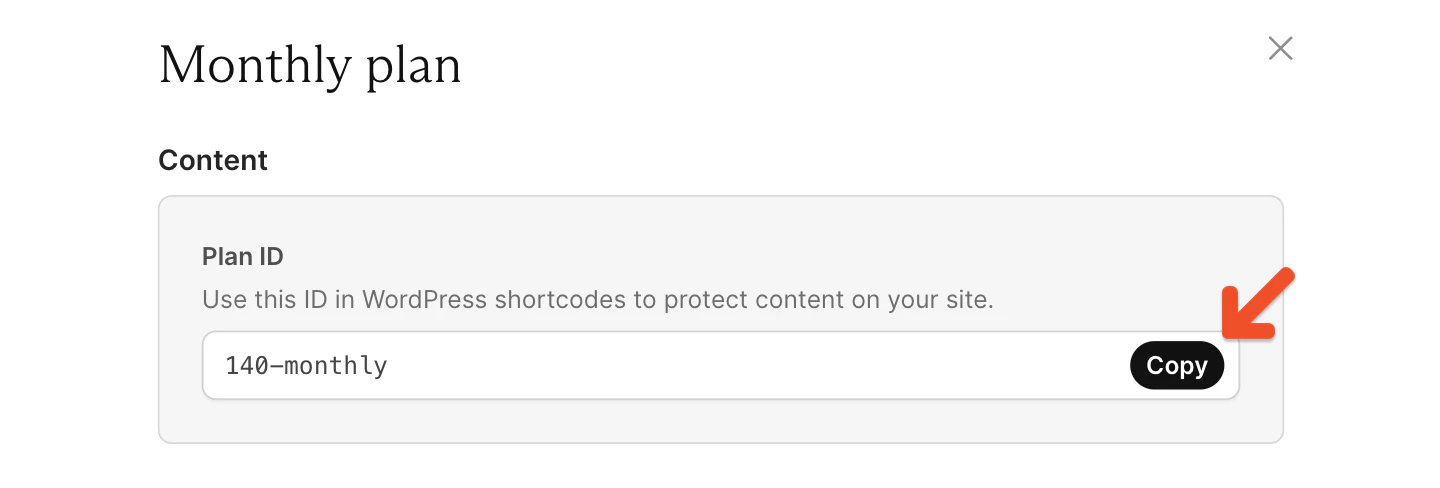
Most of these functions require you to provide the Plan ID of a plan.
To find the Plan ID, go to *Revenue → Plans* and click the **Links** button of the plan you want to find the ID for. Click the Plan ID **Copy** button and paste it into your WordPress function.
 Renaming a plan or a download will modify its slug, but the old slug will continue to work in WordPress functions. Rename your plans and downloads anytime, knowing that your existing functions will not break.
## Find the necessary Slug
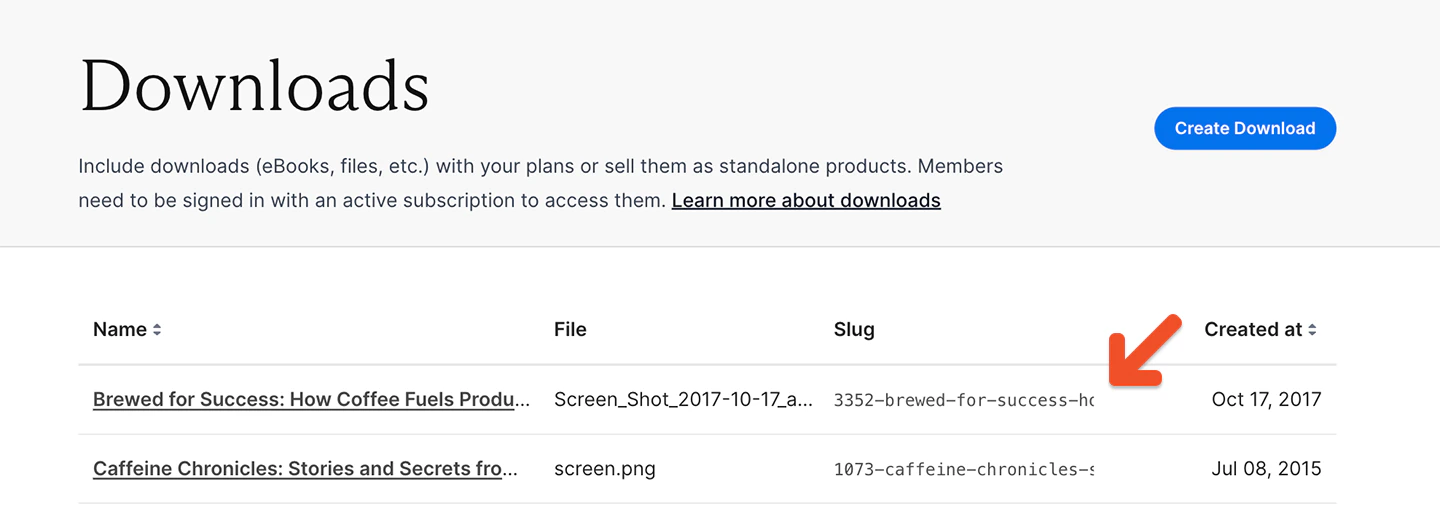
The slug for a download can be found in the list of downloads under *Content → Downloads*.
Renaming a plan or a download will modify its slug, but the old slug will continue to work in WordPress functions. Rename your plans and downloads anytime, knowing that your existing functions will not break.
## Find the necessary Slug
The slug for a download can be found in the list of downloads under *Content → Downloads*.
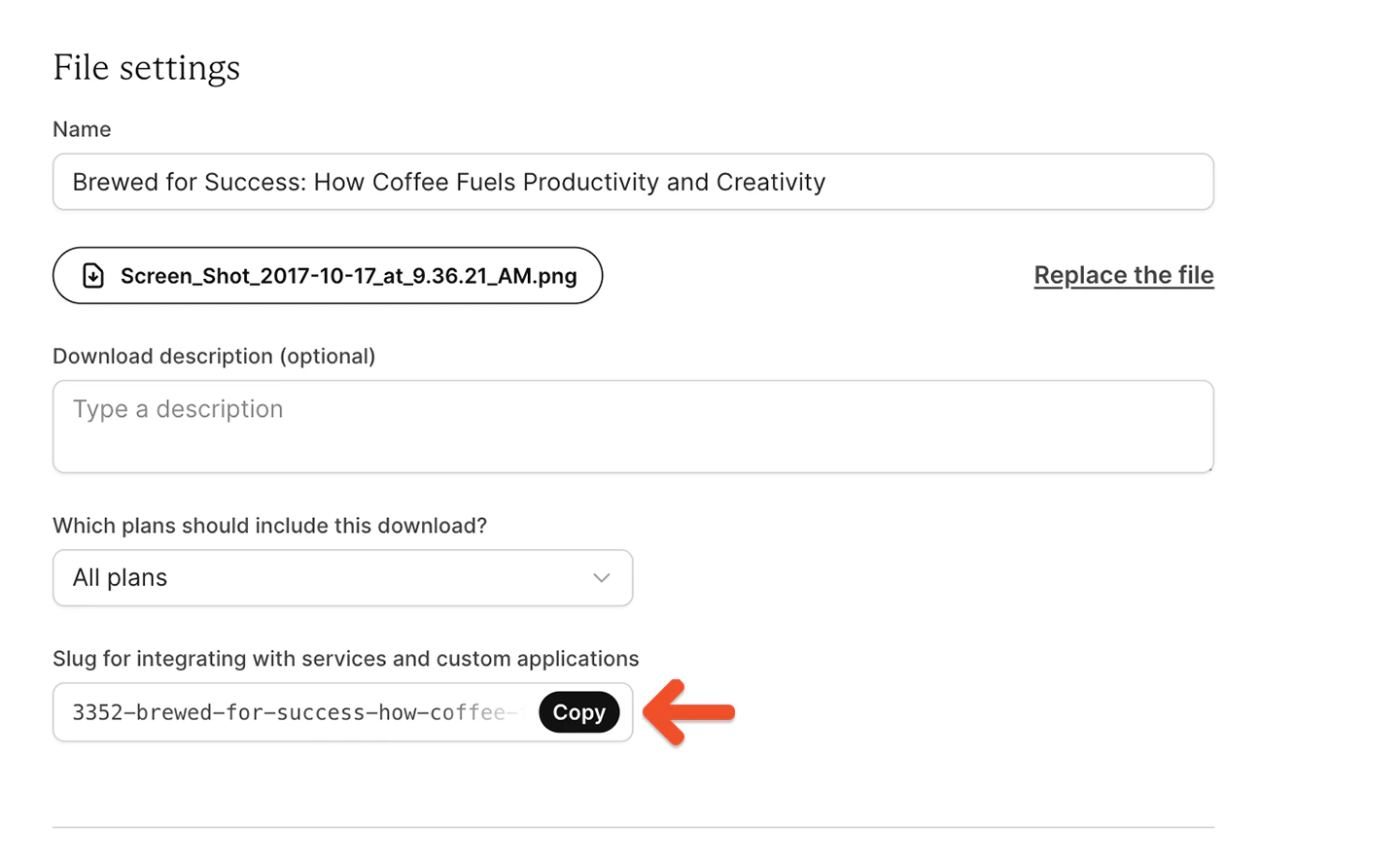
 You can also copy it from the bottom of the page when editing a download.
 ## Find the necessary podcast ID
The ID for a podcast can be found in the URL while editing the podcast. It's the numeric segment of this URL:
```text theme={null}
ACCOUNT-URL.memberful.com/admin/feeds/63010/edit
```
## Check member permissions
We've included three functions for checking if the current signed-in member is subscribed to plans, owns downloads, or has access to podcast feeds. Use them in your WordPress theme's template files:
* `is_subscribed_to_memberful_plan( $slug )`
* `has_memberful_download( $slug )`
* `has_memberful_feed( $id )`
If you pass either of the functions an array of slugs or IDs, the function will return true if the member owns **any** of the downloads or podcast feeds, or is subscribed to at least one of the plans.
You can also check if the given member has an active subscription to **any** plan by using the function `is_subscribed_to_any_memberful_plan($user_id)`.
### Basic example
Require a subscription to the *Big Awesome* plan:
```php theme={null}
Shown only to members with a subscription to the Big Awesome plan.
```
### Multiple plans
Require a subscription to at least one of the listed plans:
```php theme={null}
Shown to members with the Super Rad plan **OR** the Rock On plan **OR** the Chill Out plan.
```
### Any plan
Require a subscription to any plan.
This function accepts any valid user ID, but you'll typically want to use the current signed-in member, so we'll get their user ID first.
```php theme={null}
ID;
if ( is_subscribed_to_any_memberful_plan( $user_id ) ) : ?>
Shown to members subscribed to **any** plan.
```
### Plan or download
Require a subscription to the *Big Awesome* plan **or** require the *Super Rad* download.
```php theme={null}
Shown only to members with a subscription to the Big Awesome plan or the Super Rad download.
```
### Check against a different member / WordPress user
These functions check against the current (signed-in) member / WordPress user by default. To specify a different member / WordPress user, pass the function an optional WordPress user ID argument:
```php theme={null}
Shown if $user_id is subscribed to the Super Rad or Rock On plans.
```
### Check if a user has access to a post based on the Restrict Access tool
Configure access to your posts with the [Restrict Access](/wordpress-plugin/protect-content/restrict-access-to-a-single-post/#restrict-access-to-wordpress-pages-and-posts) metabox and use `memberful_can_user_access_post()` to check if a user has access to a post or not:
```php theme={null}
ID;
if ( memberful_can_user_access_post( $user_id, $post->ID) ) : ?>
Shown to members that have access based on the Restrict Access Tool.
Shown to others.
```
You only need to do this if you want to show users some custom content (e.g. content from custom fields).
If you only need to protect content in the default WordPress content area (*the\_content()* in your theme), the [Restrict Access tool](/wordpress-plugin/protect-content/restrict-access-to-a-single-post/#choose-who-has-access) will be sufficient and you won't need to use this function.
## Check which plans a user is subscribed to
The memberful\_wp\_user\_plans\_subscribed\_to function returns the member's subscriptions as an array.
```php theme={null}
$subscriptions = memberful_wp_user_plans_subscribed_to( $user_id );
```
Each subscription in the array contains the following keys:
* id (this refers to the Plan's ID)
* autorenew
* activated\_at
* expires\_at
* in\_trial\_period
* trial\_start\_at
* trial\_end\_at
## Add a custom function that checks if a member is on a trial
We can leverage the `memberful_wp_user_plans_subscribed_to` function to create a custom function that checks if a member is currently on a trial for any of their subscriptions.
Add the following custom function to your `functions.php` file:
```php theme={null}
function is_on_trial() {
if ( ! function_exists( "memberful_wp_user_plans_subscribed_to" ) ) {
return false;
}
$user_id = wp_get_current_user()->ID;
$subscriptions = memberful_wp_user_plans_subscribed_to($user_id);
if( empty( $subscriptions ) ) {
return false;
}
foreach( $subscriptions as $subscription ) {
if ( $subscription["in_trial_period"] ) {
return true;
}
}
return false;
}
```
Now `is_on_trial()` will return `true` if the member is on a trial (for any subscription).
## Show profile information in WordPress themes
We've included a few functions for adding profile information to your theme template files:
* `memberful_account_url`
* `memberful_sign_in_url`
* `memberful_sign_out_url`
Here's an example of using these functions to generate a profile box:
```php theme={null}
```
## Link to downloads
You can use the `memberful_account_get_download_url($slug)` function to link to a download. The parameter to this function must be the [slug](#find-the-necessary-slug-or-id) of the download you're linking to.
```php theme={null}
Download my ebook!
```
## Link to podcasts
If you're using the [private podcasts](/podcasting/setup/create-a-paid-podcast/) feature inside Memberful, you can use the `memberful_wp_feed_url($id)` function to link to a member's unique RSS feed.
The parameter to this function must be the ID of the podcast you're linking to. If the member doesn't have access to the given podcast, it returns `null`, so we should check for that before rendering the link.
```php theme={null}
Subscribe to the podcast!';
}
?>
```
## Link to private RSS feeds
If you've turned on [private RSS feeds](/wordpress-plugin/protect-content/private-rss-feeds), you can share a link to the member's private RSS feed using this function:
```php theme={null}
```
## Find the necessary podcast ID
The ID for a podcast can be found in the URL while editing the podcast. It's the numeric segment of this URL:
```text theme={null}
ACCOUNT-URL.memberful.com/admin/feeds/63010/edit
```
## Check member permissions
We've included three functions for checking if the current signed-in member is subscribed to plans, owns downloads, or has access to podcast feeds. Use them in your WordPress theme's template files:
* `is_subscribed_to_memberful_plan( $slug )`
* `has_memberful_download( $slug )`
* `has_memberful_feed( $id )`
If you pass either of the functions an array of slugs or IDs, the function will return true if the member owns **any** of the downloads or podcast feeds, or is subscribed to at least one of the plans.
You can also check if the given member has an active subscription to **any** plan by using the function `is_subscribed_to_any_memberful_plan($user_id)`.
### Basic example
Require a subscription to the *Big Awesome* plan:
```php theme={null}
Shown only to members with a subscription to the Big Awesome plan.
```
### Multiple plans
Require a subscription to at least one of the listed plans:
```php theme={null}
Shown to members with the Super Rad plan **OR** the Rock On plan **OR** the Chill Out plan.
```
### Any plan
Require a subscription to any plan.
This function accepts any valid user ID, but you'll typically want to use the current signed-in member, so we'll get their user ID first.
```php theme={null}
ID;
if ( is_subscribed_to_any_memberful_plan( $user_id ) ) : ?>
Shown to members subscribed to **any** plan.
```
### Plan or download
Require a subscription to the *Big Awesome* plan **or** require the *Super Rad* download.
```php theme={null}
Shown only to members with a subscription to the Big Awesome plan or the Super Rad download.
```
### Check against a different member / WordPress user
These functions check against the current (signed-in) member / WordPress user by default. To specify a different member / WordPress user, pass the function an optional WordPress user ID argument:
```php theme={null}
Shown if $user_id is subscribed to the Super Rad or Rock On plans.
```
### Check if a user has access to a post based on the Restrict Access tool
Configure access to your posts with the [Restrict Access](/wordpress-plugin/protect-content/restrict-access-to-a-single-post/#restrict-access-to-wordpress-pages-and-posts) metabox and use `memberful_can_user_access_post()` to check if a user has access to a post or not:
```php theme={null}
ID;
if ( memberful_can_user_access_post( $user_id, $post->ID) ) : ?>
Shown to members that have access based on the Restrict Access Tool.
Shown to others.
```
You only need to do this if you want to show users some custom content (e.g. content from custom fields).
If you only need to protect content in the default WordPress content area (*the\_content()* in your theme), the [Restrict Access tool](/wordpress-plugin/protect-content/restrict-access-to-a-single-post/#choose-who-has-access) will be sufficient and you won't need to use this function.
## Check which plans a user is subscribed to
The memberful\_wp\_user\_plans\_subscribed\_to function returns the member's subscriptions as an array.
```php theme={null}
$subscriptions = memberful_wp_user_plans_subscribed_to( $user_id );
```
Each subscription in the array contains the following keys:
* id (this refers to the Plan's ID)
* autorenew
* activated\_at
* expires\_at
* in\_trial\_period
* trial\_start\_at
* trial\_end\_at
## Add a custom function that checks if a member is on a trial
We can leverage the `memberful_wp_user_plans_subscribed_to` function to create a custom function that checks if a member is currently on a trial for any of their subscriptions.
Add the following custom function to your `functions.php` file:
```php theme={null}
function is_on_trial() {
if ( ! function_exists( "memberful_wp_user_plans_subscribed_to" ) ) {
return false;
}
$user_id = wp_get_current_user()->ID;
$subscriptions = memberful_wp_user_plans_subscribed_to($user_id);
if( empty( $subscriptions ) ) {
return false;
}
foreach( $subscriptions as $subscription ) {
if ( $subscription["in_trial_period"] ) {
return true;
}
}
return false;
}
```
Now `is_on_trial()` will return `true` if the member is on a trial (for any subscription).
## Show profile information in WordPress themes
We've included a few functions for adding profile information to your theme template files:
* `memberful_account_url`
* `memberful_sign_in_url`
* `memberful_sign_out_url`
Here's an example of using these functions to generate a profile box:
```php theme={null}
```
## Link to downloads
You can use the `memberful_account_get_download_url($slug)` function to link to a download. The parameter to this function must be the [slug](#find-the-necessary-slug-or-id) of the download you're linking to.
```php theme={null}
Download my ebook!
```
## Link to podcasts
If you're using the [private podcasts](/podcasting/setup/create-a-paid-podcast/) feature inside Memberful, you can use the `memberful_wp_feed_url($id)` function to link to a member's unique RSS feed.
The parameter to this function must be the ID of the podcast you're linking to. If the member doesn't have access to the given podcast, it returns `null`, so we should check for that before rendering the link.
```php theme={null}
Subscribe to the podcast!';
}
?>
```
## Link to private RSS feeds
If you've turned on [private RSS feeds](/wordpress-plugin/protect-content/private-rss-feeds), you can share a link to the member's private RSS feed using this function:
```php theme={null}
```