> ## Documentation Index
> Fetch the complete documentation index at: https://memberful.com/docs/llms.txt
> Use this file to discover all available pages before exploring further.
# Private RSS feeds
> Enable private RSS feeds in Memberful so members can read your members-only posts in their favorite RSS reader using a personal, authenticated feed URL.
export const RelatedDocs = ({link1, link2, link3, link4, link5, link6, link7, link8, link9, link10, className = ""}) => {
const links = [link1, link2, link3, link4, link5, link6, link7, link8, link9, link10].filter(Boolean);
if (!links.length) return null;
return ;
};
In this help article, we'll cover how Memberful hides protected posts from WordPress RSS feeds and how you can offer private RSS feeds to members who like reading through an RSS reader.
## Enable the private RSS feed
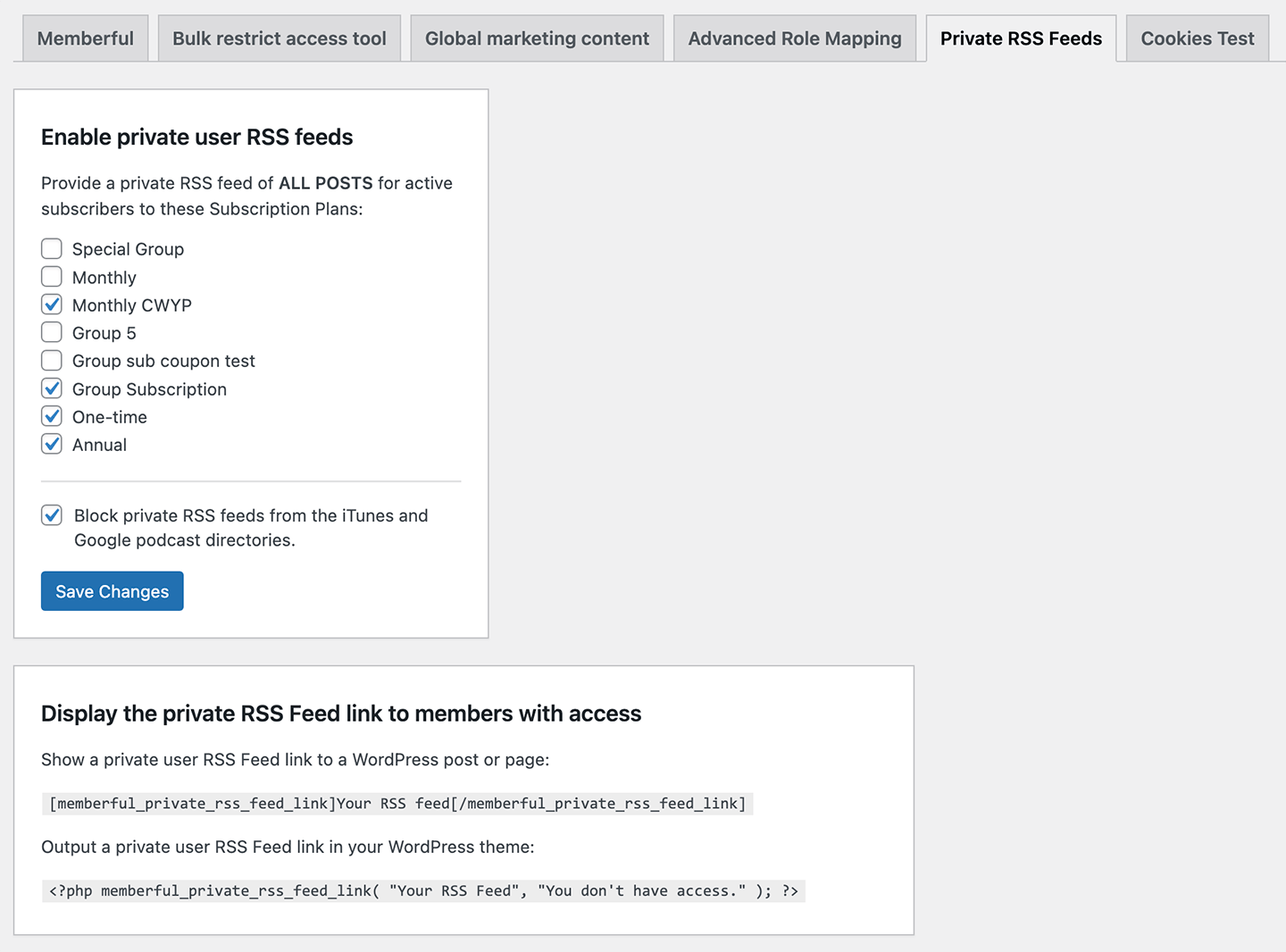
From WordPress, visit *Settings → Memberful → Private RSS Feeds* and enable the private RSS feed feature for active members on all plans or specific plans.
 ## Display the private RSS feed
Each signed-in member with the specified access has their own unique RSS feed. You can share this RSS feed with the member in any WordPress page or post with a shortcode:
```text theme={null}
[memberful_private_rss_feed_link]Your RSS feed[/memberful_private_rss_feed_link]
```
Or, you can add it directly to your theme template files:
```php theme={null}
```
## Restrict by plan
If you are selling different levels of membership, and each level gives access to different content, you (or your developer) will want to customize access to your RSS posts. To do that, add this code snippet to your WordPress site:
```php theme={null}
function restrict_rss_post_access($allowAccess, $user_id, $post_id) {
return memberful_can_user_access_post($user_id, $post_id);
}
add_filter("memberful_can_user_access_rss_post", "restrict_rss_post_access", 10, 3);
```
If you don't have a place where you usually add filters, you can add the snippet to your theme's functions.php file. That snippet will restrict posts in the RSS feed using the same logic as the web version.
## Limit feed to specific categories
By default, the feed includes posts from any of your WordPress categories. You can limit the feed to a single category by specifying it in the shortcode. For example, if you only wanted posts in the "interviews" category, you would add:
```text theme={null}
[memberful_private_rss_feed_link category="interviews"]Your feed of bonus interviews[/memberful_private_rss_feed_link]
```
Limit it to multiple categories using the `memberful_private_rss_category_ids` filter action:
```php theme={null}
function my_theme_private_rss_category_ids( $category_ids ) {
return array( 1, 3 );
}
add_filter( 'memberful_private_rss_category_ids', 'my_theme_private_rss_category_ids' );
```
This is currently only a superficial change — members could modify the link to remove the category filtering and see all posts if they wanted to.
## Include custom post types
By default, only regular WordPress posts are included in the private RSS feed. Add support for Custom Post Types by hooking into the `memberful_private_rss_post_types` filter action:
```php theme={null}
function my_theme_private_rss_post_types( $post_types ) {
return array( 'post', 'custom_post_type' );
}
add_filter( 'memberful_private_rss_post_types', 'my_theme_private_rss_post_types' );
```
## Prevent feed from being indexed
If you're using the Memberful WordPress plugin to create a private podcast, some podcast directories (such as iTunes) will find your feed and publish it in their apps so that their users can access it. While that's a useful feature for free podcasts, you don't want that happening to your private feed.
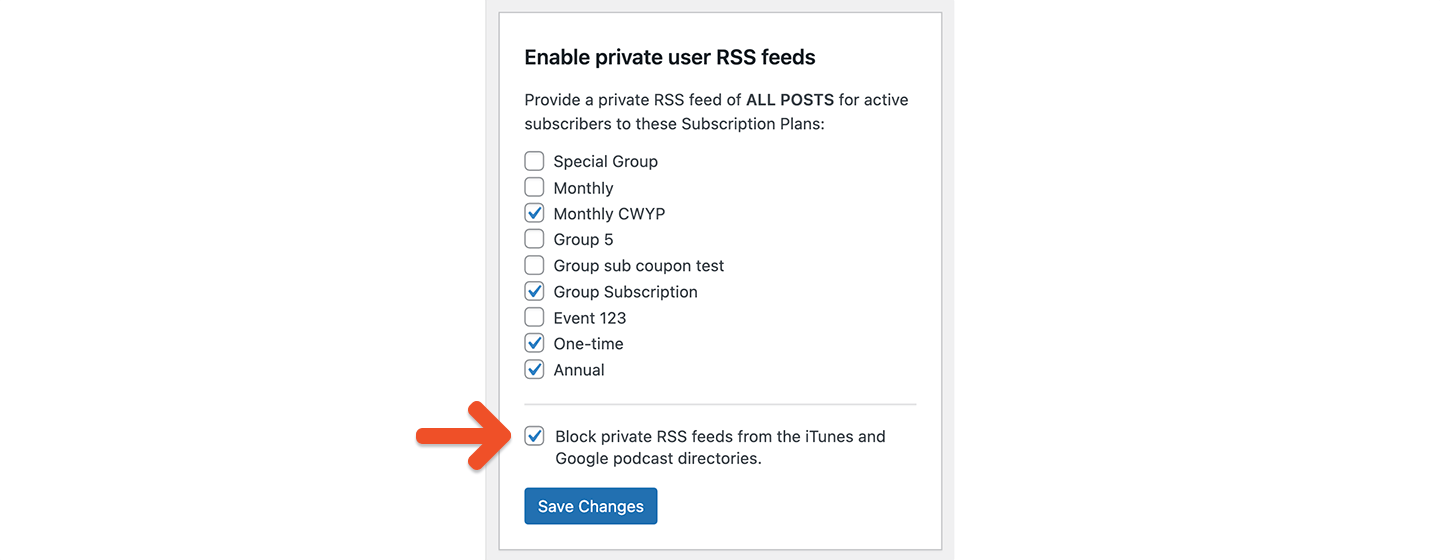
To block indexing by iTunes, check the *Block private RSS feeds from the iTunes podcast directory* option:
## Display the private RSS feed
Each signed-in member with the specified access has their own unique RSS feed. You can share this RSS feed with the member in any WordPress page or post with a shortcode:
```text theme={null}
[memberful_private_rss_feed_link]Your RSS feed[/memberful_private_rss_feed_link]
```
Or, you can add it directly to your theme template files:
```php theme={null}
```
## Restrict by plan
If you are selling different levels of membership, and each level gives access to different content, you (or your developer) will want to customize access to your RSS posts. To do that, add this code snippet to your WordPress site:
```php theme={null}
function restrict_rss_post_access($allowAccess, $user_id, $post_id) {
return memberful_can_user_access_post($user_id, $post_id);
}
add_filter("memberful_can_user_access_rss_post", "restrict_rss_post_access", 10, 3);
```
If you don't have a place where you usually add filters, you can add the snippet to your theme's functions.php file. That snippet will restrict posts in the RSS feed using the same logic as the web version.
## Limit feed to specific categories
By default, the feed includes posts from any of your WordPress categories. You can limit the feed to a single category by specifying it in the shortcode. For example, if you only wanted posts in the "interviews" category, you would add:
```text theme={null}
[memberful_private_rss_feed_link category="interviews"]Your feed of bonus interviews[/memberful_private_rss_feed_link]
```
Limit it to multiple categories using the `memberful_private_rss_category_ids` filter action:
```php theme={null}
function my_theme_private_rss_category_ids( $category_ids ) {
return array( 1, 3 );
}
add_filter( 'memberful_private_rss_category_ids', 'my_theme_private_rss_category_ids' );
```
This is currently only a superficial change — members could modify the link to remove the category filtering and see all posts if they wanted to.
## Include custom post types
By default, only regular WordPress posts are included in the private RSS feed. Add support for Custom Post Types by hooking into the `memberful_private_rss_post_types` filter action:
```php theme={null}
function my_theme_private_rss_post_types( $post_types ) {
return array( 'post', 'custom_post_type' );
}
add_filter( 'memberful_private_rss_post_types', 'my_theme_private_rss_post_types' );
```
## Prevent feed from being indexed
If you're using the Memberful WordPress plugin to create a private podcast, some podcast directories (such as iTunes) will find your feed and publish it in their apps so that their users can access it. While that's a useful feature for free podcasts, you don't want that happening to your private feed.
To block indexing by iTunes, check the *Block private RSS feeds from the iTunes podcast directory* option:
 If you ever need to reinstate your feed, you might need to contact Apple support, so use this option with care.
To create the best podcasting experience for your members, we recommend using the [**private podcast feature**](/podcasting/setup/create-a-paid-podcast/) inside of Memberful.
If you ever need to reinstate your feed, you might need to contact Apple support, so use this option with care.
To create the best podcasting experience for your members, we recommend using the [**private podcast feature**](/podcasting/setup/create-a-paid-podcast/) inside of Memberful.