Related help docs:
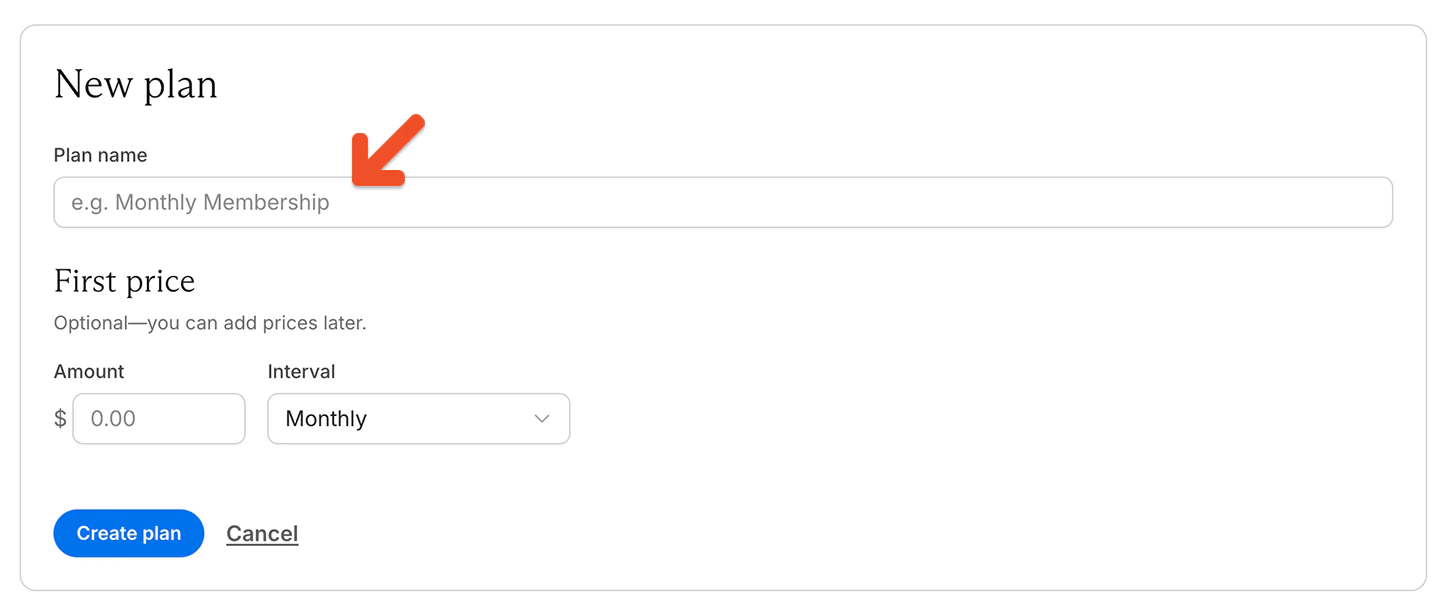
 Enter a plan name, then add a price and billing interval, and click **Create plan**.
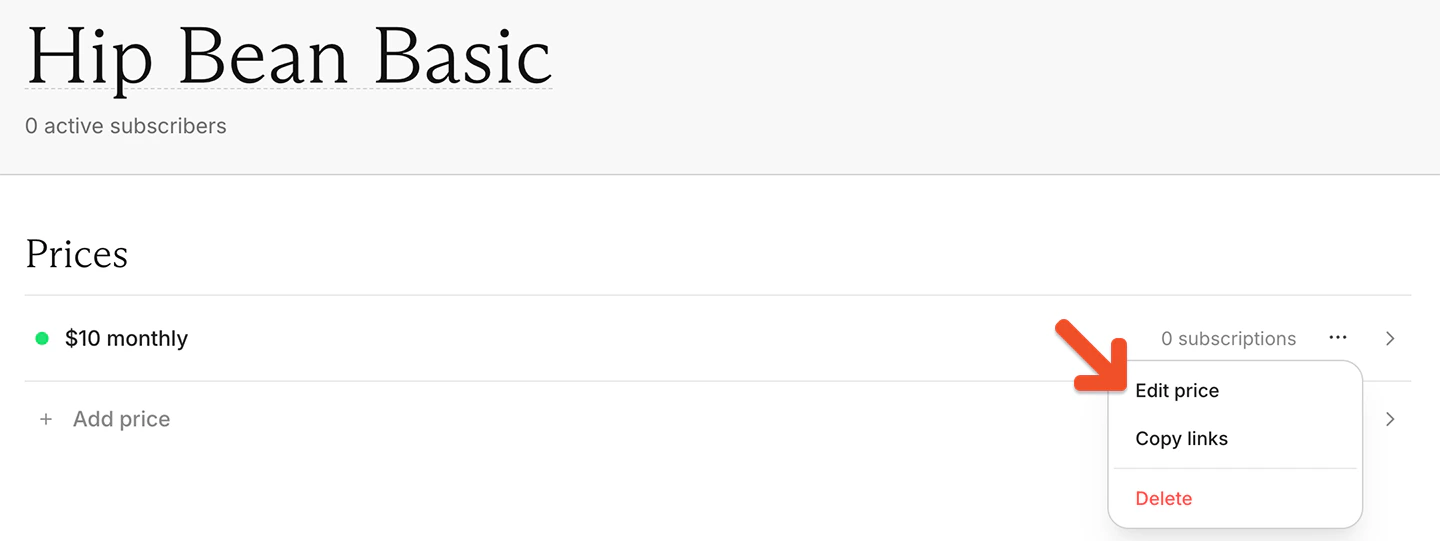
 In the Prices section, click the **•••** menu next to the price and choose **Edit price.**
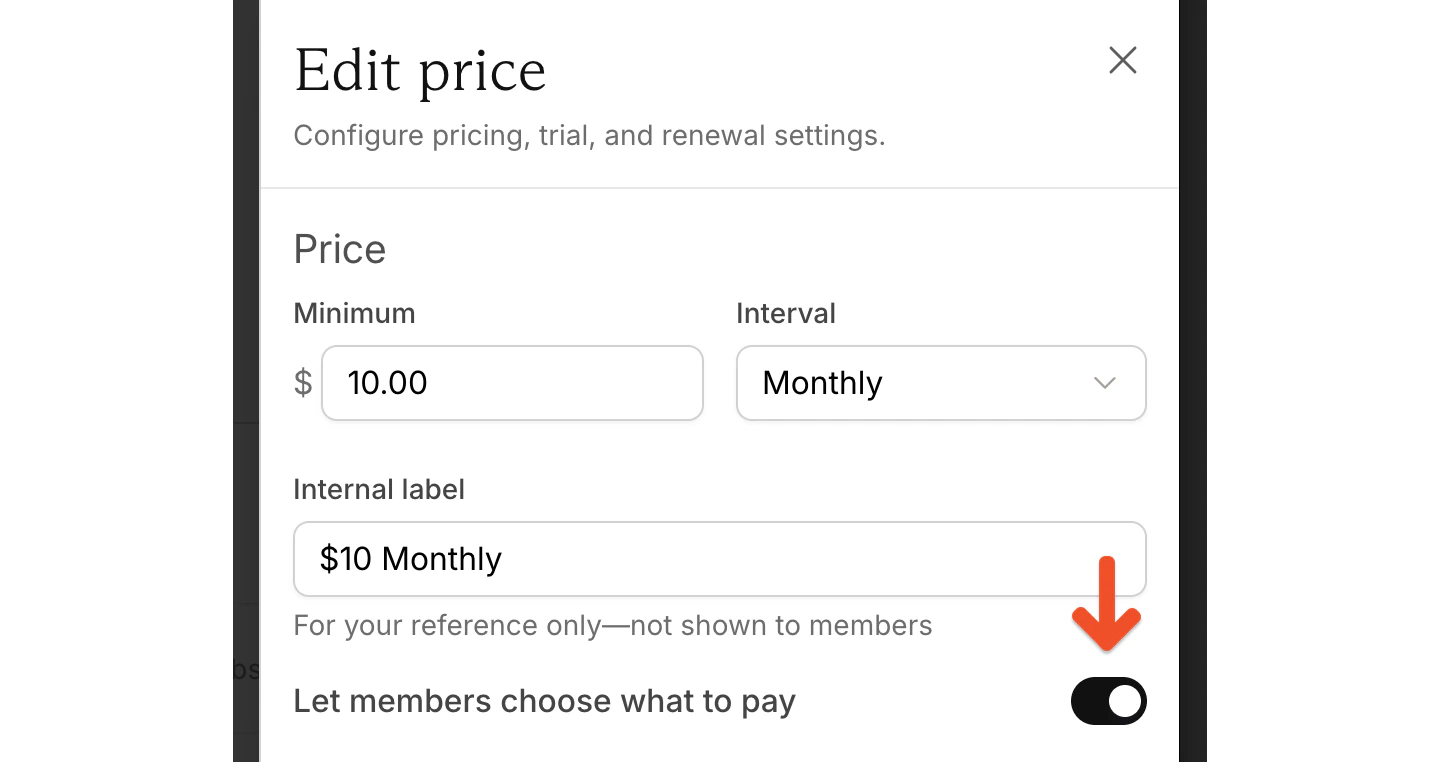
 Toggle on *Let members choose what to pay.*
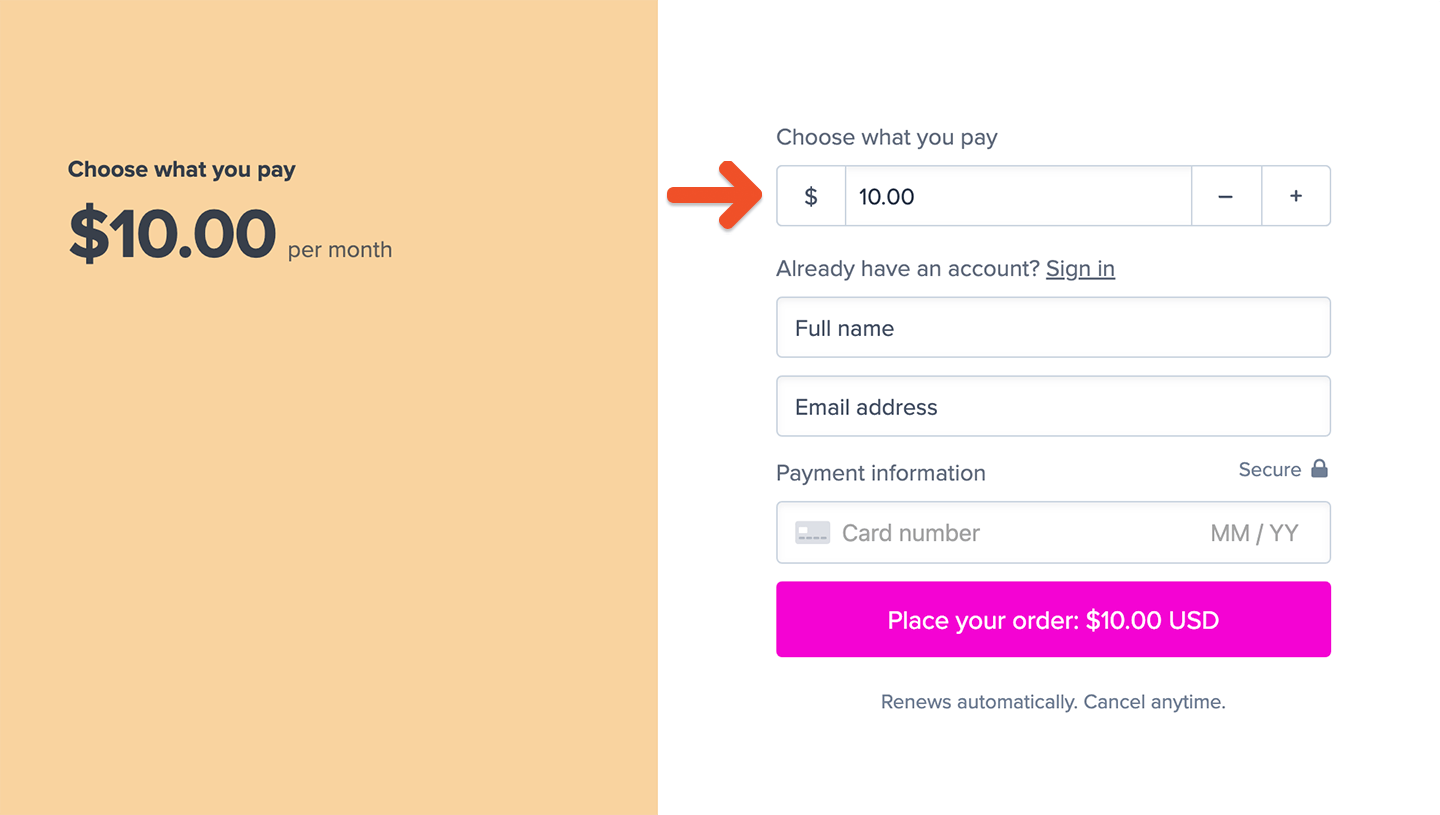
 Once enabled, the price you set becomes the minimum amount members can pay. Members can enter any amount equal to or greater than this minimum, up to \$999,999.
You can toggle this setting off as long as the plan doesn't have any active members.
You can also share a suggested price by passing the amount through a query string in the purchase link URL.
To charge \$50 for a plan, the URL would look like this:
```text theme={null}
https://ACCOUNT-URL.memberful.com/checkout?plan=2&price=50
```
You can also include decimal points in the amount, which would look like this:
```text theme={null}
https://ACCOUNT-URL.memberful.com/checkout?plan=2&price=25.50
```
Replace `ACCOUNT-URL` with your actual Account URL subdomain, which can be found in your Memberful dashboard via *Website → Settings*. Also replace the number 2 with your own plan ID, which you can find in your plan's [purchase link](/plans/promote-and-sell/add-a-link-to-buy-a-plan/#create-a-purchase-button-with-any-website-builder).
When you build the membership sales page on your website, create buttons for each of the amounts you'd like to collect with the proper amount in the URL.
You can also create an open text field for members to enter a fully custom amount of their own choosing. You can get example HTML at any time from the Plan Settings page, and then customize it using your own CSS and HTML.
Once enabled, the price you set becomes the minimum amount members can pay. Members can enter any amount equal to or greater than this minimum, up to \$999,999.
You can toggle this setting off as long as the plan doesn't have any active members.
You can also share a suggested price by passing the amount through a query string in the purchase link URL.
To charge \$50 for a plan, the URL would look like this:
```text theme={null}
https://ACCOUNT-URL.memberful.com/checkout?plan=2&price=50
```
You can also include decimal points in the amount, which would look like this:
```text theme={null}
https://ACCOUNT-URL.memberful.com/checkout?plan=2&price=25.50
```
Replace `ACCOUNT-URL` with your actual Account URL subdomain, which can be found in your Memberful dashboard via *Website → Settings*. Also replace the number 2 with your own plan ID, which you can find in your plan's [purchase link](/plans/promote-and-sell/add-a-link-to-buy-a-plan/#create-a-purchase-button-with-any-website-builder).
When you build the membership sales page on your website, create buttons for each of the amounts you'd like to collect with the proper amount in the URL.
You can also create an open text field for members to enter a fully custom amount of their own choosing. You can get example HTML at any time from the Plan Settings page, and then customize it using your own CSS and HTML.
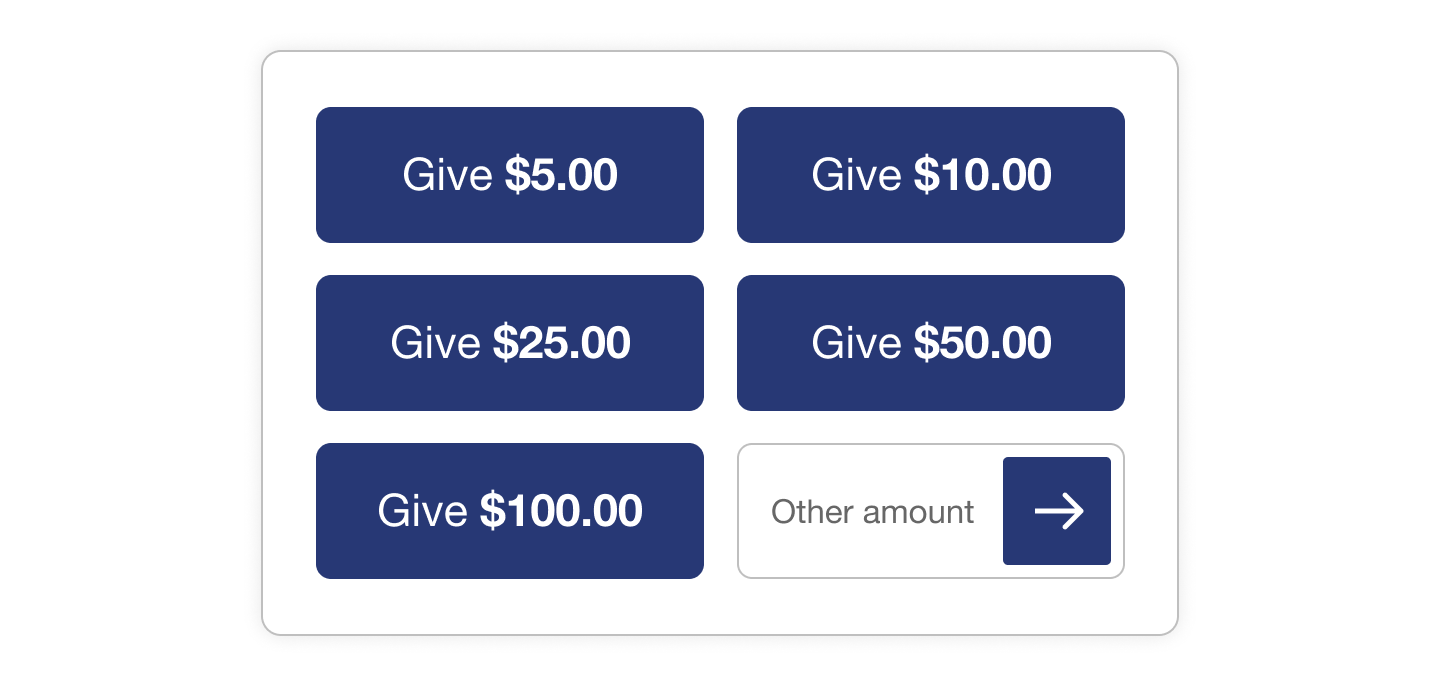 Here's an example of how you'd create the text field that launches your checkout (also available on the **Plan Settings** page):
```html theme={null}
```
## Edit a member's custom amount
You can edit the custom amount a member is paying through their subscription page in the dashboard. Search for the member by name or email.
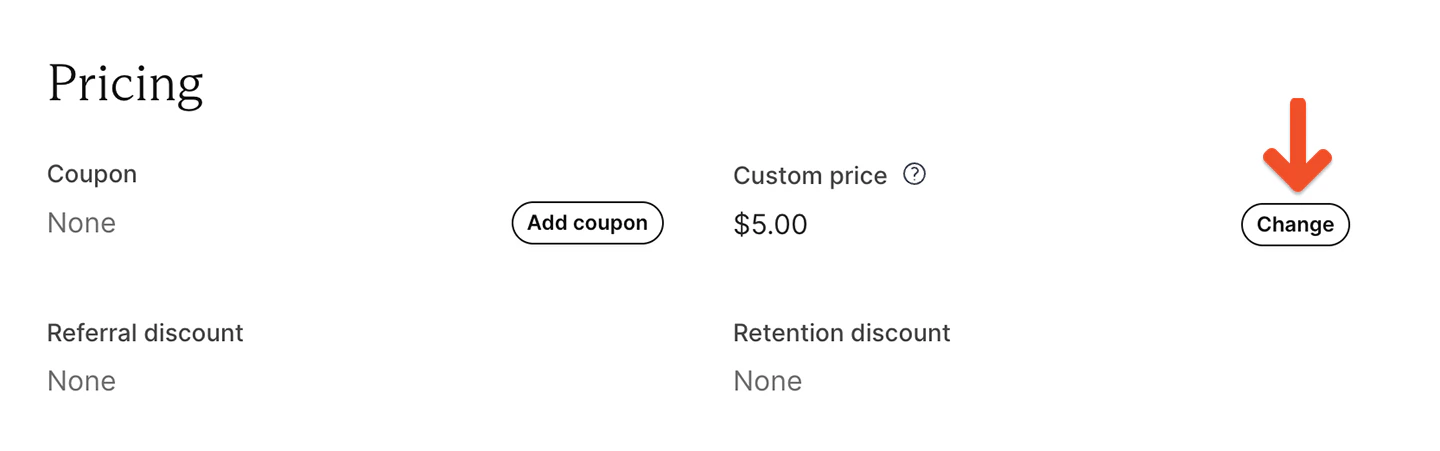
Under **Custom price,** click **Change** and enter a new amount that's equal to or greater than the plan's minimum price. The member will be charged this amount at their next renewal, and all renewals going forward.
Here's an example of how you'd create the text field that launches your checkout (also available on the **Plan Settings** page):
```html theme={null}
```
## Edit a member's custom amount
You can edit the custom amount a member is paying through their subscription page in the dashboard. Search for the member by name or email.
Under **Custom price,** click **Change** and enter a new amount that's equal to or greater than the plan's minimum price. The member will be charged this amount at their next renewal, and all renewals going forward.
 ## Move members with custom prices
When members are moved from one price to another, Memberful checks whether the destination price also allows members to choose what they pay.
* If the destination price allows members to choose what they pay, members keep their custom price as long as it is at or above the destination price.
* If the destination price does not allow members to choose what they pay, the custom price is replaced with the destination price on the next renewal.
To learn more about moving members between prices, see [Move all members](/plans/plan-options/understand-plans-and-prices).
## Move members with custom prices
When members are moved from one price to another, Memberful checks whether the destination price also allows members to choose what they pay.
* If the destination price allows members to choose what they pay, members keep their custom price as long as it is at or above the destination price.
* If the destination price does not allow members to choose what they pay, the custom price is replaced with the destination price on the next renewal.
To learn more about moving members between prices, see [Move all members](/plans/plan-options/understand-plans-and-prices).