> ## Documentation Index
> Fetch the complete documentation index at: https://memberful.com/docs/llms.txt
> Use this file to discover all available pages before exploring further.
# Import members via CSV
> Import members into Memberful from a CSV file. Assign plans, set renewal dates, and choose billing behavior so each row becomes the right kind of subscription.
export const ContactSupport = ({label = "Contact us to get set up →", fallbackEmail = "info@memberful.com", className = ""}) => {
const handleClick = e => {
e.preventDefault();
if (typeof window !== 'undefined' && window.Intercom) {
try {
window.Intercom('showNewMessage');
return;
} catch (error) {
console.warn('Intercom failed to open:', error);
}
}
window.location.href = `mailto:${fallbackEmail}`;
};
return
{label}
;
};
export const RelatedDocs = ({link1, link2, link3, link4, link5, link6, link7, link8, link9, link10, className = ""}) => {
const links = [link1, link2, link3, link4, link5, link6, link7, link8, link9, link10].filter(Boolean);
if (!links.length) return null;
return ;
};
You can import members into Memberful using a CSV file, including their personal details, subscriptions, and renewal settings. This is useful when migrating from another platform or bulk-adding members.
In this help article, we'll show you how to prepare your CSV file, upload it, and understand the available fields for importing members.
## Populate our sample CSV file with your member data
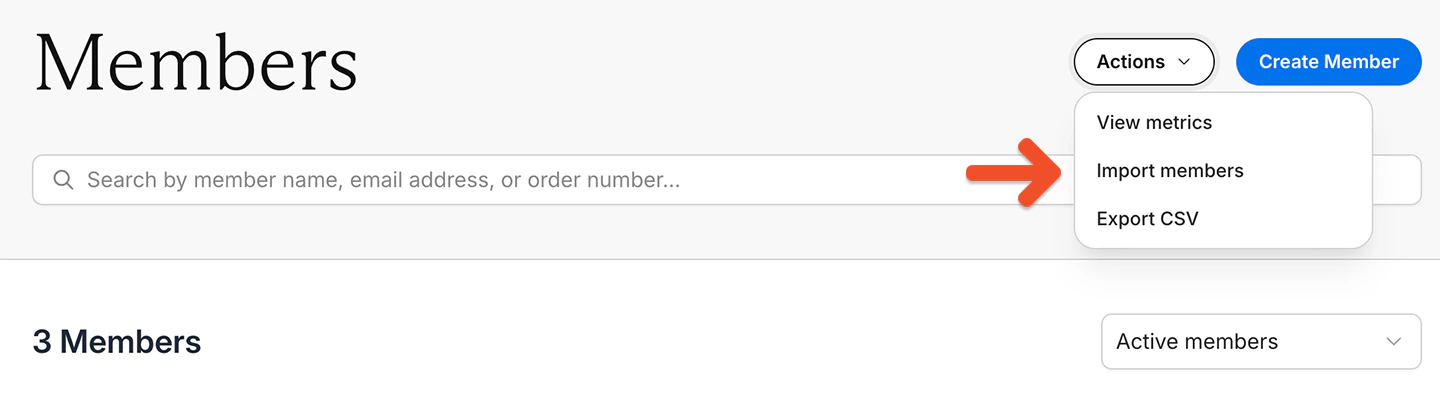
1. Go to the Members tab.
2. Click *Actions → Import members.*
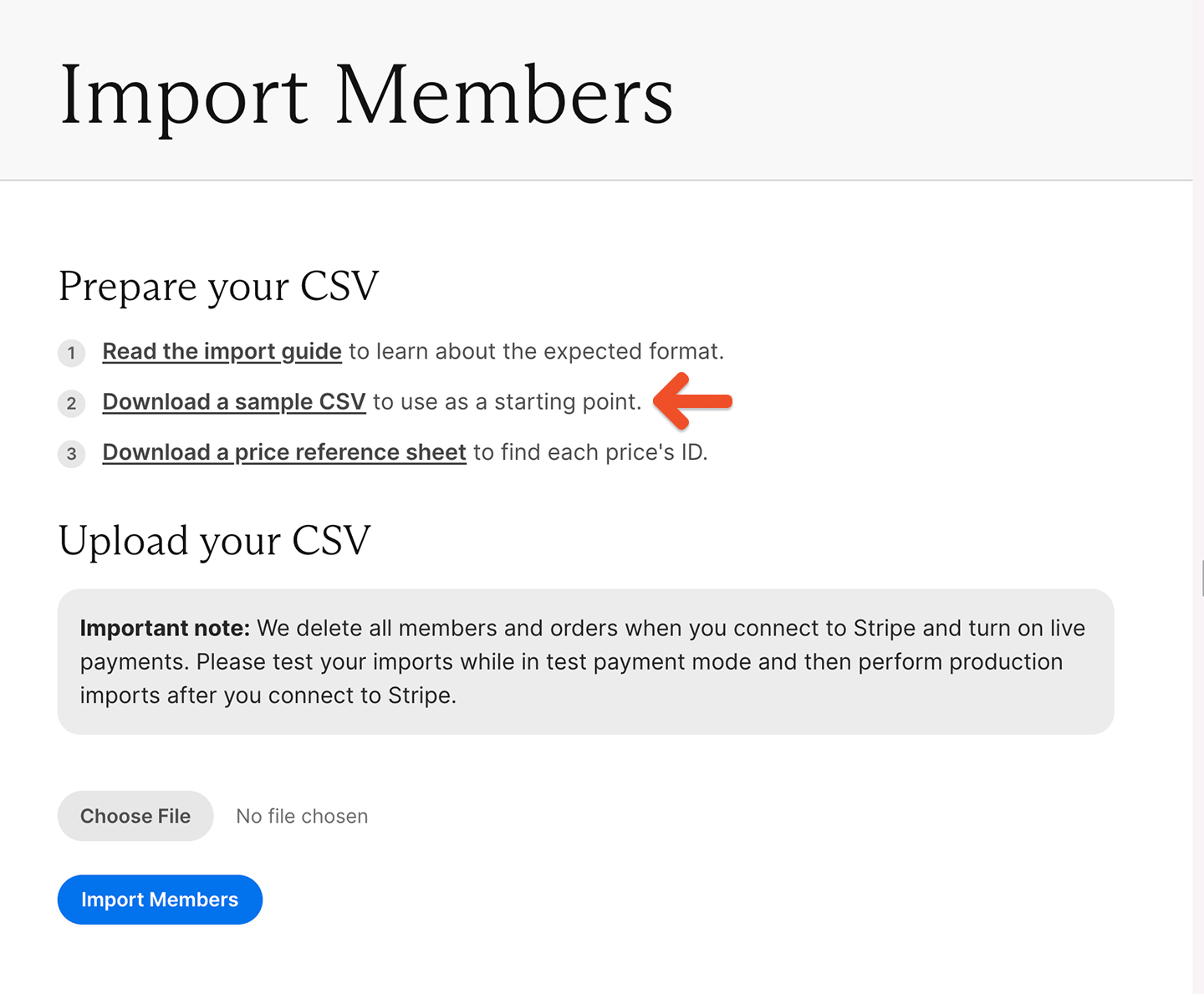
 3. Download our sample import file.
 4. Import it into Google Sheets to avoid issues with special characters. (Excel generates these special characters, so we recommend importing and exporting the CSV via Google Sheets.)
Make sure you keep the column headers in the first row of the sample CSV intact. If you change the column headers, your CSV import might not work.
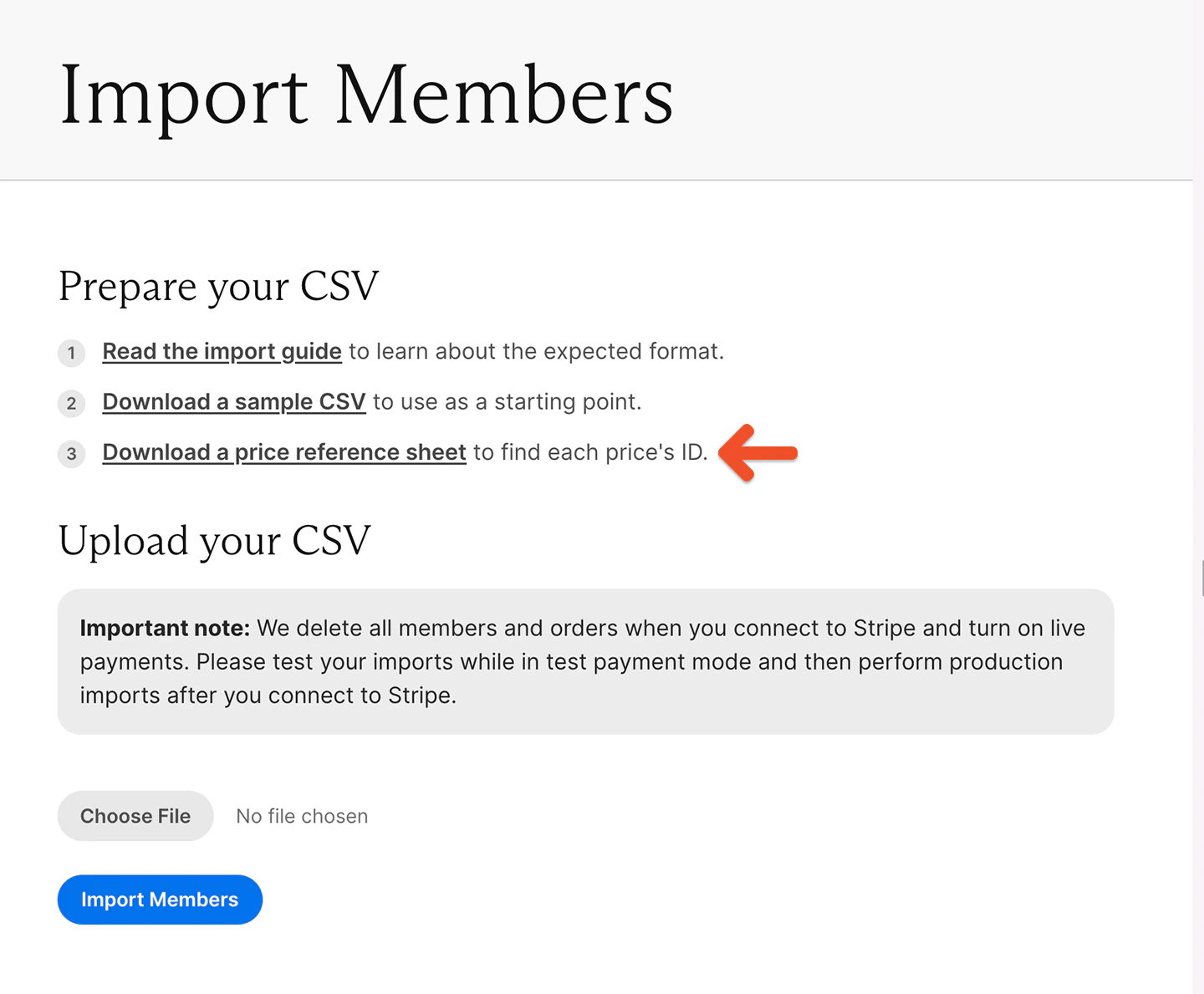
5. The Import Members page also includes a downloadable price reference file with all plans and prices, along with their shortcode IDs. You can use this file to copy the correct values when preparing your CSV.
4. Import it into Google Sheets to avoid issues with special characters. (Excel generates these special characters, so we recommend importing and exporting the CSV via Google Sheets.)
Make sure you keep the column headers in the first row of the sample CSV intact. If you change the column headers, your CSV import might not work.
5. The Import Members page also includes a downloadable price reference file with all plans and prices, along with their shortcode IDs. You can use this file to copy the correct values when preparing your CSV.
 6. Export member data from your current membership system (if applicable) and format it in the Memberful import file. [Refer to the list of fields below.](#details-on-csv-import-fields)
### Importing group members
You can't import members directly into a group subscription via CSV. Instead:
* Import the group manager into a plan
* Then add members using one of the following methods:
* Share their [unique invite link](https://memberful.com/docs/member-interface/subscription/manage-group-subscriptions#managing-a-group-subscription-for-group-managers)
* Import members without a plan and then [add them to the group from your dashboard](https://memberful.com/docs/member-management/group-management/add-or-remove-group-members)
## Upload your CSV file
On the Import Members page:
* Click **Choose File** and select your CSV
* Click **Import Members** to upload it
We recommend testing with one or two members first to confirm everything imports correctly.
If the import fails:
* Check that your column headers match the sample file exactly
* Confirm required fields are filled in correctly
## Avoid duplicate records in your CSV
Each member's personal details should appear only once per subscription.
* Multiple rows with the same member and the same subscription will create duplicate subscriptions
* Use separate rows only when assigning different subscriptions
## Subscribe a member to multiple plans
To subscribe a member to multiple plans:
* Add multiple rows for that member
* Use a different subscription and price in each row
## Use price shortcode IDs for subscriptions
Subscriptions are assigned using price shortcode IDs instead of plan names.
A shortcode ID looks like: `42-pro-membership-10-monthly`
* The number at the beginning uniquely identifies the price
* The rest of the text is for readability only
You can find the shortcode ID in the **Links** modal for each plan.
Using shortcode IDs ensures imports remain accurate even if plan names change.
## Details on CSV import fields
Here's a reference list of the columns in the sample CSV file.
| Field Name | Description | Required | Default |
| --------------------------------------- | -------------------------------------------------------------------------------------------------------------------------------------------------- | --------- | ------- |
| **First name** | Member's first name. | ✅ | – |
| **Last name** | Member's last name. | ❌ | – |
| **Email** | Member's email address. | ✅ | – |
| **All access pass** | Grant access to all plans and downloads. Enter Yes or No. | ❌ | No |
| **Address** | Member's street address, line 1. | ❌ | – |
| **Address Line 2** | Member's street address, line 2, if applicable. | ❌ | – |
| **City** | Member's city. | ❌ | – |
| **Postal code** | Member's ZIP or postal code. | ❌ | – |
| **State** | Two-letter state or province code. | ❌ | – |
| **Country** | Two-letter country code in ISO 3166 Alpha-2 format. | ❌ | – |
| **Phone number** | Member's phone number. | ❌ | – |
| **subscription\_price\_id** | Shortcode ID of the price to subscribe the member to. | ❌ | – |
| **subscription\_expiration\_date** | Expiration or renewal date. Required if a subscription is set. | ⚠️ If set | – |
| **subscription\_automatically\_renews** | Determines whether the subscription renews automatically. Enter Yes or No. | ❌ | Yes |
| **Trialling** | Determines whether the member starts on a trial. Applies only if the subscription supports trials. Uses the expiration date as the trial end date. | ❌ | No |
| **Stripe Customer ID** | Associates the member with an existing Stripe customer. | ❌ | – |
| **Custom field value** | Populates custom fields created in Memberful. The downloadable sample file includes your custom fields. | ❌ | – |
| **Coupon code** | Applies a valid coupon code at the next renewal. | ❌ | – |
**Legend:**
* ✅ Required
* ❌ Optional
* ⚠️ Conditionally required
6. Export member data from your current membership system (if applicable) and format it in the Memberful import file. [Refer to the list of fields below.](#details-on-csv-import-fields)
### Importing group members
You can't import members directly into a group subscription via CSV. Instead:
* Import the group manager into a plan
* Then add members using one of the following methods:
* Share their [unique invite link](https://memberful.com/docs/member-interface/subscription/manage-group-subscriptions#managing-a-group-subscription-for-group-managers)
* Import members without a plan and then [add them to the group from your dashboard](https://memberful.com/docs/member-management/group-management/add-or-remove-group-members)
## Upload your CSV file
On the Import Members page:
* Click **Choose File** and select your CSV
* Click **Import Members** to upload it
We recommend testing with one or two members first to confirm everything imports correctly.
If the import fails:
* Check that your column headers match the sample file exactly
* Confirm required fields are filled in correctly
## Avoid duplicate records in your CSV
Each member's personal details should appear only once per subscription.
* Multiple rows with the same member and the same subscription will create duplicate subscriptions
* Use separate rows only when assigning different subscriptions
## Subscribe a member to multiple plans
To subscribe a member to multiple plans:
* Add multiple rows for that member
* Use a different subscription and price in each row
## Use price shortcode IDs for subscriptions
Subscriptions are assigned using price shortcode IDs instead of plan names.
A shortcode ID looks like: `42-pro-membership-10-monthly`
* The number at the beginning uniquely identifies the price
* The rest of the text is for readability only
You can find the shortcode ID in the **Links** modal for each plan.
Using shortcode IDs ensures imports remain accurate even if plan names change.
## Details on CSV import fields
Here's a reference list of the columns in the sample CSV file.
| Field Name | Description | Required | Default |
| --------------------------------------- | -------------------------------------------------------------------------------------------------------------------------------------------------- | --------- | ------- |
| **First name** | Member's first name. | ✅ | – |
| **Last name** | Member's last name. | ❌ | – |
| **Email** | Member's email address. | ✅ | – |
| **All access pass** | Grant access to all plans and downloads. Enter Yes or No. | ❌ | No |
| **Address** | Member's street address, line 1. | ❌ | – |
| **Address Line 2** | Member's street address, line 2, if applicable. | ❌ | – |
| **City** | Member's city. | ❌ | – |
| **Postal code** | Member's ZIP or postal code. | ❌ | – |
| **State** | Two-letter state or province code. | ❌ | – |
| **Country** | Two-letter country code in ISO 3166 Alpha-2 format. | ❌ | – |
| **Phone number** | Member's phone number. | ❌ | – |
| **subscription\_price\_id** | Shortcode ID of the price to subscribe the member to. | ❌ | – |
| **subscription\_expiration\_date** | Expiration or renewal date. Required if a subscription is set. | ⚠️ If set | – |
| **subscription\_automatically\_renews** | Determines whether the subscription renews automatically. Enter Yes or No. | ❌ | Yes |
| **Trialling** | Determines whether the member starts on a trial. Applies only if the subscription supports trials. Uses the expiration date as the trial end date. | ❌ | No |
| **Stripe Customer ID** | Associates the member with an existing Stripe customer. | ❌ | – |
| **Custom field value** | Populates custom fields created in Memberful. The downloadable sample file includes your custom fields. | ❌ | – |
| **Coupon code** | Applies a valid coupon code at the next renewal. | ❌ | – |
**Legend:**
* ✅ Required
* ❌ Optional
* ⚠️ Conditionally required