> ## Documentation Index
> Fetch the complete documentation index at: https://memberful.com/docs/llms.txt
> Use this file to discover all available pages before exploring further.
# Track paying members
> Track paying members in the Memberful dashboard to see how many active recurring members you have and the activity that grows or shrinks that total each month.
export const RelatedDocs = ({link1, link2, link3, link4, link5, link6, link7, link8, link9, link10, className = ""}) => {
const links = [link1, link2, link3, link4, link5, link6, link7, link8, link9, link10].filter(Boolean);
if (!links.length) return null;
return ;
};
Paying Members helps you understand the size and health of your membership base. This metric shows how many members have an active recurring subscription at the end of each month, and highlights the activity that impacts that total.
In this help article, we’ll explain who counts as a paying member, how the metric is calculated, what affects the monthly total, and how to use this data to better understand your membership’s performance.
## Where to find this metric
Go to *Revenue → Metrics → Paying Members* in your Memberful dashboard.
## Who is considered a paying member?
A paying member is a member who has a recurring payment that's active at the end of the month.
### Not considered paying members until renewal
These members do not count toward Paying Members until their subscription renews and the payment is collected:
* Members with an all-access pass
* Members with a 100% coupon
* Members on a free trial
* Admin-created subscriptions with no initial charge
* Gifted subscriptions
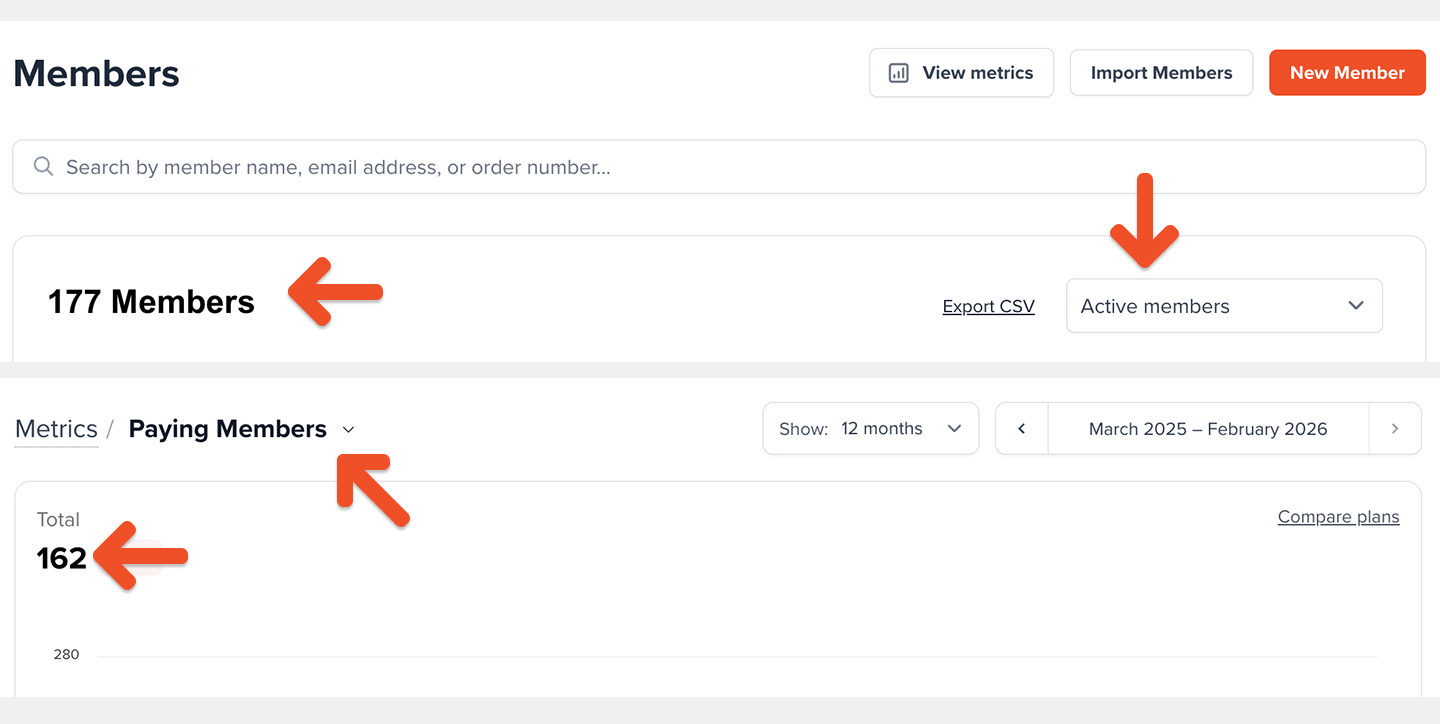
Because the [Active Members](/metrics-and-analytics/compare-and-export/export-data) count is calculated differently, it may include members from the categories above even if they aren’t counted as Paying Members yet. This is one reason the two metrics may not match.
 ### Never counted as paying members
* Members who purchase one-time plans
* Members subscribed to plans with a fixed number of payments
## How is the Paying Members metric calculated?
We count each unique member with at least one active recurring subscription at month-end.
A member with multiple recurring plans still counts as **one** paying member.
Metrics update daily at midnight UTC and reflect the previous calendar day.
## What affects the Paying Members metric?
The Paying Members total is composed of the following segments:
* **New**: Members who started a recurring subscription for the first time
* **Reactivations**: Members who returned after previously canceling
* **Upgrades**: Members who moved to a higher-priced recurring plan
* **Downgrades**: Members who moved to a lower-priced recurring plan
* **Cancellations**: Members who ended their recurring subscription
* **Failed payments**: Members whose payment could not be collected within 30 days
Members whose payment fails are still counted as Paying Members for up to 30 days while we attempt to collect payment. If payment isn’t collected within 30 days, they’re removed from the Paying Members count.
## How to explore your Paying Members data
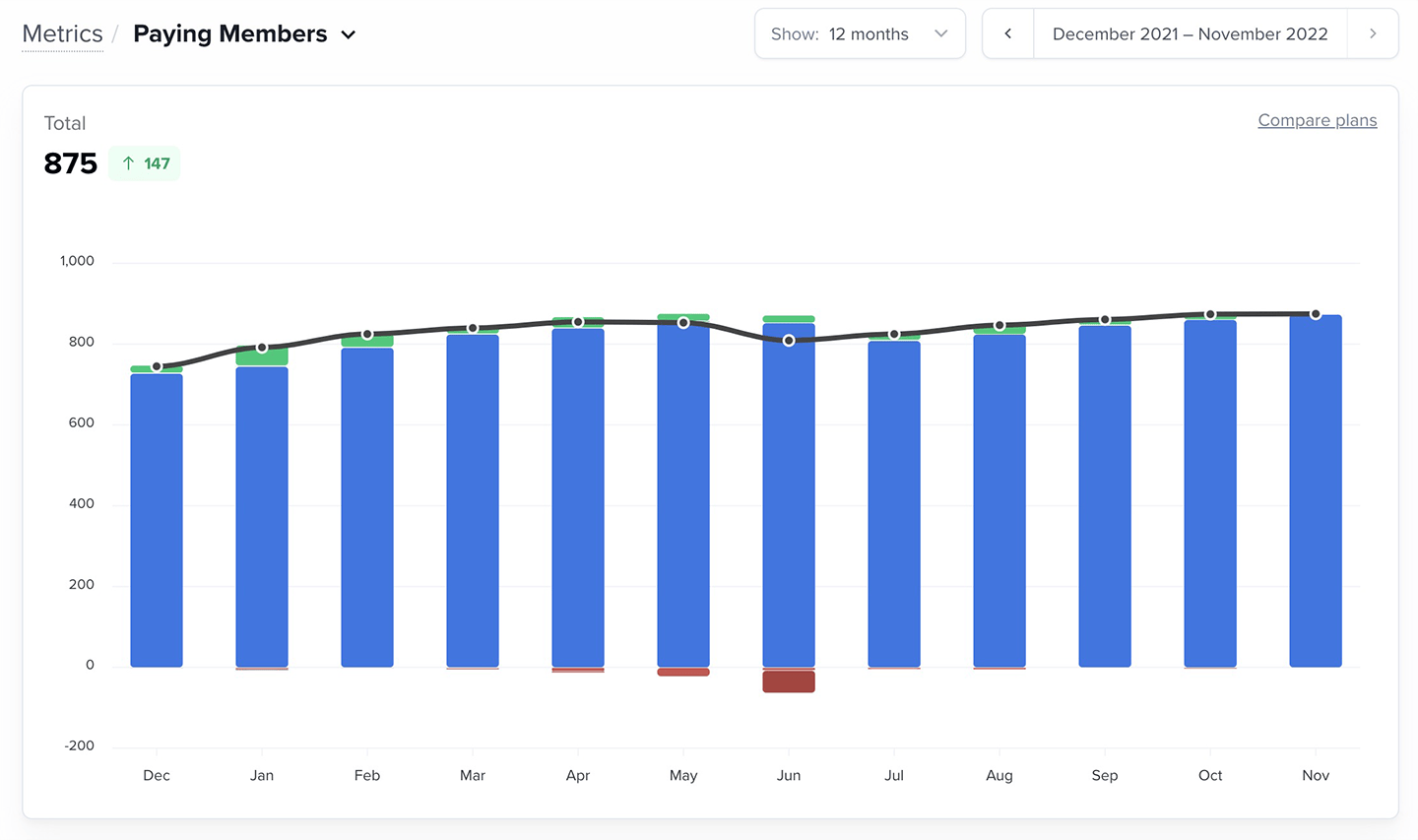
The Paying Members chart shows your monthly totals (including the current, partially complete month). You can view the last 12 months by default, or switch to 3- or 6-month views.
### Never counted as paying members
* Members who purchase one-time plans
* Members subscribed to plans with a fixed number of payments
## How is the Paying Members metric calculated?
We count each unique member with at least one active recurring subscription at month-end.
A member with multiple recurring plans still counts as **one** paying member.
Metrics update daily at midnight UTC and reflect the previous calendar day.
## What affects the Paying Members metric?
The Paying Members total is composed of the following segments:
* **New**: Members who started a recurring subscription for the first time
* **Reactivations**: Members who returned after previously canceling
* **Upgrades**: Members who moved to a higher-priced recurring plan
* **Downgrades**: Members who moved to a lower-priced recurring plan
* **Cancellations**: Members who ended their recurring subscription
* **Failed payments**: Members whose payment could not be collected within 30 days
Members whose payment fails are still counted as Paying Members for up to 30 days while we attempt to collect payment. If payment isn’t collected within 30 days, they’re removed from the Paying Members count.
## How to explore your Paying Members data
The Paying Members chart shows your monthly totals (including the current, partially complete month). You can view the last 12 months by default, or switch to 3- or 6-month views.
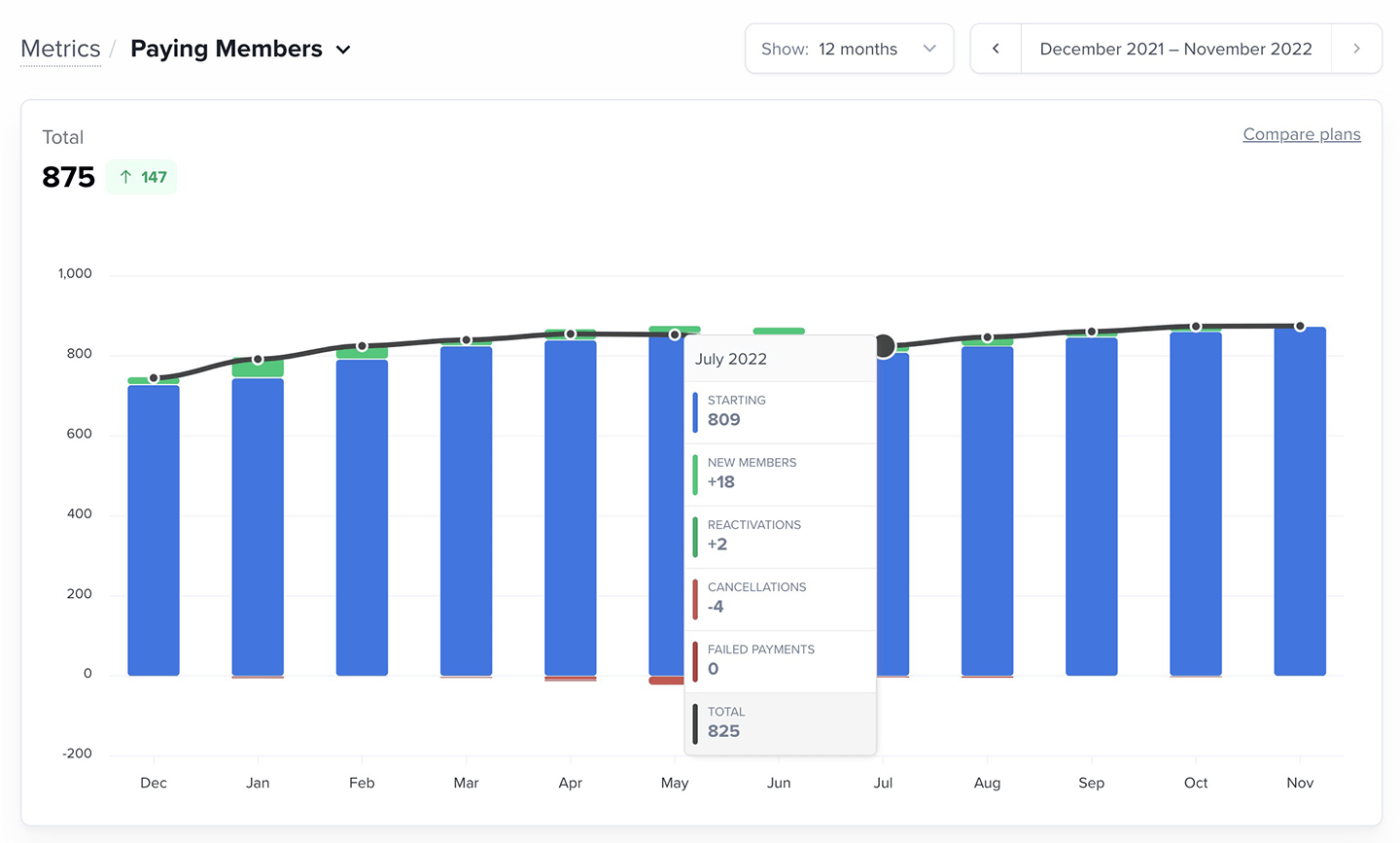
 Hover over any bar to see:
* The starting member count
* The segment values (new, reactivated, etc.)
* The total number of paying members for that month
Hover over any bar to see:
* The starting member count
* The segment values (new, reactivated, etc.)
* The total number of paying members for that month
 Want to compare Paying Members across plans? [Learn More.](/metrics-and-analytics/compare-and-export/plan-comparison/)
Below the chart, you’ll see all activity segmented by calendar month.
Want to compare Paying Members across plans? [Learn More.](/metrics-and-analytics/compare-and-export/plan-comparison/)
Below the chart, you’ll see all activity segmented by calendar month.
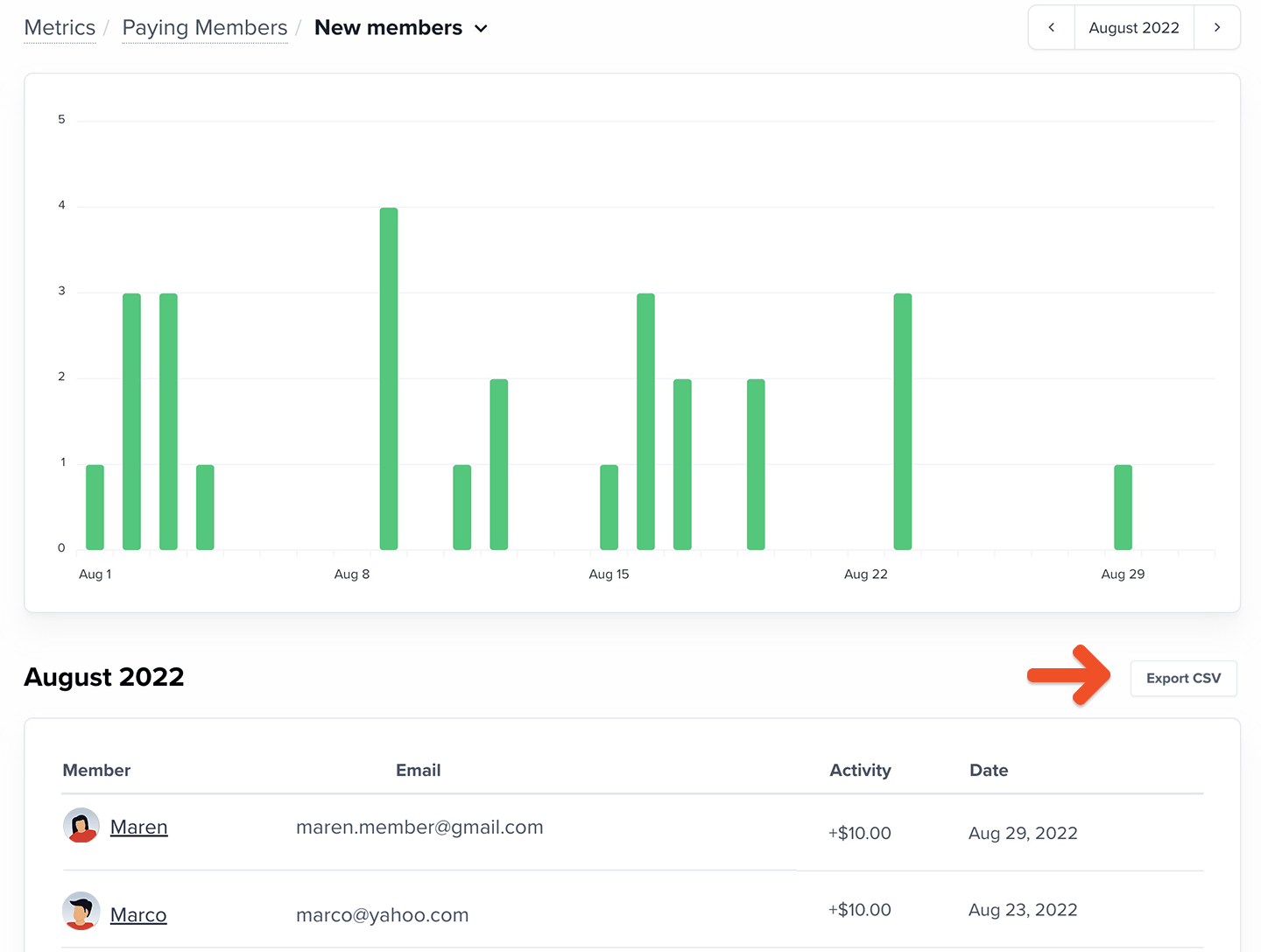
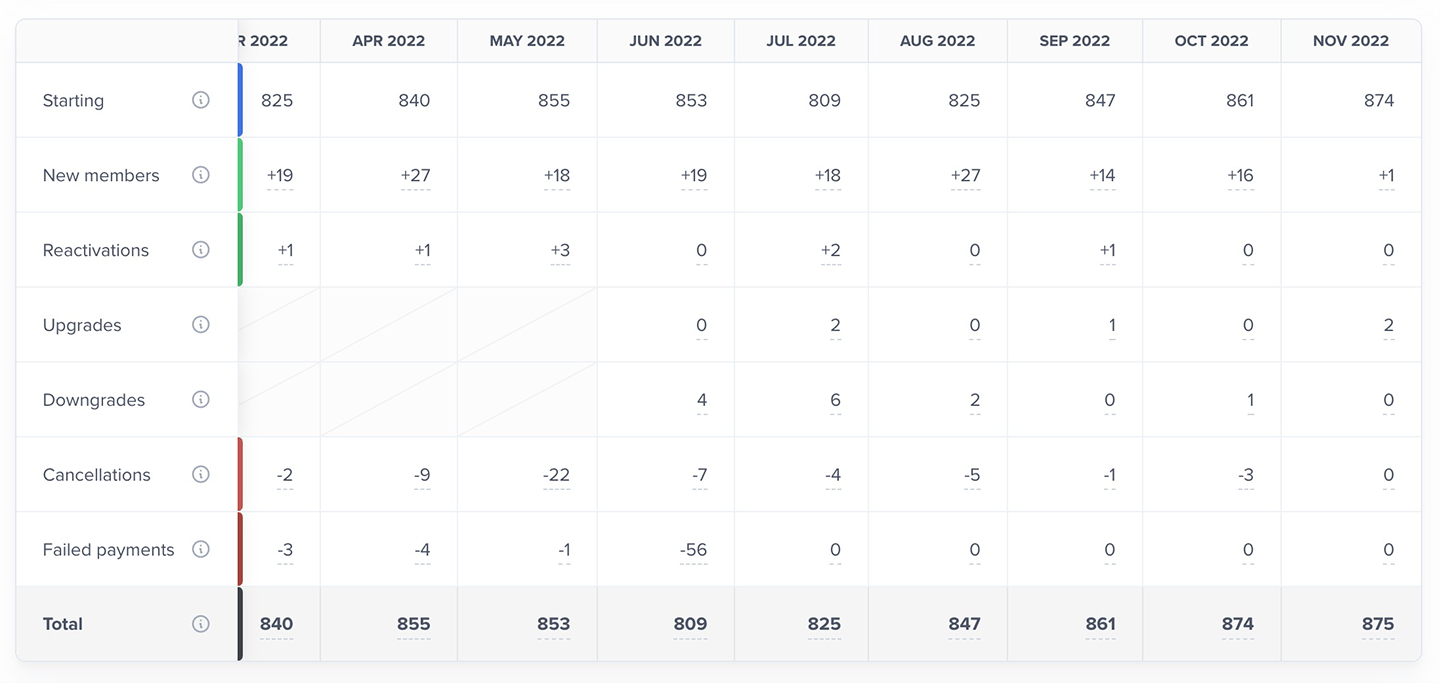 Click any non-total value to view the daily activity for that month. You can also export the data.
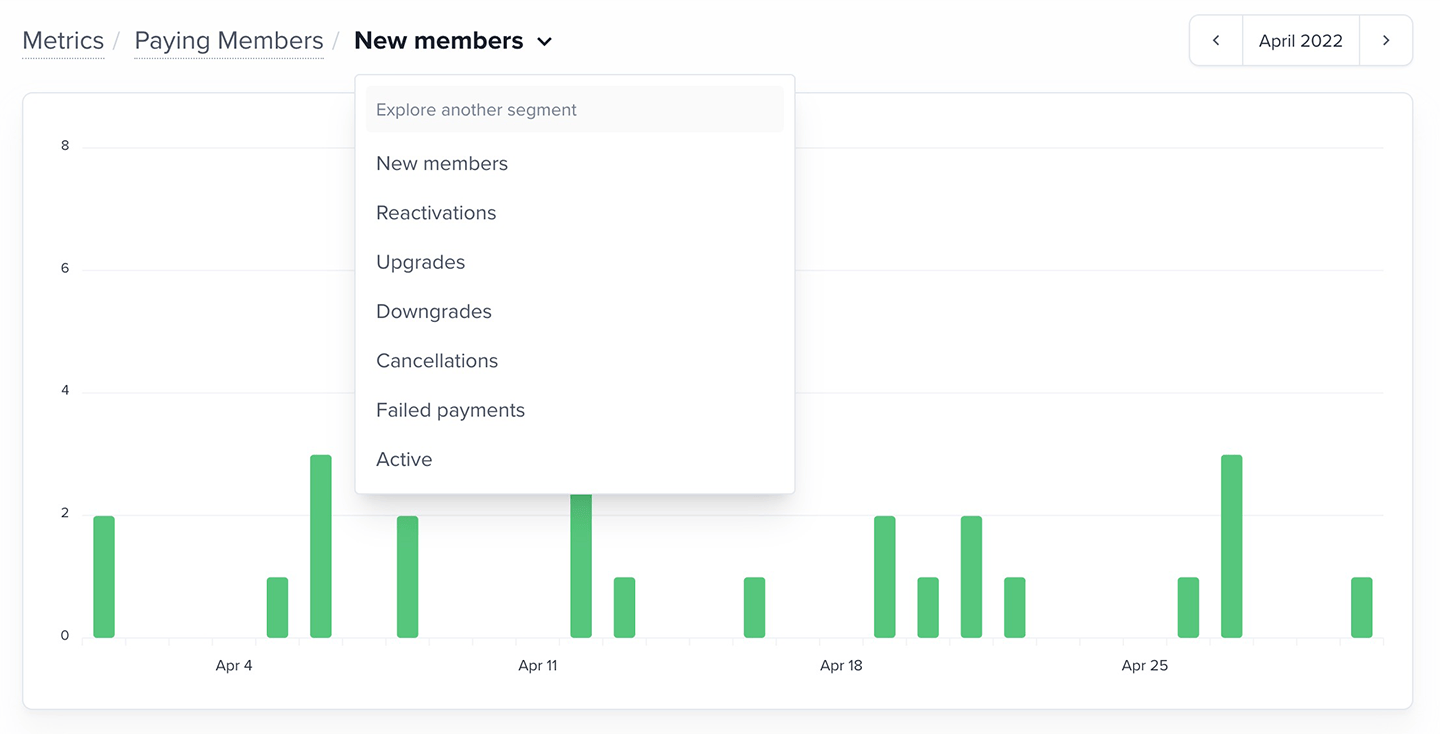
 You can switch segments or select another month from the dropdown.
 ## How should I use this metric?
The Paying Members metric helps you understand why your member count is changing. By reviewing activity segments, you can see what’s driving growth or causing declines — and adjust accordingly.
### Reactivations
Reactivations show how many former members return. Use this to measure the impact of win-back campaigns or re-engagement efforts.
### Upgrades
Upgrades increase the value of existing members. Use this to evaluate whether higher-tier plans or added benefits are resonating.
### Downgrades
A spike in downgrades may point to pricing friction or unmet expectations. Use this to assess plan value and identify areas for improvement.
### Cancellations
Cancellations are a strong signal of member satisfaction. If cancellations trend up, investigate potential triggers — pricing changes, content cadence, or fulfillment issues.
### Failed payments
Failed payments represent involuntary churn. Use this to monitor how often members lose access due to card issues and where additional nudges or communication could help.
## How should I use this metric?
The Paying Members metric helps you understand why your member count is changing. By reviewing activity segments, you can see what’s driving growth or causing declines — and adjust accordingly.
### Reactivations
Reactivations show how many former members return. Use this to measure the impact of win-back campaigns or re-engagement efforts.
### Upgrades
Upgrades increase the value of existing members. Use this to evaluate whether higher-tier plans or added benefits are resonating.
### Downgrades
A spike in downgrades may point to pricing friction or unmet expectations. Use this to assess plan value and identify areas for improvement.
### Cancellations
Cancellations are a strong signal of member satisfaction. If cancellations trend up, investigate potential triggers — pricing changes, content cadence, or fulfillment issues.
### Failed payments
Failed payments represent involuntary churn. Use this to monitor how often members lose access due to card issues and where additional nudges or communication could help.