> ## Documentation Index
> Fetch the complete documentation index at: https://memberful.com/docs/llms.txt
> Use this file to discover all available pages before exploring further.
# Move subscribers between plans and prices
> Move active subscribers from one plan or price to another, and review billing, access, integration, tax, and plan change impacts before confirming the move.
export const RelatedDocs = ({link1, link2, link3, link4, link5, link6, link7, link8, link9, link10, className = ""}) => {
const links = [link1, link2, link3, link4, link5, link6, link7, link8, link9, link10].filter(Boolean);
if (!links.length) return null;
return ;
};
Move subscribers between plans and prices to retire legacy pricing, consolidate offerings, or update pricing for existing members. Before you confirm the move, Memberful shows any blockers and warnings that apply to the selected source and destination.
In this help article, we'll show you how to move subscribers to another plan or price, review blockers and warnings, understand how the move affects billing and access, and disable the old price when you no longer want members to purchase it.
## Before you begin
Memberful only moves active subscriptions from the selected source price to the destination price.
Members are not notified when they are moved between prices unless you have an automation set up outside of Memberful. If the move changes billing, renewal timing, or access, consider notifying affected members before you continue.
## Move subscribers to another price
Go to **Revenue** → **Plans**, then select the plan that includes the price you want to move subscribers from.
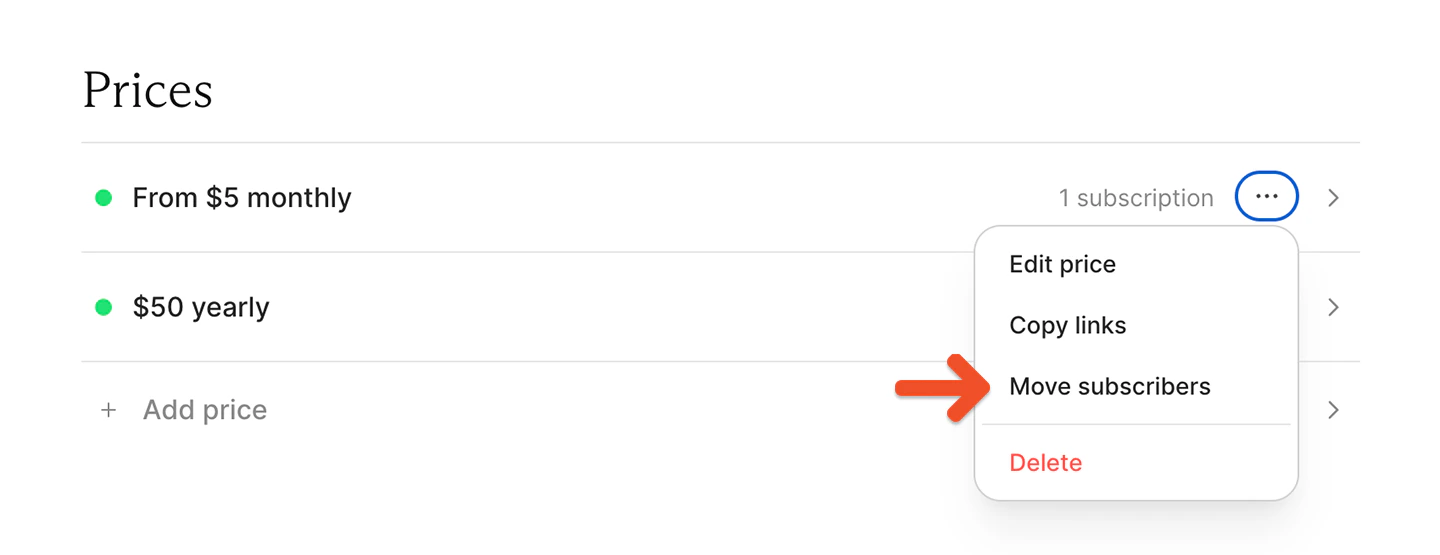
Click the **•••** menu next to the source price, then select **Move subscribers**.
 Choose the plan you want to move subscribers to.
 Choose **Move subscribers** to move active subscribers to another price on the selected plan.
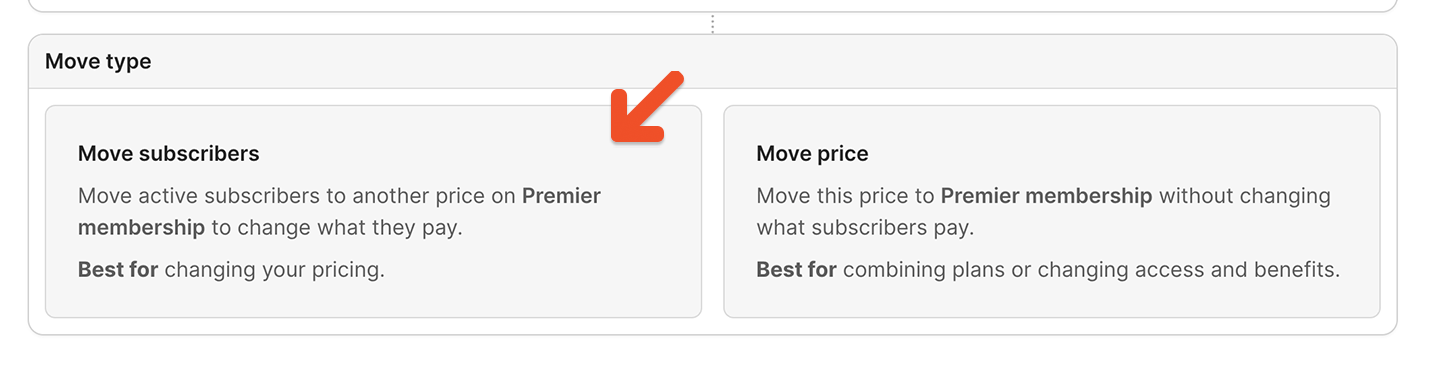 Choose **Move price** only if you want to move the current price to the selected plan without changing what subscribers pay.
Choose the price you want to move subscribers to.
Choose **Move price** only if you want to move the current price to the selected plan without changing what subscribers pay.
Choose the price you want to move subscribers to.
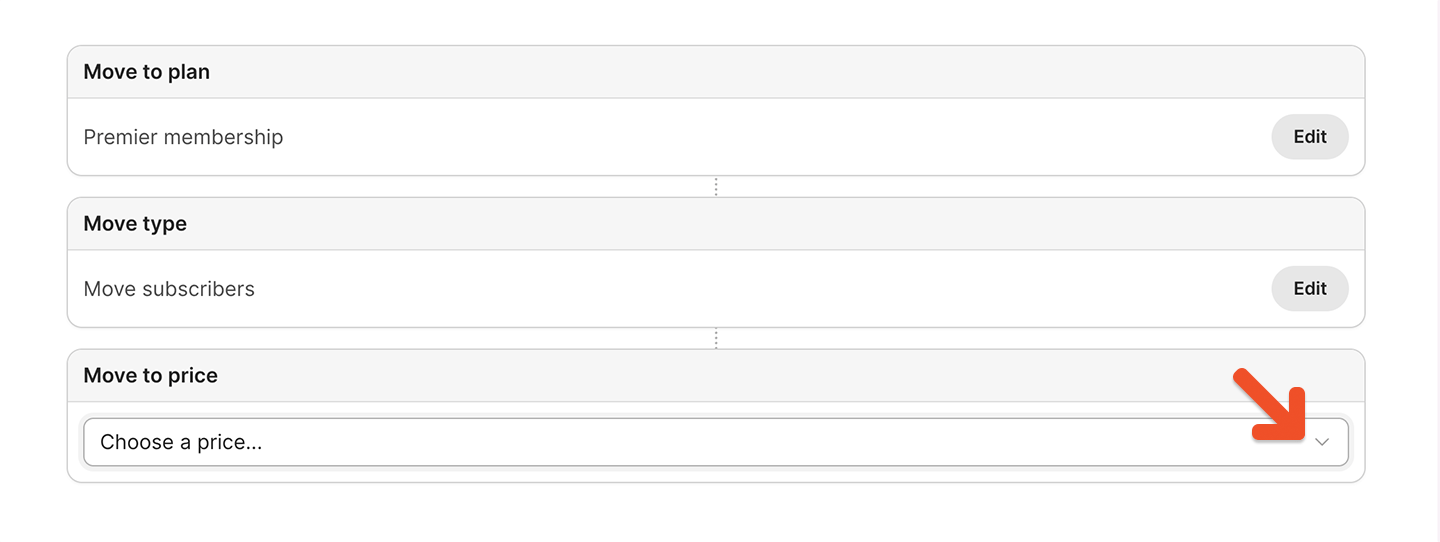 Review the destination and any blockers or warnings that appear. Memberful only shows sections that apply to the selected move.
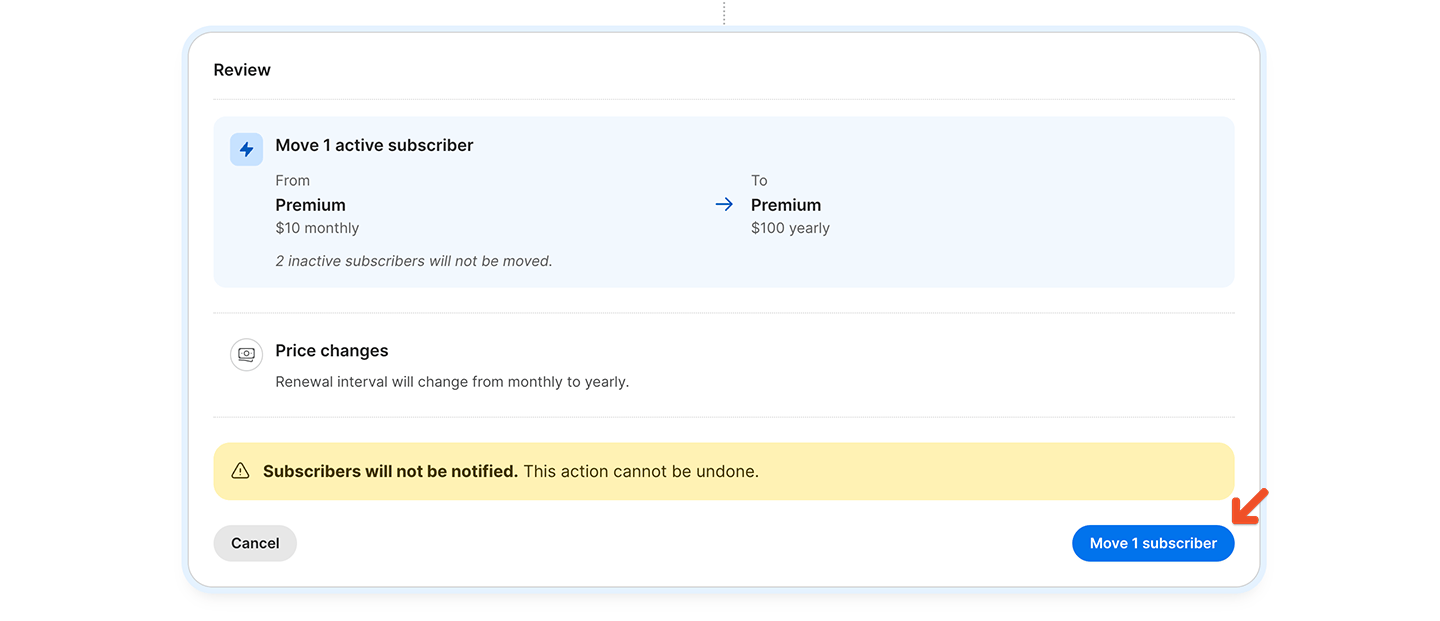
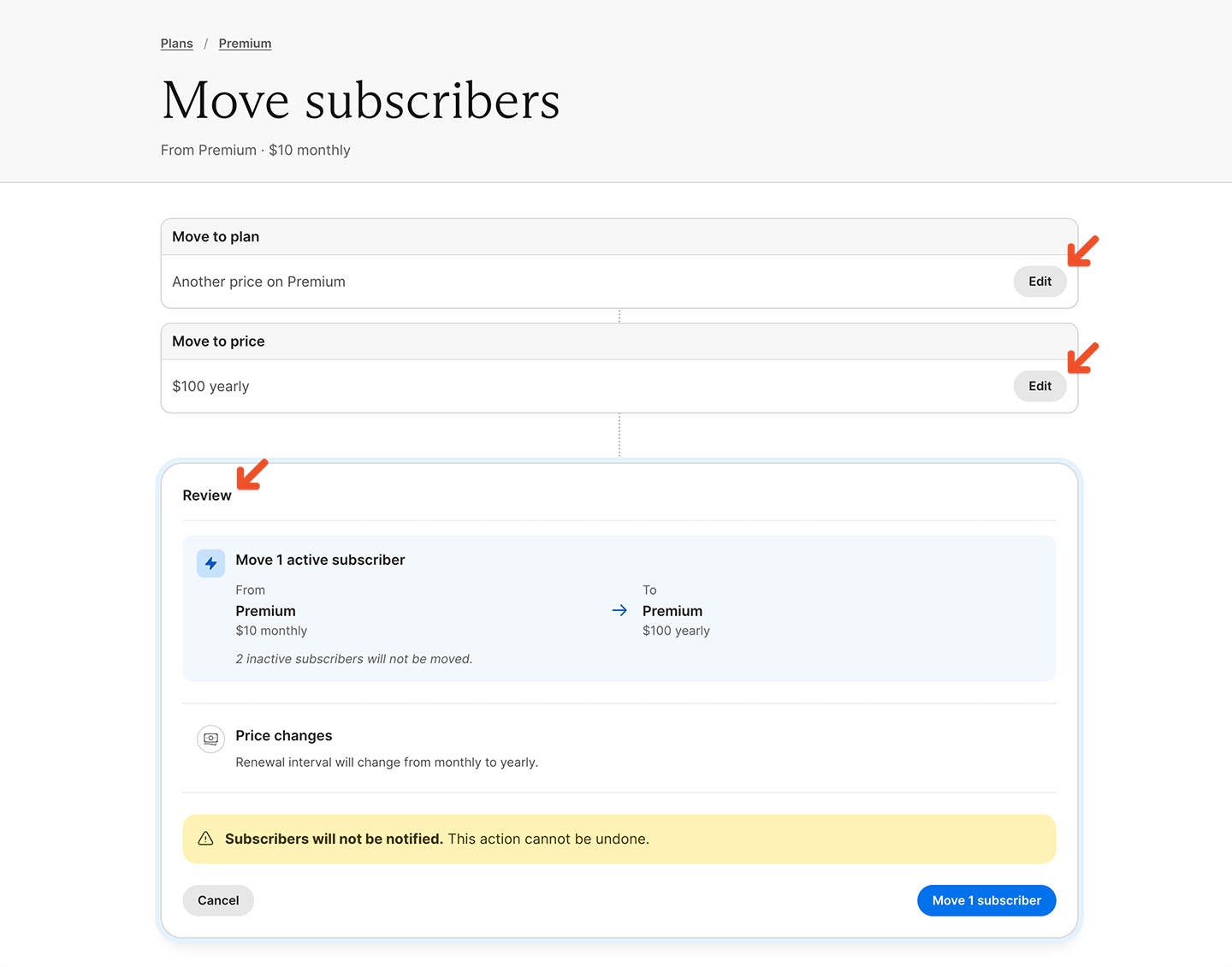 Click the **Move \[number] subscriber(s)** button.
 ## Fix blockers
Blockers prevent the move from continuing. If a blocker appears, update the source or destination plan before trying again.
A move may be blocked when the destination group plan cannot accommodate all members in the group. For example, a move is blocked if the group's member count exceeds the destination plan's seat maximum.
## Review warnings and consequences
Warnings explain how the move affects billing, renewals, access, integrations, taxes, and future plan changes. Memberful only shows warnings that apply to the selected move.
### Billing and renewals
Depending on the source and destination prices, Memberful may warn that:
* Moved subscriptions will never renew.
* Moved subscriptions will renew on a specific date.
* The renewal interval will change.
* Custom prices will be preserved or replaced.
* Fixed-payment behavior will change.
If a member is subscribed to a price with *Let members choose what to pay* enabled, their custom price after the move depends on the destination price:
* If the destination price allows members to choose what they pay, members paying a custom price keep paying it as long as it is at or above the destination price.
* If the destination price does not allow members to choose what they pay, custom prices are replaced with the destination price on the next renewal.
When you move subscribers to or from a fixed-payment price, Memberful shows how the move affects remaining payments:
* Moving between fixed-payment prices preserves each subscription's remaining payments.
* Moving from a fixed-payment price to a recurring price removes the fixed-payment limit, so moved subscriptions keep renewing indefinitely.
* Moving from a recurring price to a fixed-payment price sets the number of remaining payments based on the destination price.
### Taxes
If tax collection changes because of the destination plan or price, Memberful shows that change under billing and renewal warnings.
Depending on the move, Memberful may warn that:
* Tax will be charged on future orders.
* Tax will no longer be charged on future orders.
* The tax category will change on future orders.
To learn more, see [Collect taxes](/configuration/taxes/collect-taxes).
### Access and integrations
For cross-plan moves, Memberful may warn that subscribers will gain or lose access to:
* Downloads.
* Podcasts.
* Posts.
Downloads and podcasts are listed by name in an expandable list. Posts show counts only.
Memberful may also warn that subscribers will gain, lose, or move between integration access settings, including:
* Discord roles.
* Discourse groups.
* Mailchimp tags or interests.
* WordPress access.
### Plan changes
Plan-change warnings explain how the move affects which plans subscribers can switch to later.
If the destination plan allows switching to fewer plans than the source plan, Memberful shows which plan change options subscribers will lose after the move.
Scheduled plan changes are preserved when the destination plan still allows switching to the scheduled plan and price. If a scheduled plan change points to a plan or price that is no longer available after the move, Memberful cancels that scheduled change and shows the number of scheduled changes that will be cancelled.
## Disable the old plan
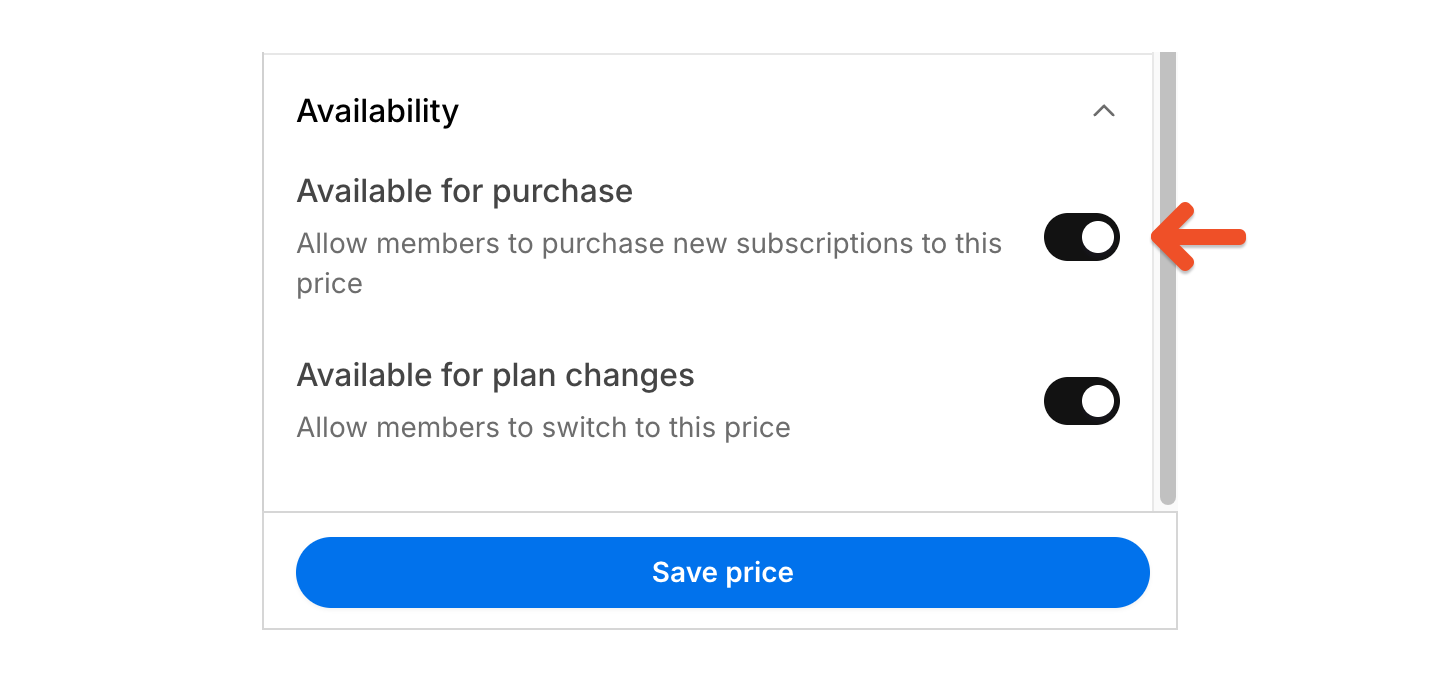
If you don't want new members to purchase the old price, make it [unavailable for purchase](/plans/individual-plans/create-a-plan#control-price-availability) or [delete it.](/plans/individual-plans/create-a-plan#delete-a-price-or-plan)
## Fix blockers
Blockers prevent the move from continuing. If a blocker appears, update the source or destination plan before trying again.
A move may be blocked when the destination group plan cannot accommodate all members in the group. For example, a move is blocked if the group's member count exceeds the destination plan's seat maximum.
## Review warnings and consequences
Warnings explain how the move affects billing, renewals, access, integrations, taxes, and future plan changes. Memberful only shows warnings that apply to the selected move.
### Billing and renewals
Depending on the source and destination prices, Memberful may warn that:
* Moved subscriptions will never renew.
* Moved subscriptions will renew on a specific date.
* The renewal interval will change.
* Custom prices will be preserved or replaced.
* Fixed-payment behavior will change.
If a member is subscribed to a price with *Let members choose what to pay* enabled, their custom price after the move depends on the destination price:
* If the destination price allows members to choose what they pay, members paying a custom price keep paying it as long as it is at or above the destination price.
* If the destination price does not allow members to choose what they pay, custom prices are replaced with the destination price on the next renewal.
When you move subscribers to or from a fixed-payment price, Memberful shows how the move affects remaining payments:
* Moving between fixed-payment prices preserves each subscription's remaining payments.
* Moving from a fixed-payment price to a recurring price removes the fixed-payment limit, so moved subscriptions keep renewing indefinitely.
* Moving from a recurring price to a fixed-payment price sets the number of remaining payments based on the destination price.
### Taxes
If tax collection changes because of the destination plan or price, Memberful shows that change under billing and renewal warnings.
Depending on the move, Memberful may warn that:
* Tax will be charged on future orders.
* Tax will no longer be charged on future orders.
* The tax category will change on future orders.
To learn more, see [Collect taxes](/configuration/taxes/collect-taxes).
### Access and integrations
For cross-plan moves, Memberful may warn that subscribers will gain or lose access to:
* Downloads.
* Podcasts.
* Posts.
Downloads and podcasts are listed by name in an expandable list. Posts show counts only.
Memberful may also warn that subscribers will gain, lose, or move between integration access settings, including:
* Discord roles.
* Discourse groups.
* Mailchimp tags or interests.
* WordPress access.
### Plan changes
Plan-change warnings explain how the move affects which plans subscribers can switch to later.
If the destination plan allows switching to fewer plans than the source plan, Memberful shows which plan change options subscribers will lose after the move.
Scheduled plan changes are preserved when the destination plan still allows switching to the scheduled plan and price. If a scheduled plan change points to a plan or price that is no longer available after the move, Memberful cancels that scheduled change and shows the number of scheduled changes that will be cancelled.
## Disable the old plan
If you don't want new members to purchase the old price, make it [unavailable for purchase](/plans/individual-plans/create-a-plan#control-price-availability) or [delete it.](/plans/individual-plans/create-a-plan#delete-a-price-or-plan)