> ## Documentation Index
> Fetch the complete documentation index at: https://memberful.com/docs/llms.txt
> Use this file to discover all available pages before exploring further.

# Replace the group manager

> Replace the group manager on a Memberful group subscription. Transfer billing and management to a new account holder without disrupting members.

export const RelatedDocs = ({link1, link2, link3, link4, link5, link6, link7, link8, link9, link10, className = ""}) => {
  const links = [link1, link2, link3, link4, link5, link6, link7, link8, link9, link10].filter(Boolean);
  if (!links.length) return null;
  return <section className={`related-docs border dark:border-gray-700 rounded-2xl px-6 py-4 mt-6 ${className}`}>
      <p className="mb-2 font-medium">
        <strong>Related help docs:</strong>
      </p>
      <ul className="space-y-1 mb-1 mt-1">
        {links.map((link, index) => <li key={index}>
            <a href={link.url}>{link.label}</a>
          </li>)}
      </ul>
    </section>;
};

In this help article, we'll outline the different scenarios and provide step-by-step instructions on how to make the switch in each case.

## Group manager promotes a member

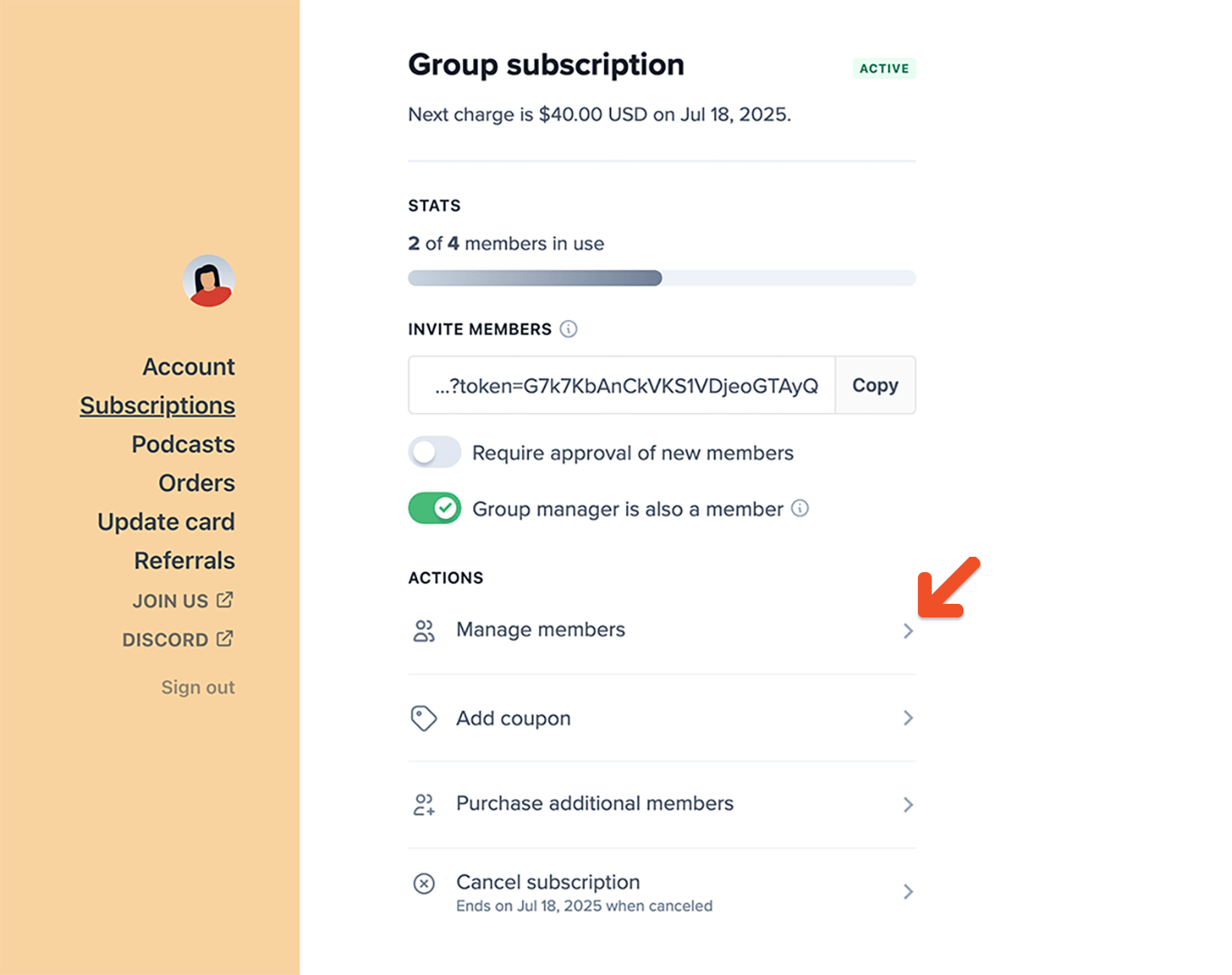
Group managers can select a group member to replace them in their role. To start, the group manager should go to the **Manage Members** tab in their account.

<Frame>
  <img src="https://mintcdn.com/memberful/Moz9yAaspGA5hBwB/images/group-plans/replace-the-group-manager/group-manager-manage-members.png?fit=max&auto=format&n=Moz9yAaspGA5hBwB&q=85&s=6fccf066ed528f82091ce81c6c079d4f" alt="Group manager manage member" width="1440" height="1140" data-path="images/group-plans/replace-the-group-manager/group-manager-manage-members.png" />
</Frame>

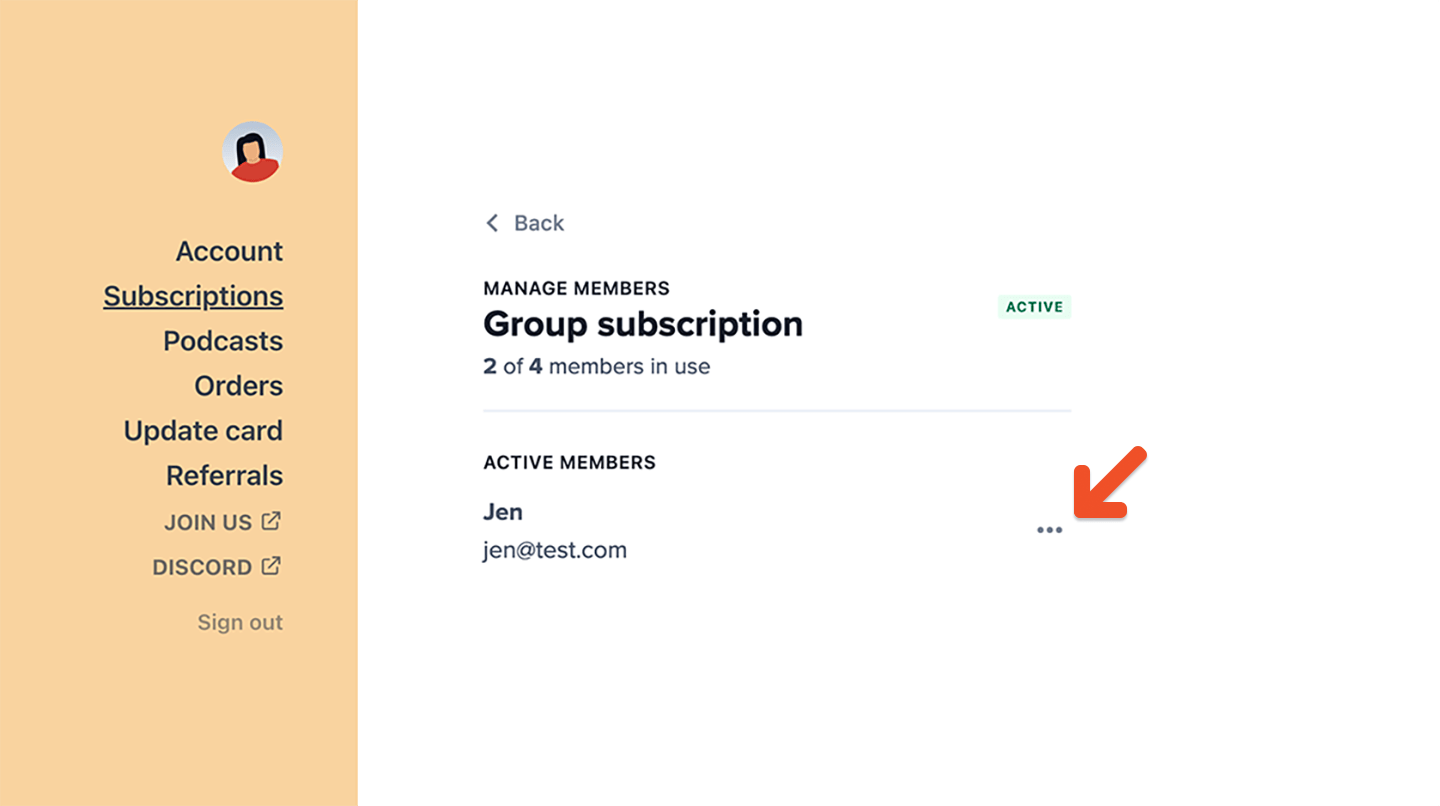
Then click the **Edit member** icon next to the member being promoted.
<Frame>
  <img src="https://mintcdn.com/memberful/Moz9yAaspGA5hBwB/images/group-plans/replace-the-group-manager/group-manager-edits-member.png?fit=max&auto=format&n=Moz9yAaspGA5hBwB&q=85&s=17751254b4e96fe24695f7c96b68cc98" alt="Group manager edits member" width="1440" height="806" data-path="images/group-plans/replace-the-group-manager/group-manager-edits-member.png" />
</Frame>

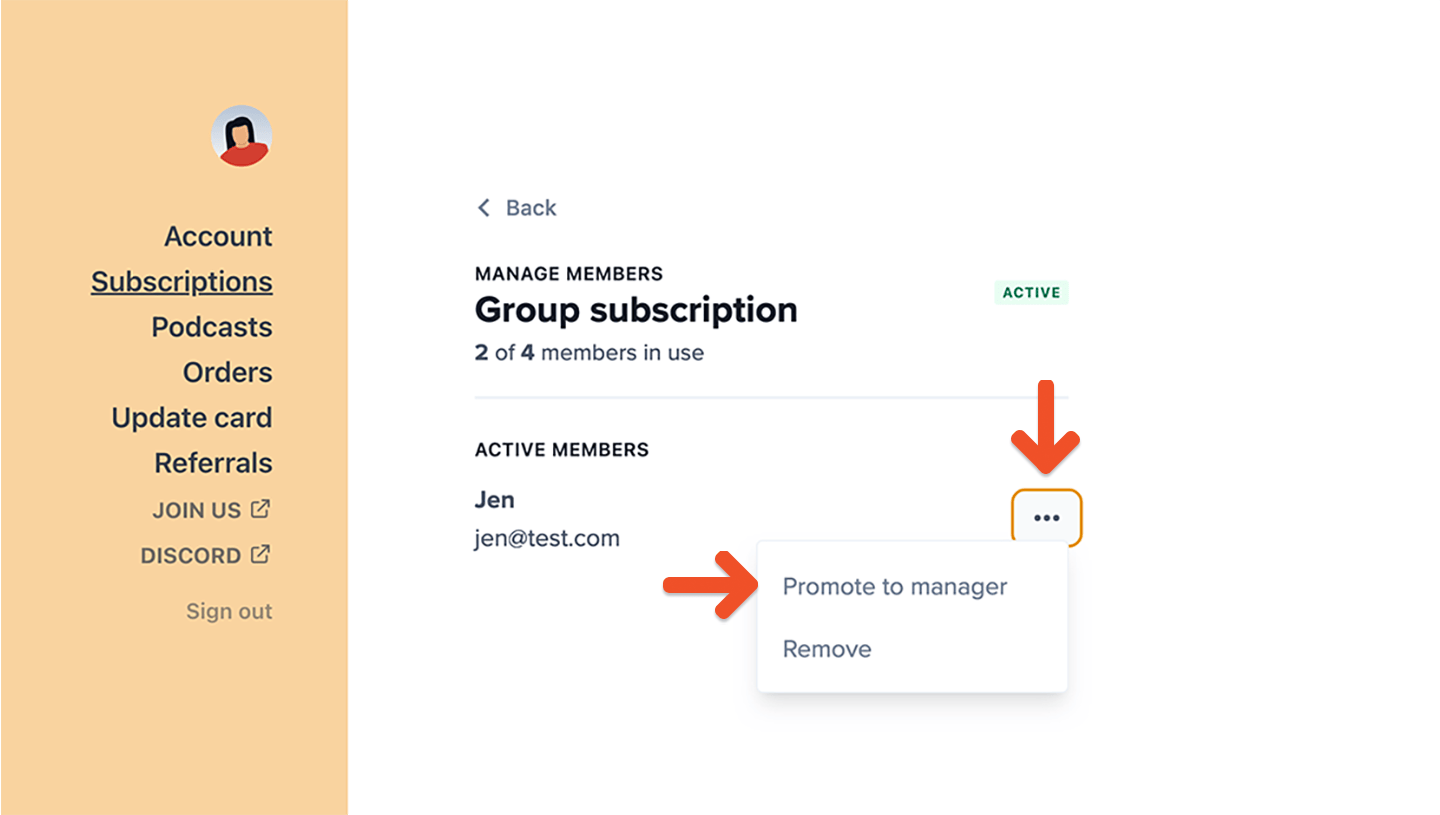
After clicking the icon, they'll be able to promote the member to manager. The new group manager will be sent the group manager welcome email (if enabled).
<Frame>
  <img src="https://mintcdn.com/memberful/Moz9yAaspGA5hBwB/images/group-plans/replace-the-group-manager/group-manager-dropdown.png?fit=max&auto=format&n=Moz9yAaspGA5hBwB&q=85&s=0dd755165d29ec5b8687c7b5f127d93f" alt="Group manager dropdown" width="1440" height="815" data-path="images/group-plans/replace-the-group-manager/group-manager-dropdown.png" />
</Frame>

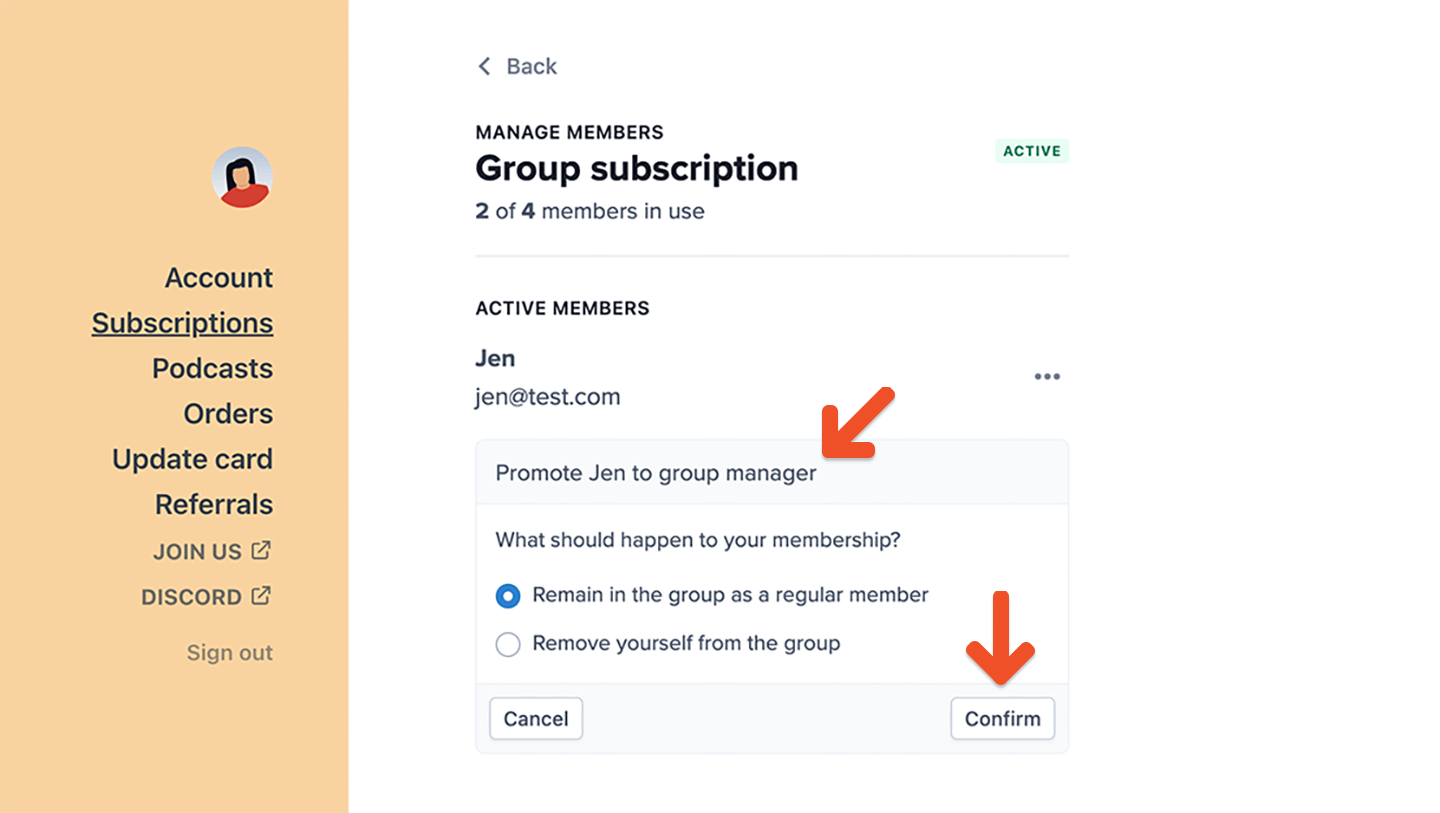
If the group manager promotes the member, they'll be able to either remain in the group as a regular member or remove themselves from the group.
<Frame>
  <img src="https://mintcdn.com/memberful/Moz9yAaspGA5hBwB/images/group-plans/replace-the-group-manager/group-manager-promotes-member.png?fit=max&auto=format&n=Moz9yAaspGA5hBwB&q=85&s=060ca1f76f016d67381e635a39723eda" alt="Group manager promotes member" width="1440" height="813" data-path="images/group-plans/replace-the-group-manager/group-manager-promotes-member.png" />
</Frame>

Removing themselves from the group will open a seat in the subscription. Remaining in the group as a member will maintain the current seat count.

## Admin promotes a member to group manager

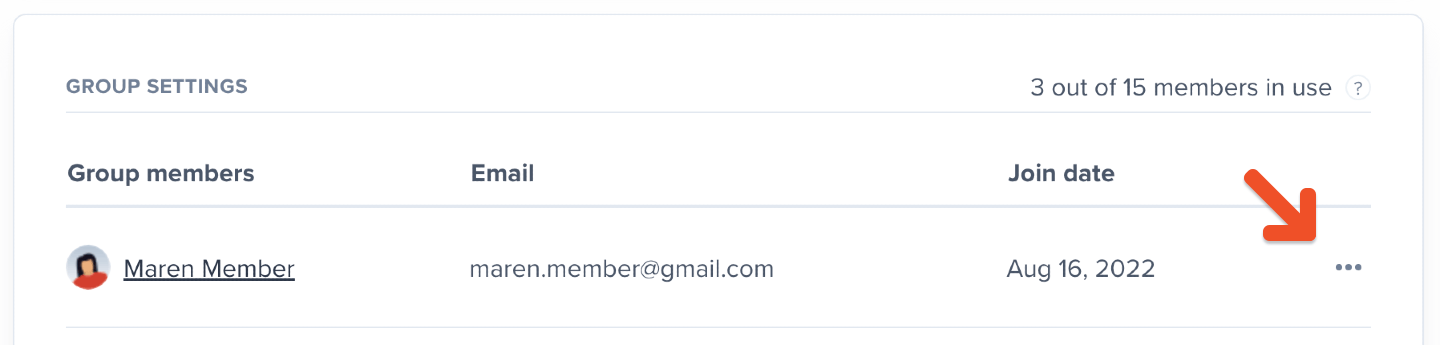
To replace a group manager via the Memberful dashboard, go to the group subscription, click the **Edit member** icon, and promote a member to manager. The new group manager will be sent the group manager welcome email (if enabled).
<Frame>
  <img src="https://mintcdn.com/memberful/Moz9yAaspGA5hBwB/images/group-plans/replace-the-group-manager/group-manager-admin-edit.png?fit=max&auto=format&n=Moz9yAaspGA5hBwB&q=85&s=bd26d974252792fa5afafa7f1ef53df6" alt="Group manager admin edit" width="1440" height="345" data-path="images/group-plans/replace-the-group-manager/group-manager-admin-edit.png" />
</Frame>

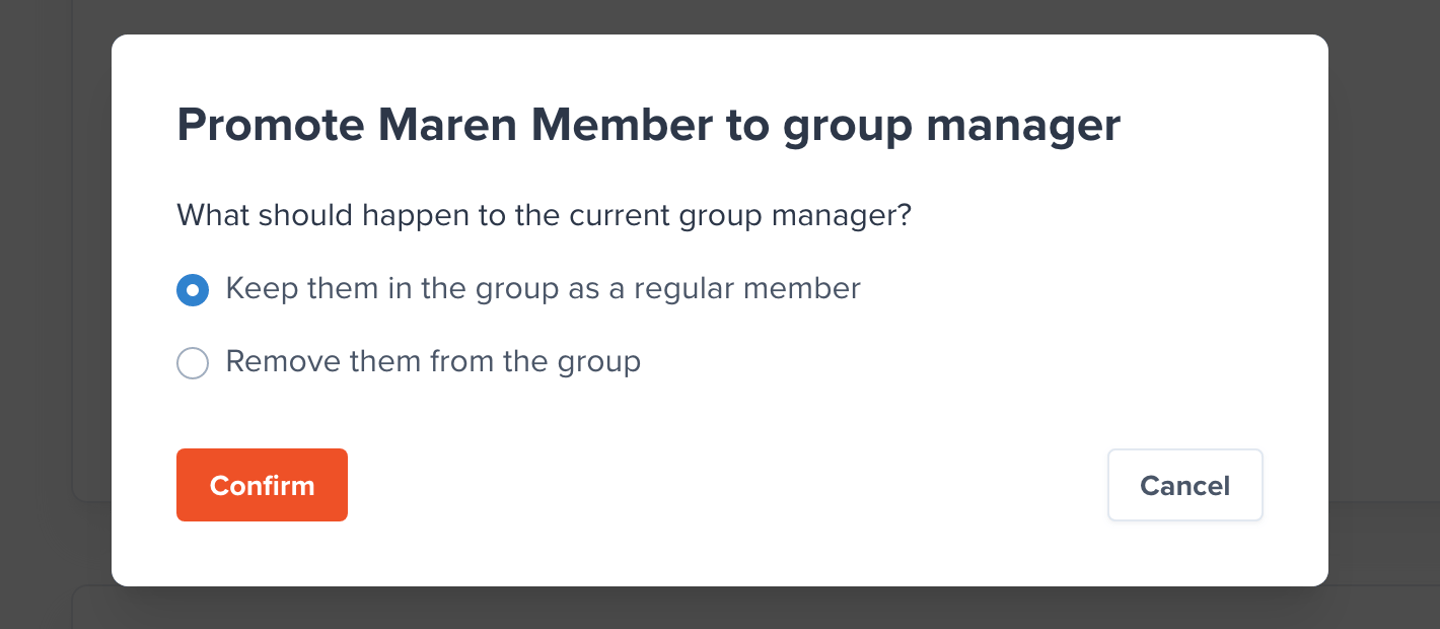
Once done, you'll be able to keep the previous manager in the group as a regular member or remove them from the group altogether. Removing them from the group will open a seat in the subscription. Keeping them in the group as a member will maintain the current seat count.
<Frame>
  <img src="https://mintcdn.com/memberful/Moz9yAaspGA5hBwB/images/group-plans/replace-the-group-manager/group-manager-what-happens.png?fit=max&auto=format&n=Moz9yAaspGA5hBwB&q=85&s=3bed0919ed5ccd598fba2b10639f0b8d" alt="Group manager what happens" width="1440" height="629" data-path="images/group-plans/replace-the-group-manager/group-manager-what-happens.png" />
</Frame>

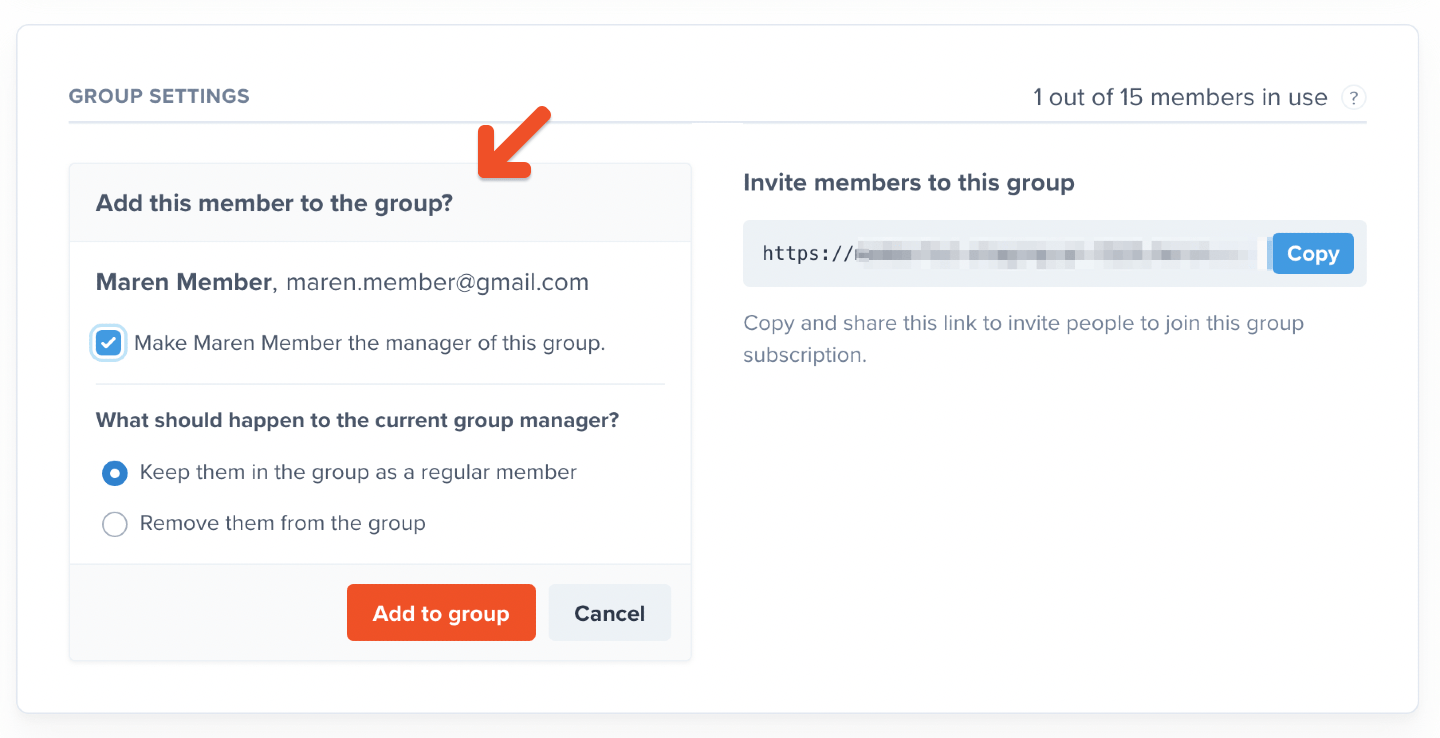
If you [add a new member](/member-management/group-management/add-or-remove-group-members/) to the group subscription, you can immediately promote that member to group manager and either keep or remove the previous one.
<Frame>
  <img src="https://mintcdn.com/memberful/Moz9yAaspGA5hBwB/images/group-plans/replace-the-group-manager/group-manager-admin-new-group-member.png?fit=max&auto=format&n=Moz9yAaspGA5hBwB&q=85&s=e2d71ef00fea50b03f348b2bb086aa83" alt="Group manager admin new member" width="1440" height="738" data-path="images/group-plans/replace-the-group-manager/group-manager-admin-new-group-member.png" />
</Frame>

<RelatedDocs
  link1={{
url: "/member-interface/subscription/manage-group-subscriptions",
label: "Learn how group managers can manage their members.",
}}
  link2={{
url: "/member-management/group-management/move-group-to-a-different-plan/",
label: "Move group to a different plan.",
}}
  link3={{
url: "/member-management/group-management/add-or-remove-group-members/",
label: "Add or remove group members.",
}}
  link4={{
url: "/plans/plan-options/accept-external-payments/",
label: "Accept external payments.",
}}
/>
