Related help docs:
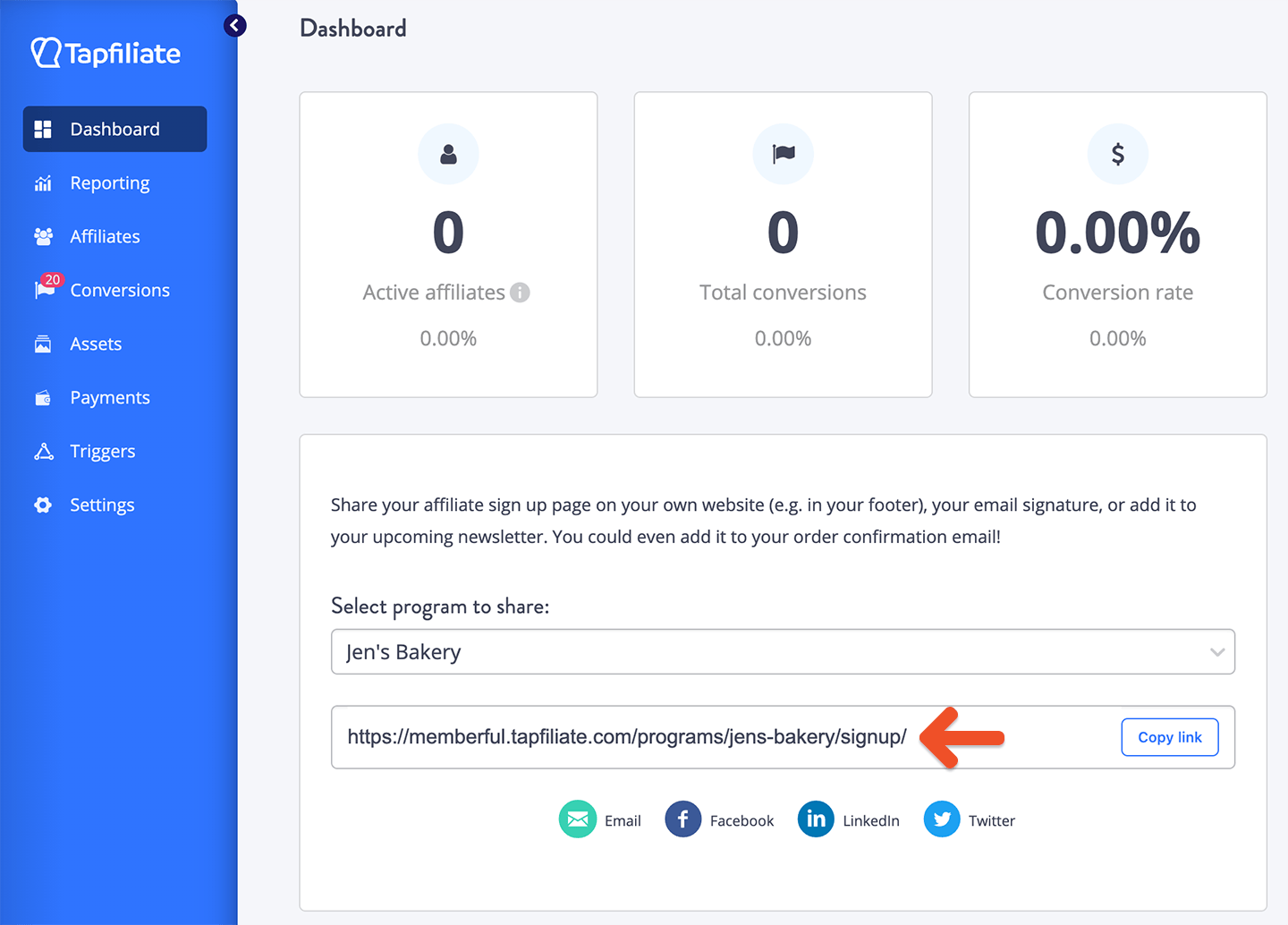 Once a person signs up to become an affiliate, they will receive their own unique referral link to share with their customers or followers. They can find their unique link in their Tapfiliate dashboard.
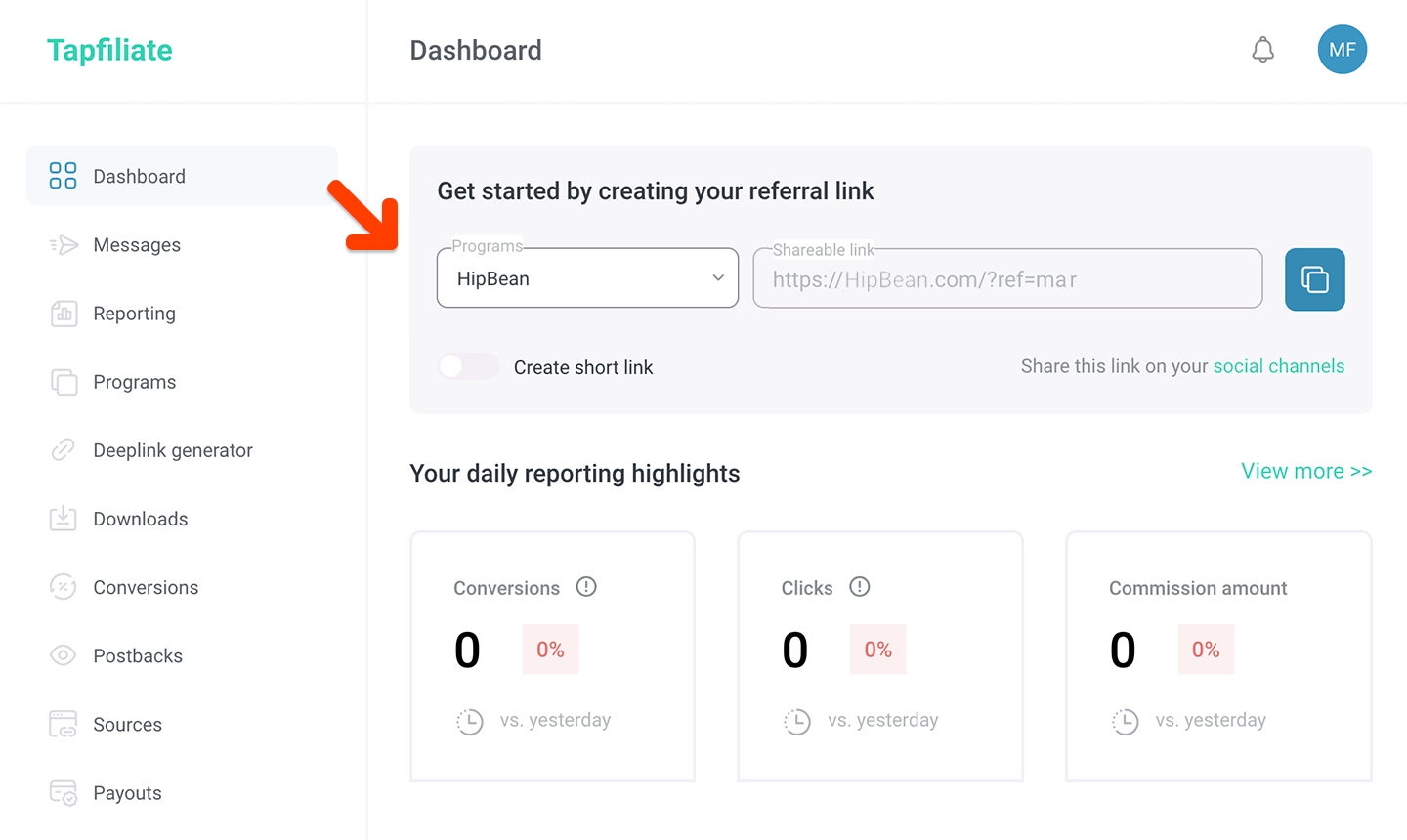 ## Integrate Tapfiliate with Memberful
Go to *Revenue → Tapfiliate* in your Memberful dashboard, and click **Connect to Tapfiliate.**
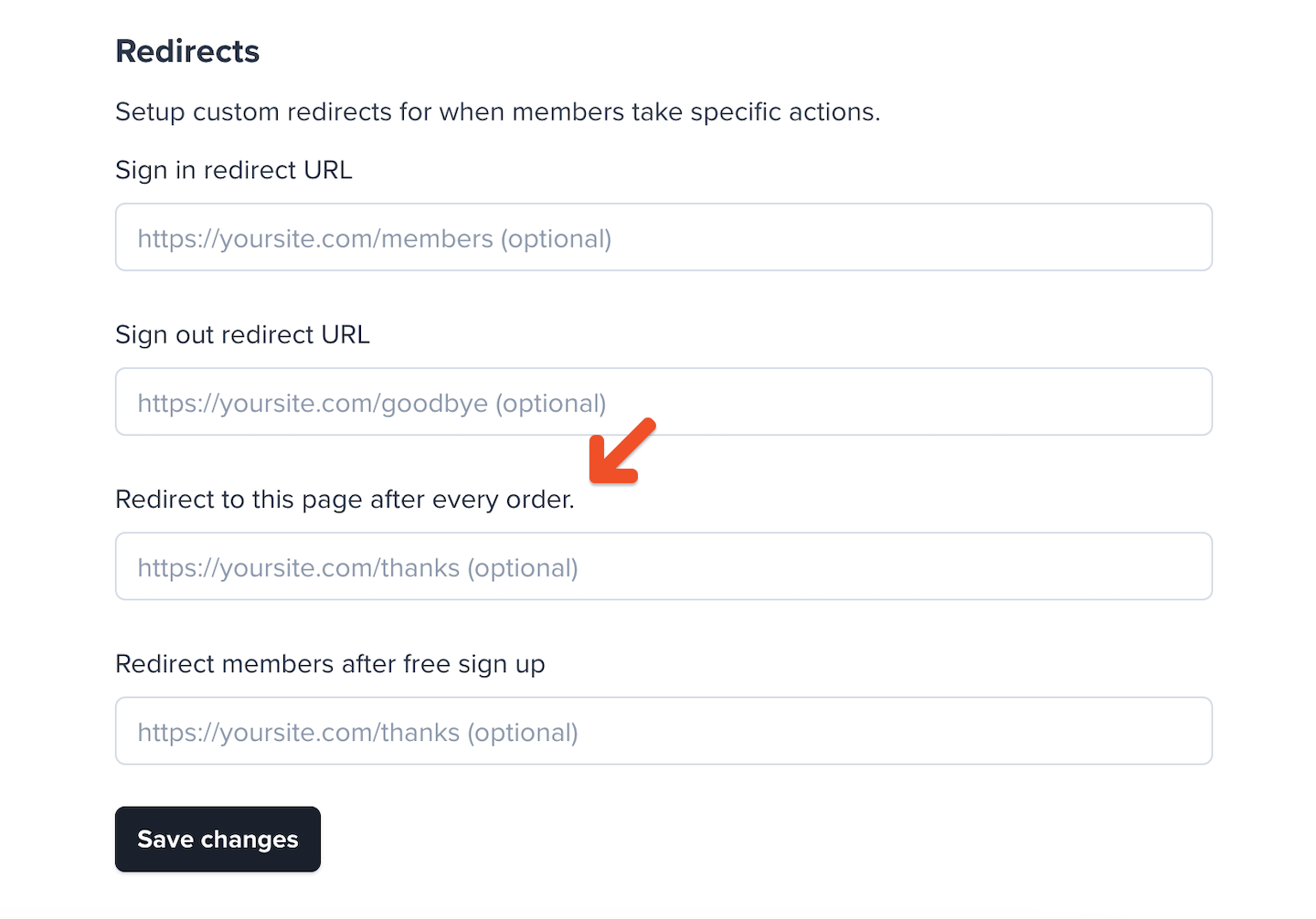
Then go to *Website → External website* and fill out the **Redirect to this page after every order** field. If you prefer, you can also set this on a per-plan basis by going to the desired plan and setting [the plan's redirect URL](/configuration/other-settings/configure-redirect-settings/#set-up-plan-specific-redirects).
This should be set to the URL of a page on your website, usually a "Thank you" page. Memberful-hosted pages like [our subscribe page](/website-builder/pages/subscribe-page/) or [plan purchase URLs](/plans/promote-and-sell/add-a-link-to-buy-a-plan) won't work.
## Integrate Tapfiliate with Memberful
Go to *Revenue → Tapfiliate* in your Memberful dashboard, and click **Connect to Tapfiliate.**
Then go to *Website → External website* and fill out the **Redirect to this page after every order** field. If you prefer, you can also set this on a per-plan basis by going to the desired plan and setting [the plan's redirect URL](/configuration/other-settings/configure-redirect-settings/#set-up-plan-specific-redirects).
This should be set to the URL of a page on your website, usually a "Thank you" page. Memberful-hosted pages like [our subscribe page](/website-builder/pages/subscribe-page/) or [plan purchase URLs](/plans/promote-and-sell/add-a-link-to-buy-a-plan) won't work.
 ### Track conversions with WordPress
If you're using WordPress, you can track conversions with Tapfiliate's WordPress Plugin.
1. Install [Tapfiliate's WordPress Plugin](https://wordpress.org/plugins/tapfiliate/).
2. Go to *Settings → Tapfiliate.*
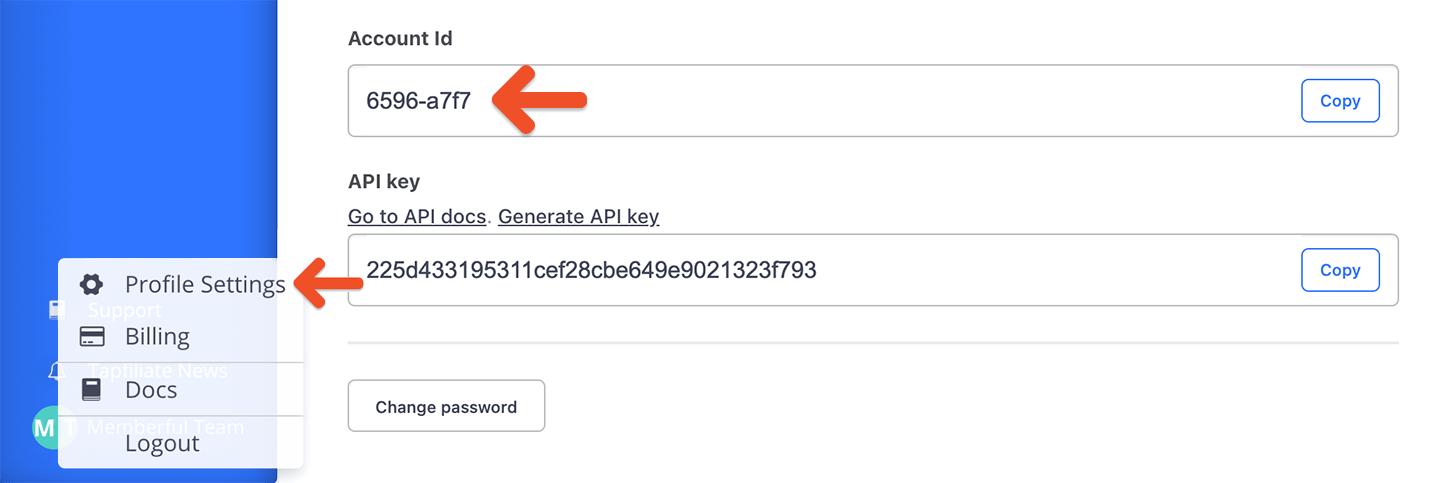
3. Fill out the **Tapfiliate account ID** field with your account ID found in your Tapfiliate profile settings.
### Track conversions with WordPress
If you're using WordPress, you can track conversions with Tapfiliate's WordPress Plugin.
1. Install [Tapfiliate's WordPress Plugin](https://wordpress.org/plugins/tapfiliate/).
2. Go to *Settings → Tapfiliate.*
3. Fill out the **Tapfiliate account ID** field with your account ID found in your Tapfiliate profile settings.
 4. Click **Save Changes.**
5. Add the following shortcode to the "Thank you" page, which you configured in the [Integrate Tapfiliate with Memberful](#integrate-tapfiliate-with-memberful) section:
```text theme={null}
[tapfiliate amount_query_param=amount external_id_query_param=order_id customer_id_query_param=member_id]
```
### Track conversions without WordPress
If you're not using WordPress, you'll need to add some JavaScript code between the `` and `` HTML tags on every page of your website.
```javascript theme={null}
```
Replace **YOUR\_ACCOUNT\_ID** with your actual account ID, which can be found in your Tapfiliate profile settings. Make sure that your account ID is between single quotes (`'`).
Next, place the following code inside the `` tag of your "Thank You" page, configured in the [Integrate Tapfiliate with Memberful](#integrate-tapfiliate-with-memberful) section. This will send your conversions to Tapfiliate:
```javascript theme={null}
```
Replace **YOUR\_ACCOUNT\_ID** with your actual account ID, which can be found in your Tapfiliate profile settings. Make sure that your account ID is between single quotes (`'`).
## Track and manage affiliate activity
If a member uses an affiliate's referral link to access your website and make a purchase, that information (affiliate, conversion ID, and amount) is communicated to Tapfiliate via the WP Plugin or the JavaScript code you inserted. You can manage your affiliates (and their payments) through your Tapfiliate account.
### Locate a Tapfiliate conversion in Memberful
If you'd like to cross-reference a Tapfiliate conversion with the related order in Memberful, add your Memberful account URL subdomain and the Tapfiliate external ID (replace 12345) to the URL below:
```text theme={null}
https://ACCOUNT-URL.memberful.com/admin/orders/12345
```
The external ID in Tapfiliate refers to the order ID in Memberful.
## Integrate Tapfiliate with Stripe
Since both Memberful and Tapfiliate integrate with Stripe, some tasks can be automated. To integrate Tapfiliate with Stripe:
1. Open the Stripe integration page (replace `YOUR-TAPFILIATE-ACCOUNT` with your Tapfiliate subdomain):
```text theme={null}
https://YOUR-TAPFILIATE-ACCOUNT.tapfiliate.com/a/integrations/?open=stripe
```
2. Click **Go to Installation** or **Installation**.
4. Click **Save Changes.**
5. Add the following shortcode to the "Thank you" page, which you configured in the [Integrate Tapfiliate with Memberful](#integrate-tapfiliate-with-memberful) section:
```text theme={null}
[tapfiliate amount_query_param=amount external_id_query_param=order_id customer_id_query_param=member_id]
```
### Track conversions without WordPress
If you're not using WordPress, you'll need to add some JavaScript code between the `` and `` HTML tags on every page of your website.
```javascript theme={null}
```
Replace **YOUR\_ACCOUNT\_ID** with your actual account ID, which can be found in your Tapfiliate profile settings. Make sure that your account ID is between single quotes (`'`).
Next, place the following code inside the `` tag of your "Thank You" page, configured in the [Integrate Tapfiliate with Memberful](#integrate-tapfiliate-with-memberful) section. This will send your conversions to Tapfiliate:
```javascript theme={null}
```
Replace **YOUR\_ACCOUNT\_ID** with your actual account ID, which can be found in your Tapfiliate profile settings. Make sure that your account ID is between single quotes (`'`).
## Track and manage affiliate activity
If a member uses an affiliate's referral link to access your website and make a purchase, that information (affiliate, conversion ID, and amount) is communicated to Tapfiliate via the WP Plugin or the JavaScript code you inserted. You can manage your affiliates (and their payments) through your Tapfiliate account.
### Locate a Tapfiliate conversion in Memberful
If you'd like to cross-reference a Tapfiliate conversion with the related order in Memberful, add your Memberful account URL subdomain and the Tapfiliate external ID (replace 12345) to the URL below:
```text theme={null}
https://ACCOUNT-URL.memberful.com/admin/orders/12345
```
The external ID in Tapfiliate refers to the order ID in Memberful.
## Integrate Tapfiliate with Stripe
Since both Memberful and Tapfiliate integrate with Stripe, some tasks can be automated. To integrate Tapfiliate with Stripe:
1. Open the Stripe integration page (replace `YOUR-TAPFILIATE-ACCOUNT` with your Tapfiliate subdomain):
```text theme={null}
https://YOUR-TAPFILIATE-ACCOUNT.tapfiliate.com/a/integrations/?open=stripe
```
2. Click **Go to Installation** or **Installation**.
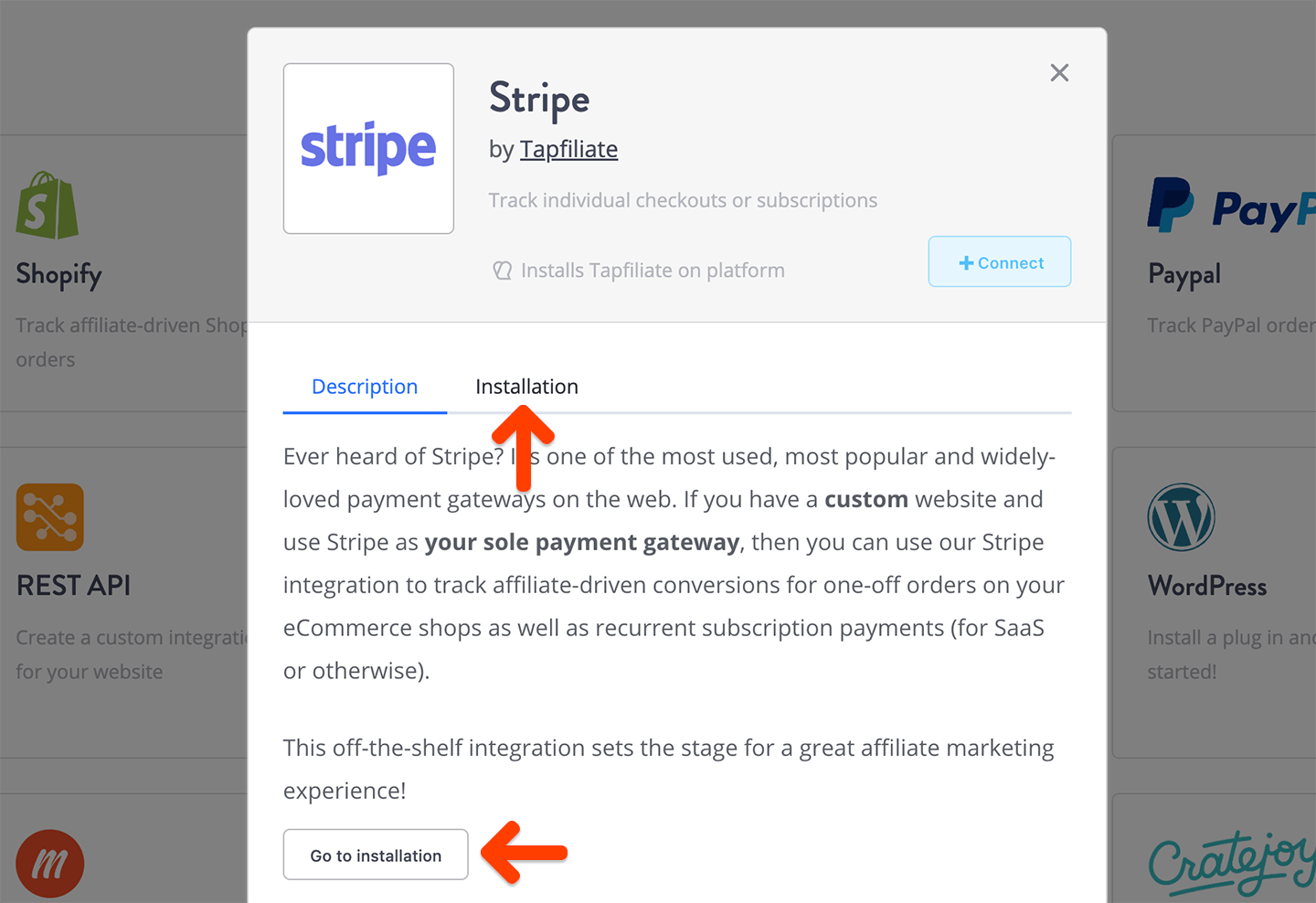 3. Skip to the last step (connect with Stripe).
4. Connect your Stripe account.
### Set up recurring commissions
If you'd like your affiliates to earn ongoing commissions for referring members, you can use [Tapfiliate's Stripe integration](https://tapfiliate.com/docs/integrations/stripe/), which automatically handles renewals.
1. Make sure you've integrated your Tapfiliate account with Stripe.
2. Enable lifetime / recurring commissions via *Programs → View program → Commission structure.*
### Automatically handle refunds
If you've integrated your Tapfiliate account with Stripe, and you want all refunds initiated inside Memberful to be propagated to your Tapfiliate account, you can set up an automation using Tapfiliate's [REST API.](https://tapfiliate.com/docs/rest/) Check out our [Partners page](https://memberful.com/preferred-partners) if you need a developer's help with this task.
### Automatically handle disputes
If you've integrated your Tapfiliate account with Stripe, all disputes in Stripe will automatically result in a Tapfiliate commission being disapproved.
3. Skip to the last step (connect with Stripe).
4. Connect your Stripe account.
### Set up recurring commissions
If you'd like your affiliates to earn ongoing commissions for referring members, you can use [Tapfiliate's Stripe integration](https://tapfiliate.com/docs/integrations/stripe/), which automatically handles renewals.
1. Make sure you've integrated your Tapfiliate account with Stripe.
2. Enable lifetime / recurring commissions via *Programs → View program → Commission structure.*
### Automatically handle refunds
If you've integrated your Tapfiliate account with Stripe, and you want all refunds initiated inside Memberful to be propagated to your Tapfiliate account, you can set up an automation using Tapfiliate's [REST API.](https://tapfiliate.com/docs/rest/) Check out our [Partners page](https://memberful.com/preferred-partners) if you need a developer's help with this task.
### Automatically handle disputes
If you've integrated your Tapfiliate account with Stripe, all disputes in Stripe will automatically result in a Tapfiliate commission being disapproved.