> ## Documentation Index
> Fetch the complete documentation index at: https://memberful.com/docs/llms.txt
> Use this file to discover all available pages before exploring further.
# Webhooks
> Use Memberful webhooks to notify your app when events happen, such as a member signing up, a subscription updating, or a plan changing, and react in real time.
export const RelatedDocs = ({link1, link2, link3, link4, link5, link6, link7, link8, link9, link10, className = ""}) => {
const links = [link1, link2, link3, link4, link5, link6, link7, link8, link9, link10].filter(Boolean);
if (!links.length) return null;
return ;
};
export const Video = ({url}) => {
return
;
};
Webhooks notify your website/app of events that happen in Memberful, such as when a member creates an account, a subscription is updated, or a plan is deleted.
This allows your app to respond to the event and take action, such as creating an account on another platform or syncing updated data to your own database.
Webhooks are very similar to Zapier triggers/events, except that you'll use custom code to react to those events. Want code-free event notifications? [Use Memberful with Zapier](/api-reference/integrate-with-zapier/)
## Webhook process overview
Here's an overview of the process by which Memberful sends webhooks to your application.
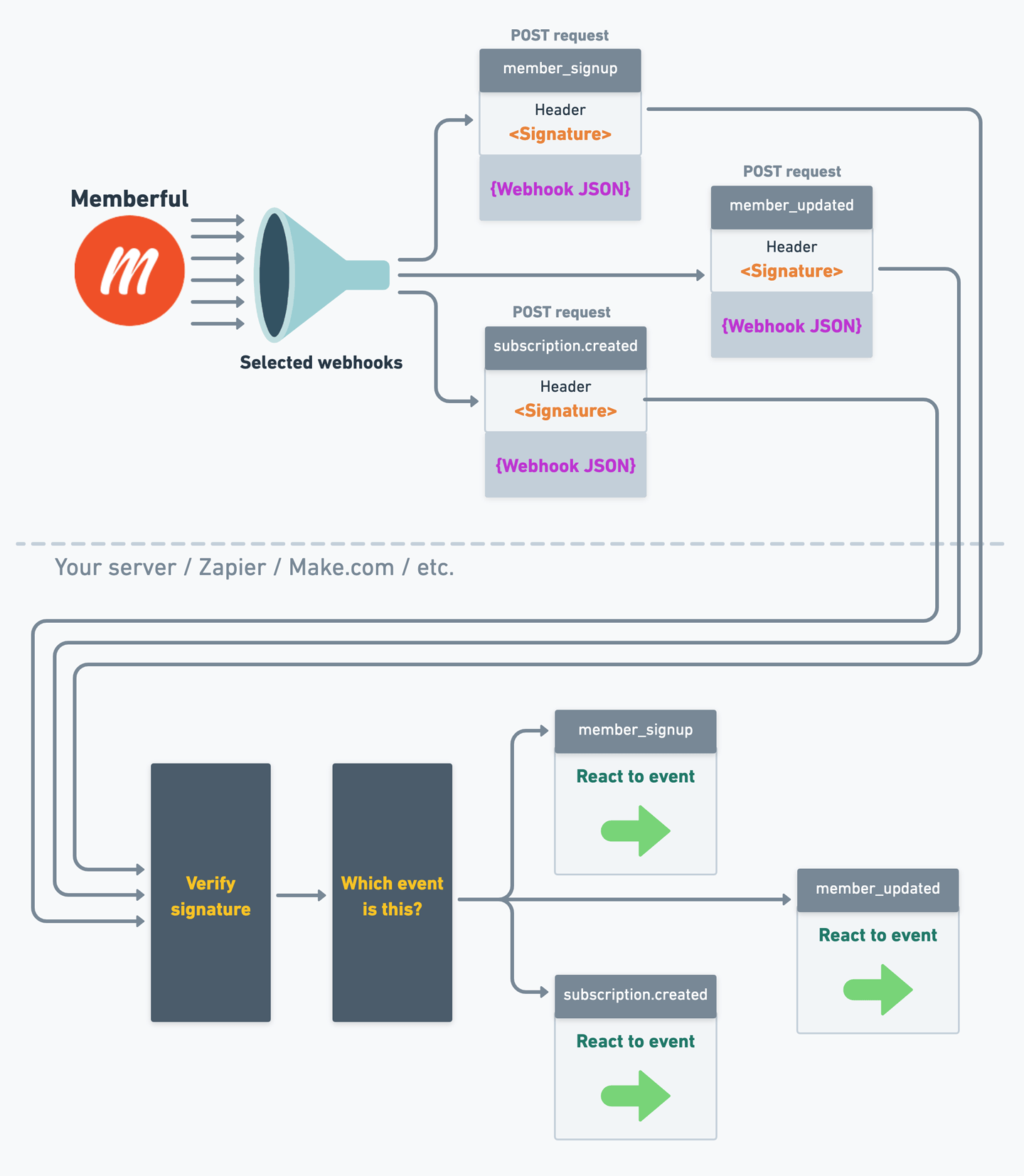 Memberful allows you to select which events you want to be notified about, so only events that pass that filter will result in a webhook.
When selected events happen, Memberful will send a webhook to your application (or to a service that can process webhooks, like Zapier or Make.com).
The webhook itself is a `POST` request with a **header** that contains a signature (to ensure it's legitimate) and a **JSON payload** that contains the event data.
When your endpoint receives the webhook, it should verify the signature and process the event only if it's legitimate.
Then, your endpoint can take whatever action is appropriate for each event type.
## Set up a webhook
Memberful allows you to select which events you want to be notified about, so only events that pass that filter will result in a webhook.
When selected events happen, Memberful will send a webhook to your application (or to a service that can process webhooks, like Zapier or Make.com).
The webhook itself is a `POST` request with a **header** that contains a signature (to ensure it's legitimate) and a **JSON payload** that contains the event data.
When your endpoint receives the webhook, it should verify the signature and process the event only if it's legitimate.
Then, your endpoint can take whatever action is appropriate for each event type.
## Set up a webhook
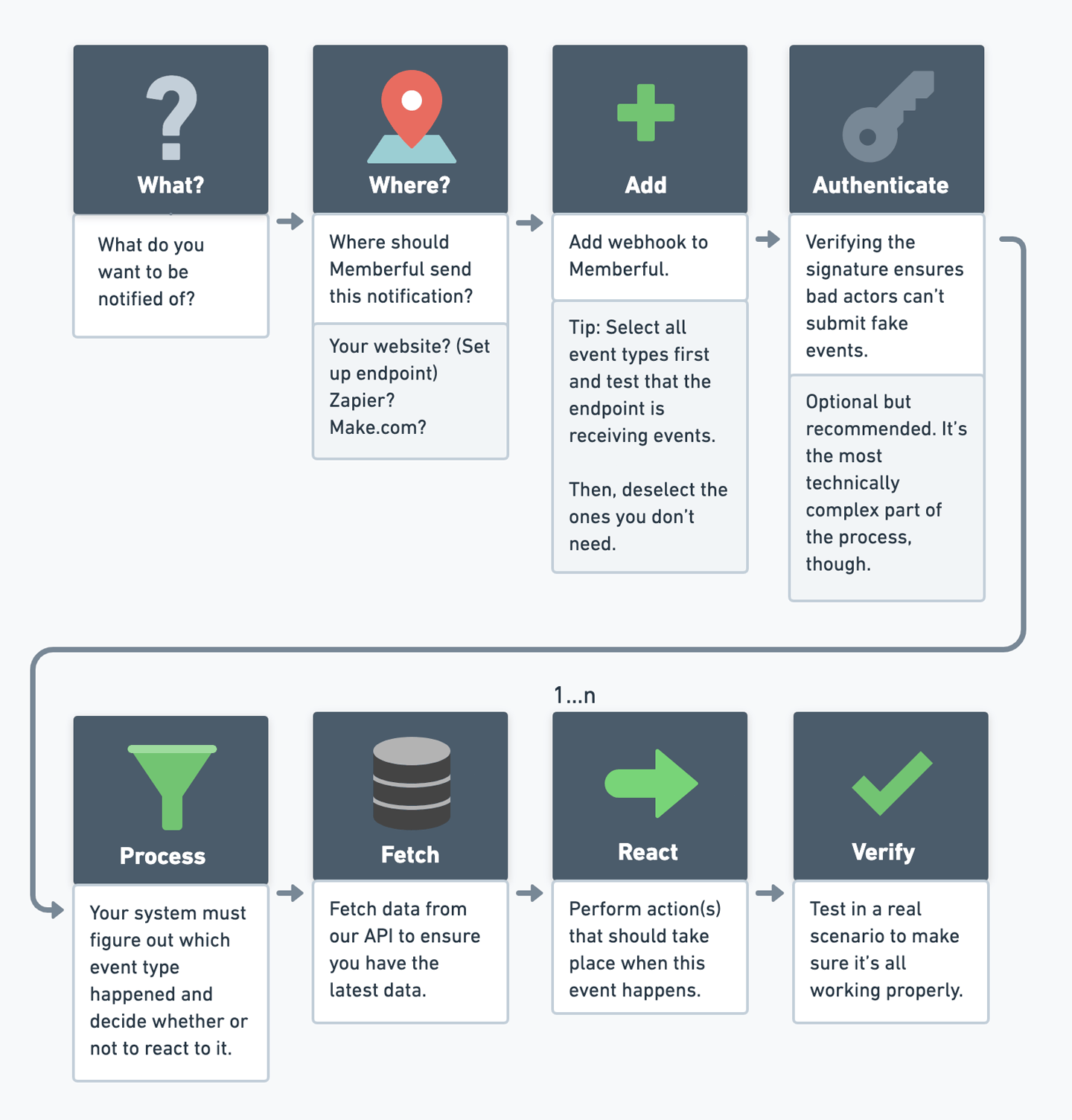 To set up a webhook, follow these steps:
Determine which events you want to be notified about.
[Create an endpoint](#create-an-endpoint) where Memberful will send webhook notifications.
[Create a webhook in Memberful](#create-and-manage-webhooks), select the events you want to be notified about, and specify the endpoint URL. It would be a good idea to trigger a test webhook at this point to make sure your endpoint is working properly.
[Implement verification](#verify-requests) of the webhook signature in your endpoint. This ensures that the webhook is legitimate and not a malicious request.
[Fetch data from our API](/api-reference/memberful-api/) to ensure you are acting on the latest data.
Take the appropriate action(s) for each event type.
Test your webhook endpoint in a realistic scenario to make sure it's working properly.
## Create an endpoint
You'll need to create an endpoint that will receive and process the webhooks.
This can be an endpoint on your site/app or an external service like [Zapier](/api-reference/integrate-with-zapier/) or [Make.com](https://www.make.com/).
Memberful sends webhooks as `POST` requests with a JSON payload, so it's a good idea to ensure that your endpoint only responds to `POST` requests.
If you're having trouble and want to find out whether or not Memberful is sending webhooks to your endpoint, you can use a service like [Webhook.site](https://webhook.site/) to create a temporary endpoint that will log all requests that are received, in realtime.
## Create and manage webhooks
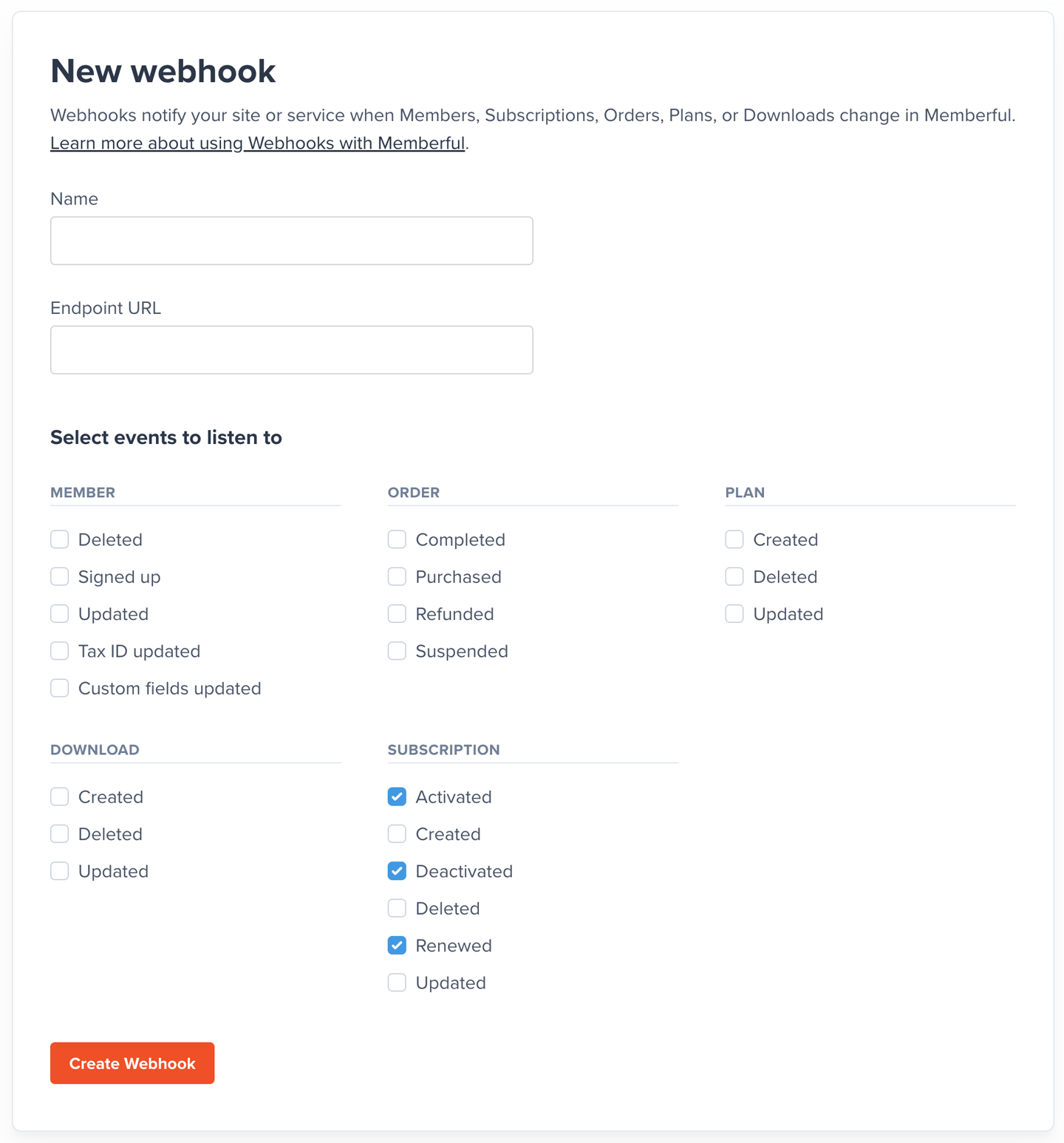
To create and manage webhooks in Memberful, go to *Settings → Webhooks* in your Memberful dashboard.
When creating or editing a webhook, you can specify the type of changes you want to be notified about. For example, you can specify that you only want to be notified when a subscription is activated, deactivated, or renewed.
To set up a webhook, follow these steps:
Determine which events you want to be notified about.
[Create an endpoint](#create-an-endpoint) where Memberful will send webhook notifications.
[Create a webhook in Memberful](#create-and-manage-webhooks), select the events you want to be notified about, and specify the endpoint URL. It would be a good idea to trigger a test webhook at this point to make sure your endpoint is working properly.
[Implement verification](#verify-requests) of the webhook signature in your endpoint. This ensures that the webhook is legitimate and not a malicious request.
[Fetch data from our API](/api-reference/memberful-api/) to ensure you are acting on the latest data.
Take the appropriate action(s) for each event type.
Test your webhook endpoint in a realistic scenario to make sure it's working properly.
## Create an endpoint
You'll need to create an endpoint that will receive and process the webhooks.
This can be an endpoint on your site/app or an external service like [Zapier](/api-reference/integrate-with-zapier/) or [Make.com](https://www.make.com/).
Memberful sends webhooks as `POST` requests with a JSON payload, so it's a good idea to ensure that your endpoint only responds to `POST` requests.
If you're having trouble and want to find out whether or not Memberful is sending webhooks to your endpoint, you can use a service like [Webhook.site](https://webhook.site/) to create a temporary endpoint that will log all requests that are received, in realtime.
## Create and manage webhooks
To create and manage webhooks in Memberful, go to *Settings → Webhooks* in your Memberful dashboard.
When creating or editing a webhook, you can specify the type of changes you want to be notified about. For example, you can specify that you only want to be notified when a subscription is activated, deactivated, or renewed.
 ## Fetch data from our API
When you receive a webhook, you should always fetch the latest version of the order/member/plan/download/etc. from [Memberful's API](/api-reference/memberful-api) to avoid issues with the order in which webhooks arrive.
Memberful does not guarantee delivery of events in the order in which they are generated.
## Verify requests
You'll receive a secret key after you create a webhook endpoint. Memberful signs every request with an `X-Memberful-Webhook-Signature` header that combines your secret key and the request payload so you can verify that the request is coming from us (an impersonator wouldn't know your secret key so they couldn't fake this header).
To generate the header, Memberful computes a *hash-based message authentication code* (`HMAC`) with `SHA-256`, using your Webhook secret as the *key* and the webhook's payload as the *message*.
To make sure the requests are coming from us, you should compute the `HMAC` signature yourself and compare it with the one that Memberful included in the header.
Here's an example using Ruby on Rails:
```ruby webhooks_controller.rb theme={null}
def webhook
request_signature = request.headers["X-Memberful-Webhook-Signature"]
secret = ENV["MEMBERFUL_WEBHOOK_SECRET"]
computed_signature = OpenSSL::HMAC.hexdigest("SHA256", secret, request.body.read)
if Rack::Utils.secure_compare(computed_signature, request_signature)
# Process webhook
end
end
```
```javascript webhooks.js theme={null}
// Node.js example
const crypto = require('crypto');
const isWebhookValid = (payload, signature, secret) => {
const computedSignature = crypto
.createHmac('sha256', secret)
.update(payload)
.digest('hex');
return crypto.timingSafeEqual(
Buffer.from(computedSignature, 'hex'),
Buffer.from(signature, 'hex')
);
}
const secret = process.env.MEMBERFUL_WEBHOOK_SECRET;
const webhookPayload = request.body;
const webhookSignature = request.headers['X-Memberful-Webhook-Signature'];
if(isWebhookValid(webhookPayload, webhookSignature, secret)) {
// Process webhook
}
```
Note that we stored our secret token in an environment variable to avoid leaking it to our codebase and we're comparing the signatures using a constant-time algorithm to prevent timing attacks.
**Ignore the request if the signatures don't match.**
If you're having trouble with the signature verification, you can use an [HMAC-SHA256 Online Generator Tool](https://www.devglan.com/online-tools/hmac-sha256-online) to test your hashing.
## How we handle failed requests
If a webhook request does not receive a response code in the **2XX** range (i.e. success) **within 15 seconds**, we'll try again multiple times with an exponential delay.
If an event can't be delivered after 24 hours of retries, we'll notify the account owner and give you three days to fix the problem. We will delete the endpoint if it's still failing after that period.
## Example app
How you consume the webhooks is entirely up to you, but if you're looking for an example of how to get started, we built a [simple Google Firebase app](https://github.com/memberful/memberful-firebase-webhooks-example). The app takes any of the subscription webhooks, extracts the subscription object, and stores it in Firestore using the subscription ID as a key.
## Webhook event reference
We've prepared an entire article that lists [all of the webhook events](/api-reference/webhook-event-reference/) and the data that is included with each event.
## Fetch data from our API
When you receive a webhook, you should always fetch the latest version of the order/member/plan/download/etc. from [Memberful's API](/api-reference/memberful-api) to avoid issues with the order in which webhooks arrive.
Memberful does not guarantee delivery of events in the order in which they are generated.
## Verify requests
You'll receive a secret key after you create a webhook endpoint. Memberful signs every request with an `X-Memberful-Webhook-Signature` header that combines your secret key and the request payload so you can verify that the request is coming from us (an impersonator wouldn't know your secret key so they couldn't fake this header).
To generate the header, Memberful computes a *hash-based message authentication code* (`HMAC`) with `SHA-256`, using your Webhook secret as the *key* and the webhook's payload as the *message*.
To make sure the requests are coming from us, you should compute the `HMAC` signature yourself and compare it with the one that Memberful included in the header.
Here's an example using Ruby on Rails:
```ruby webhooks_controller.rb theme={null}
def webhook
request_signature = request.headers["X-Memberful-Webhook-Signature"]
secret = ENV["MEMBERFUL_WEBHOOK_SECRET"]
computed_signature = OpenSSL::HMAC.hexdigest("SHA256", secret, request.body.read)
if Rack::Utils.secure_compare(computed_signature, request_signature)
# Process webhook
end
end
```
```javascript webhooks.js theme={null}
// Node.js example
const crypto = require('crypto');
const isWebhookValid = (payload, signature, secret) => {
const computedSignature = crypto
.createHmac('sha256', secret)
.update(payload)
.digest('hex');
return crypto.timingSafeEqual(
Buffer.from(computedSignature, 'hex'),
Buffer.from(signature, 'hex')
);
}
const secret = process.env.MEMBERFUL_WEBHOOK_SECRET;
const webhookPayload = request.body;
const webhookSignature = request.headers['X-Memberful-Webhook-Signature'];
if(isWebhookValid(webhookPayload, webhookSignature, secret)) {
// Process webhook
}
```
Note that we stored our secret token in an environment variable to avoid leaking it to our codebase and we're comparing the signatures using a constant-time algorithm to prevent timing attacks.
**Ignore the request if the signatures don't match.**
If you're having trouble with the signature verification, you can use an [HMAC-SHA256 Online Generator Tool](https://www.devglan.com/online-tools/hmac-sha256-online) to test your hashing.
## How we handle failed requests
If a webhook request does not receive a response code in the **2XX** range (i.e. success) **within 15 seconds**, we'll try again multiple times with an exponential delay.
If an event can't be delivered after 24 hours of retries, we'll notify the account owner and give you three days to fix the problem. We will delete the endpoint if it's still failing after that period.
## Example app
How you consume the webhooks is entirely up to you, but if you're looking for an example of how to get started, we built a [simple Google Firebase app](https://github.com/memberful/memberful-firebase-webhooks-example). The app takes any of the subscription webhooks, extracts the subscription object, and stores it in Firestore using the subscription ID as a key.
## Webhook event reference
We've prepared an entire article that lists [all of the webhook events](/api-reference/webhook-event-reference/) and the data that is included with each event.