> ## Documentation Index
> Fetch the complete documentation index at: https://memberful.com/docs/llms.txt
> Use this file to discover all available pages before exploring further.

# Create coupons in bulk via API

> Create coupon codes in bulk through the Memberful API using a mutation that generates multiple codes from an existing coupon and groups them in your dashboard.

export const BulkCouponGenerator = () => {
  const [couponID, setCouponID] = React.useState('');
  const [couponBaseName, setCouponBaseName] = React.useState('');
  const [numCoupons, setNumCoupons] = React.useState('20');
  const [includeRandom, setIncludeRandom] = React.useState(true);
  const [generatedMutation, setGeneratedMutation] = React.useState('');
  const [showMutation, setShowMutation] = React.useState(false);
  const [copyButtonText, setCopyButtonText] = React.useState('Copy to clipboard');
  const generateRandomString = () => Math.random().toString(36).substring(2, 6);
  const generateBeginning = couponID => `mutation {
  createCoupons(discountId: ${couponID}, coupons: [`;
  const generateEndingSection = mutation => mutation.slice(0, -1) + `]) {
    coupons {
      code
    }
    errors {
      key
      messages {
        attribute
        message
      }
    }
  }
}`;
  const formInputClasses = "w-full px-3 py-2 border border-gray-300 rounded-md bg-white focus:outline-none focus:ring-4 focus:ring-gray-500/10 focus:border-gray-400/80 transition-colors";
  const formLabelClasses = "block mb-2 font-medium text-sm text-gray-700";
  const generateVariations = (mutation, baseName, count, addRandom) => {
    for (let i = 0; i < count; i++) {
      let couponCode = baseName + (i + 1);
      if (addRandom) {
        couponCode += generateRandomString();
      }
      mutation += `{ code: "${couponCode}" },`;
    }
    return mutation;
  };
  const generateMutationString = (id, baseName, count, addRandom) => {
    let result = generateBeginning(id);
    result = generateVariations(result, baseName, count, addRandom);
    result = generateEndingSection(result);
    return result;
  };
  const handleGenerateMutation = e => {
    e.preventDefault();
    if (couponBaseName !== "" && numCoupons !== "") {
      const mutation = generateMutationString(couponID, couponBaseName, numCoupons, includeRandom);
      setGeneratedMutation(mutation);
      setShowMutation(true);
    }
  };
  const handleCopyToClipboard = () => {
    navigator.clipboard.writeText(generatedMutation).then(() => {
      setCopyButtonText('Copied!');
      setTimeout(() => {
        setCopyButtonText('Copy to clipboard');
      }, 3000);
    }).catch(err => {
      console.error('Failed to copy text: ', err);
      setCopyButtonText('Copy to clipboard');
    });
  };
  return <div className="bg-neutral-50 p-6 rounded-lg border border-neurtral-200 my-4">
      <form onSubmit={handleGenerateMutation}>
        <div className="mb-6">
          <label htmlFor="coupon-id" className={formLabelClasses}>
            Coupon ID:
          </label>
          <input type="text" required id="coupon-id" className={formInputClasses} placeholder="58703" value={couponID} onChange={e => setCouponID(e.target.value)} />
        </div>
        <div className="mb-6">
          <label htmlFor="coupon-base-name" className={formLabelClasses}>
            Base coupon name:
          </label>
          <input type="text" required id="coupon-base-name" className={formInputClasses} placeholder="springdiscount" value={couponBaseName} onChange={e => setCouponBaseName(e.target.value)} />
        </div>
        <div className="mb-6">
          <label htmlFor="num-coupons" className={formLabelClasses}>
            Number of coupons:
          </label>
          <input type="number" required id="num-coupons" className={formInputClasses} placeholder="20" value={numCoupons} onChange={e => setNumCoupons(e.target.value)} />
        </div>
        <div className="mb-6 flex items-center gap-3">
          <input type="checkbox" checked={includeRandom} id="include-random" className="rounded w-4 h-4 accent-primary bg-gray-100 border-gray-300 rounded focus:ring-primary/10 focus:ring-2 cursor-pointer" onChange={e => setIncludeRandom(e.target.checked)} />
          <label htmlFor="include-random" className="text-sm text-gray-700 cursor-pointer select-none">
            Include random characters <span className="text-gray-500 text-xs">(Recommended)</span>
          </label>
        </div>
        <div className="flex gap-3 items-center flex-wrap">
          <button type="submit" className="bg-primary-dark rounded-full text-white px-5 py-2.5 font-medium transition-colors focus:outline-none focus:ring-2 focus:ring-primary/10 focus:ring-offset-2">
            Generate Mutation
          </button>

          {showMutation && <button type="button" className="bg-gray-100 hover:bg-gray-200 text-gray-700 px-4 py-2 rounded-md text-sm font-medium border border-gray-300 transition-colors focus:outline-none focus:ring-2 focus:ring-gray-500 focus:ring-offset-2" onClick={handleCopyToClipboard}>
              {copyButtonText}
            </button>}
        </div>
      </form>
      {showMutation && <div className="mt-5">
          <pre className="bg-gray-900 text-gray-100 p-4 rounded-md overflow-auto text-xs leading-relaxed font-mono">
            {generatedMutation}
          </pre>
        </div>}
    </div>;
};

export const RelatedDocs = ({link1, link2, link3, link4, link5, link6, link7, link8, link9, link10, className = ""}) => {
  const links = [link1, link2, link3, link4, link5, link6, link7, link8, link9, link10].filter(Boolean);
  if (!links.length) return null;
  return <section className={`related-docs border dark:border-gray-700 rounded-2xl px-6 py-4 mt-6 ${className}`}>
      <p className="mb-2 font-medium">
        <strong>Related help docs:</strong>
      </p>
      <ul className="space-y-1 mb-1 mt-1">
        {links.map((link, index) => <li key={index}>
            <a href={link.url}>{link.label}</a>
          </li>)}
      </ul>
    </section>;
};

In this help article, we'll show you how to create a base coupon, find its ID, and then use that ID to generate a mutation that will create multiple coupon codes.

## Use the GraphQL API Explorer

You can make requests to our API in all the regular ways you're used to, but the easiest method is through our [GraphQL API Explorer](/api-reference/memberful-api/#using-the-graphql-api-explorer), which can be accessed straight from your Memberful dashboard by going to *Settings → Custom applications.*

Queries and mutations that you execute in the API Explorer will work just the same as requests that come from elsewhere, so you can generate your coupons in bulk just by using the API Explorer.

## Create a base coupon

Start off by [creating a base coupon.](/discounts-and-gifting/coupons/create-a-coupon/#add-a-coupon) Make sure to set the max redemption to "1" to ensure each code is single-use.

All your new coupons will inherit the same settings as this base coupon, and they'll be grouped under it in your Memberful dashboard.

## Find the base coupon's ID

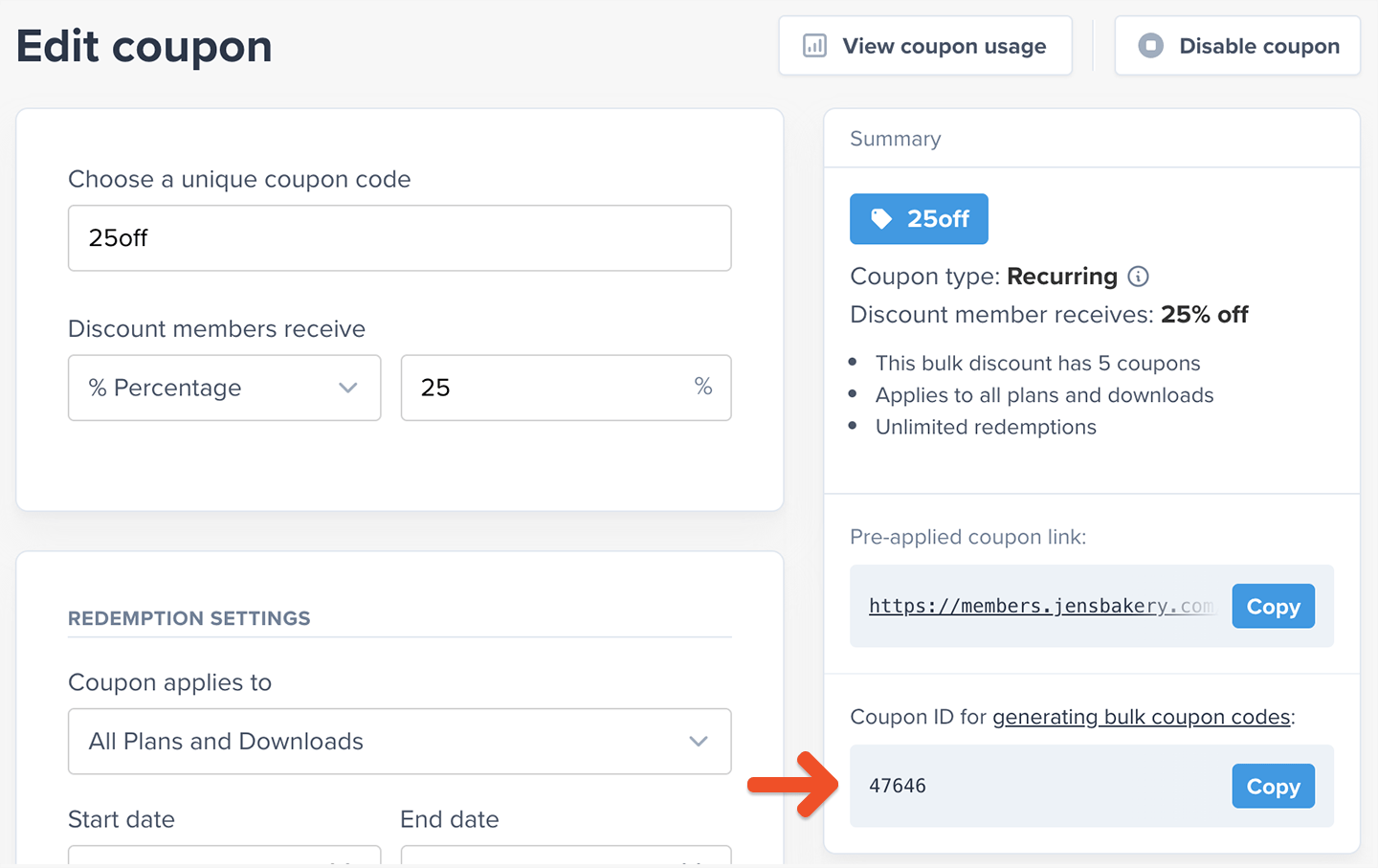
From the **Edit coupon** page, take note of the coupon's ID. You'll find it under the label *Coupon ID for generating bulk coupon codes.*

<img src="https://mintcdn.com/memberful/zfHsjCK1h1UMRz66/images/custom-development-and-api/create-coupons-in-bulk-via-api/finding-coupon-id.png?fit=max&auto=format&n=zfHsjCK1h1UMRz66&q=85&s=865313c9df1b7c5872ce1b628a3d4478" alt="Finding Coupon ID" width="1440" height="907" data-path="images/custom-development-and-api/create-coupons-in-bulk-via-api/finding-coupon-id.png" />

## Review a mutation example

Now you're ready to go to the [API Explorer](/api-reference/memberful-api/#using-the-graphql-api-explorer) and run your mutation. Keep your coupon ID handy because you're about to use it.

This is the format you need to follow for this mutation:

```graphql theme={null}
mutation {
  createCoupons(discountId: YOURCOUPONID, coupons: [{ code: "NEWCOUPONCODE1"}, { code: "NEWCOUPONCODE2"}, { code: "NEWCOUPONCODE3" }]) {
    coupons {
      code
    }
    errors {
      key
      messages {
        attribute
        message
      }
    }
  }
}
```

You should replace **YOURCOUPONID** with the coupon ID you copied before, and also replace **NEWCOUPONCODEX** with the coupon codes you'd like to create.

Here's an example mutation that creates 3 codes from a base coupon with the ID **24**:

```graphql theme={null}
mutation {
  createCoupons(discountId: 24, coupons: [{ code: "membersonly1"}, { code: "membersonly2"}, { code: "membersonly3" }]) {
    coupons {
      code
    }
    errors {
      key
      messages {
        attribute
        message
      }
    }
  }
}
```

## Generate a mutation for a large number of coupons

If you need to create a large number of coupons, use the following form to generate a mutation that assigns unique names to your coupons.
<BulkCouponGenerator />

Including random characters (letters and numbers) in your coupon codes ensures that members won't be able to guess other codes based on the one they got.

For example, if a member received the coupon code **memberdiscount22**, it would be easy for them to guess that **memberdiscount21** and **memberdiscount23** exist, and they might abuse that knowledge to get more discounts or to share those coupons with others who aren't entitled to a discount.

## Review bulk coupon requirements and troubleshooting steps

If your coupon codes were created successfully, the result will show the successfully created codes inside the *coupons* array, and *errors* will show an empty array.

```json theme={null}
{
  "data": {
    "createCoupons": {
      "coupons": [
        {
          "code": "membersonly1"
        },
        {
          "code": "membersonly2"
        },
        {
          "code": "membersonly3"
        }
      ],
      "errors": []
    }
  }
}
```

Now, here's an example result in which some coupons failed to be created, while others succeeded:

```json theme={null}
{
  "data": {
    "createCoupons": {
      "coupons": [
        {
          "code": "membersonly4"
        },
        {
          "code": "membersonly5"
        },
        {
          "code": "membersonly6"
        }
      ],
      "errors": [
        {
          "key": "membersonly_7",
          "messages": [
            {
              "attribute": "code",
              "message": "Code is invalid."
            }
          ]
        },
        {
          "key": "membersonly1",
          "messages": [
            {
              "attribute": "code",
              "message": "Code is taken."
            }
          ]
        }
      ]
    }
  }
}
```

To troubleshoot a result like this, you should look at the error messages and then review our request again to make sure that the following requirements are met by all of our requested coupon codes:

* Maximum 255 characters
* Contains no symbols or spaces
* The code doesn't already exist

Note that coupon codes are case-insensitive, so *mycouponZ* will fail to be created if *mycouponz* already exists.

Here are some valid and invalid examples for a base coupon with the code *membersonly:*

* ✅ membersonly1
* ✅ membersonly987
* ✅ membersonlyA
* ✅ membersonlyxyz
* ✅ summersale (The new code doesn't need to resemble the base coupon code)
* ❌ membersonly\_1 (Symbols aren't allowed)
* ❌ membersonly (Already exists - this is the same code as the base coupon)
* ❌ MembersOnly (Already exists - uppercase/lowercase doesn't make a difference)

If some of your coupon codes were created successfully and others failed, there's no need to resubmit the ones that were successful — those have already been created. Fix the issues with the failed ones and resubmit them.

## Manage your bulk coupon codes

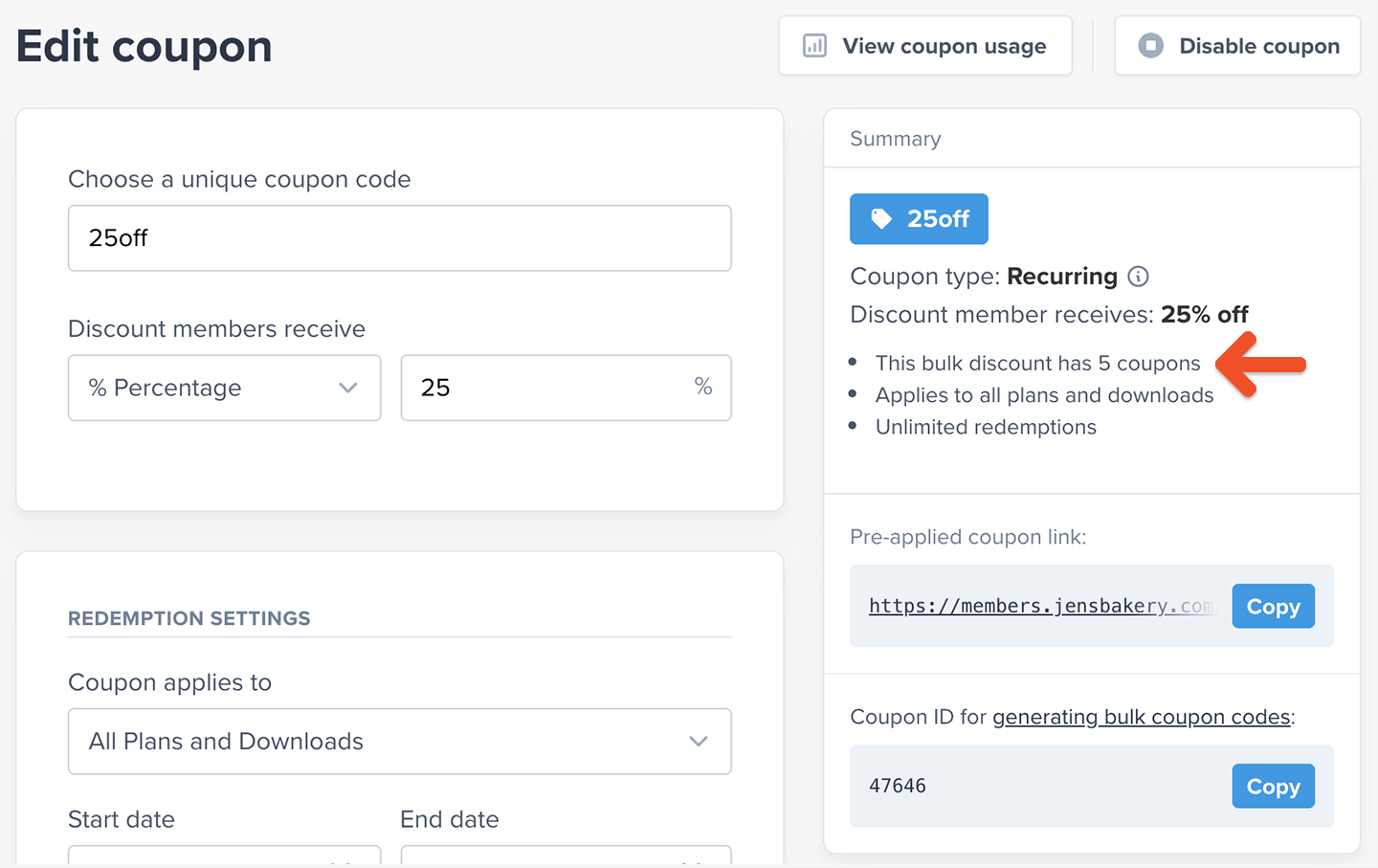
After creating some bulk coupon codes, you'll see how many coupon codes are associated with it when you edit the base coupon.

<Frame>
  <img src="https://mintcdn.com/memberful/zfHsjCK1h1UMRz66/images/custom-development-and-api/create-coupons-in-bulk-via-api/editing-bulk-coupon.png?fit=max&auto=format&n=zfHsjCK1h1UMRz66&q=85&s=f3c4cc4fe1df03dac79425f675303453" alt="Editing Bulk Coupon" width="1440" height="907" data-path="images/custom-development-and-api/create-coupons-in-bulk-via-api/editing-bulk-coupon.png" />
</Frame>

You can access a [more detailed breakdown](/discounts-and-gifting/coupons/apply-and-manage-coupons/#track-coupon-usage) of how your coupon has been used by clicking **View coupon usage.**

Purchase links with a [pre-applied coupon code](/discounts-and-gifting/coupons/apply-and-manage-coupons/#how-a-member-can-apply-a-coupon-code-at-checkout) also work with coupon codes that were created in bulk.

<RelatedDocs
  link1={{
url: "/discounts-and-gifting/coupons/apply-and-manage-coupons/",
label: "Learn about applying and managing coupons.",
}}
  link2={{
url: "/api-reference/memberful-api/",
label: "Learn to use Memberful's API.",
}}
/>